


Extending SelectMany for Multi-Column Checkbox Layouts in Optimizely CMS 12
By default, a SelectMany property is rendered as a vertical checkbox list in the CMS editor. While this works well for a small number of options, usability quickly declines as the list grows. Editors may need to scroll through dozens or even hundreds of items presented in a single column, making selection time-consuming and difficult to navigate. A multi-column layout provides a much better editing experience by improving readability, reducing scrolling, and making large option sets easier to scan and manage.
A similar approach was originally described by Per-Magne Skuseth's 2016 post for legacy EPiServer versions, using a custom SelectManyExtended attribute that implemented IMetadataAware While the core concept remains relevant in CMS 12, the underlying APIs and framework architecture have evolved significantly. As a result, the original implementation cannot be copied directly into a modern .NET 8/10 solution without modification, and several parts must be adapted to align with current CMS 12 extensibility patterns.
This post walks through a CMS 12 compatible version and calls out exactly what differs from the original approach.
Goal
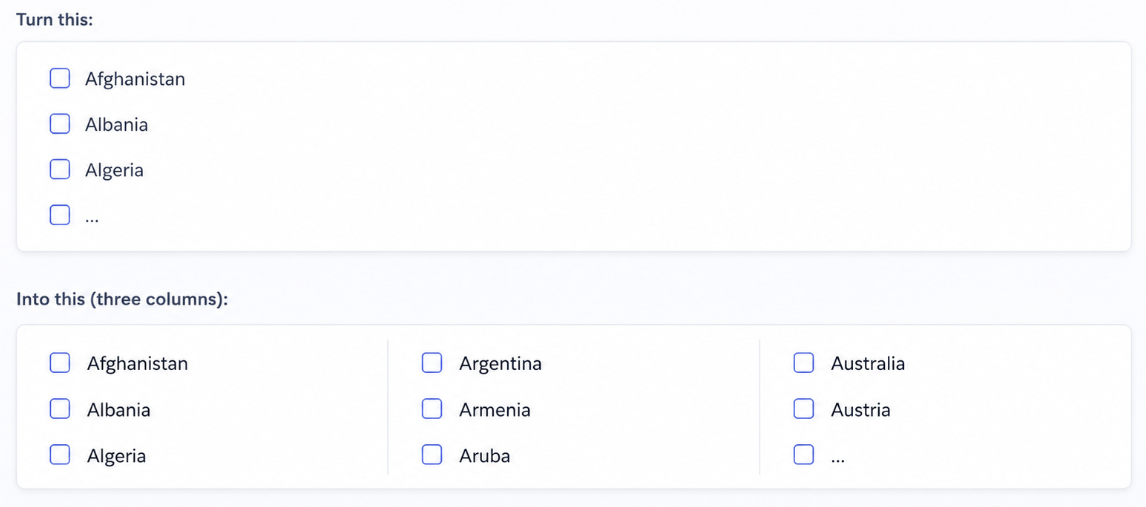
The underlying editor (CheckBoxListEditor) stays the same. We only change metadata configuration and add a small CSS rule to float each checkbox container.
CMS 12 implementation
The solution has four parts:
- A marker attribute that carries column count and selection factory type
- An EditorDescriptor that applies editor metadata (replacing IMetadataAware)
- A [UIHint] on the property to route to the custom descriptor
- CSS registered in module.config at the application root
SelectManyExtendedAttribute
The attribute holds configuration only. It does not implement IMetadataAware.
[AttributeUsage(AttributeTargets.Property)]
public class SelectManyExtendedAttribute : Attribute
{
    public virtual Type? SelectionFactoryType { get; set; }
    public virtual NumberOfColumns NumberOfColumns { get; set; } = NumberOfColumns.One;
}

public enum NumberOfColumns
{
    One,
    Two,
    Three
}
SelectManyExtendedEditorDescriptor
All metadata mutation happens here, in ModifyMetadata:
[EditorDescriptorRegistration(
    TargetType = typeof(string),
    UIHint = SelectManyExtendedEditorDescriptor.UIHint,
    EditorDescriptorBehavior = EditorDescriptorBehavior.OverrideDefault)]
public class SelectManyExtendedEditorDescriptor : EditorDescriptor
{
    public const string UIHint = "selectmanyextended";

    public override void ModifyMetadata(ExtendedMetadata metadata, IEnumerable<Attribute> attributes)
    {
        var extendedAttribute = attributes.OfType<SelectManyExtendedAttribute>().FirstOrDefault();
        if (extendedAttribute is null)
        {
            return;
        }

        metadata.ClientEditingClass = "epi-cms/contentediting/editors/CheckBoxListEditor";
        metadata.SelectionFactoryType = extendedAttribute.SelectionFactoryType;

        if (extendedAttribute.NumberOfColumns == NumberOfColumns.One)
        {
            return;
        }

        var width = extendedAttribute.NumberOfColumns == NumberOfColumns.Two ? "600px" : "900px";
        metadata.EditorConfiguration["style"] = $"width: {width}";
        metadata.EditorConfiguration["class"] = "selectmanyextended";
    }
}
Property usage
Both the custom attribute and [UIHint] are required on CMS 12. The UI hint connects the property to the editor descriptor.
[CultureSpecific]
[Display(Order = 10)]
[SelectManyExtended(NumberOfColumns = NumberOfColumns.Three,  SelectionFactoryType = typeof(CountrySelectionFactory))]
[UIHint(SelectManyExtendedEditorDescriptor.UIHint)]
public virtual string? Countries{ get; set; }
CSS
.selectmanyextended .epi-checkboxContainer {
    float: left;
    width: 290px;
}
The selectmanyextended class scopes the layout so standard single-column SelectMany fields elsewhere in the UI are unaffected.
module.config
Place module.config in the application project root (alongside Program.cs). Optimizely treats this as the application default module. The client resource base path defaults to wwwroot/ClientResources, so paths are relative to that folder.
<?xml version="1.0" encoding="utf-8"?>
<module>
  <clientResources>
    <add name="epi-cms.widgets.base"
         path="styles/country-columns.css"
         resourceType="Style"
         sortIndex="100" />
  </clientResources>
</module>
Registering the stylesheet under the existing epi-cms.widgets.base resource name ensures it loads with the CMS shell UI. Multiple entries can share the same resource name; they are grouped and loaded together.
Restart the application after adding or changing module.config.
~Thank you for reading this post. I hope you found it useful. Have a great day!

Very practicle issue Sanjay. Thanks for putting your time in this beast.