

 Certification.png "Commerce Connect 14 Developer (Expert) Certification")


Using simple address in URL
In this blog post I'll demostrate how you can utilize episerver's Simple address in URL with an Initialization module.
The simple address can be used as a direct address/Route node without language node included in URL.
See Below -
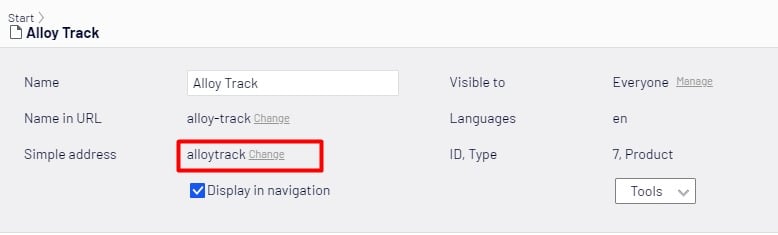
This is an external URL which you can utilize for promotional contents as News Events, Press Releases etc.
Let's create an initialization module that will parse the URL after a virtual path is created.
Step 1 - Define and initialize services to use
private bool initialized = false;
private IContentLoader contentLoader;
private IContentRouteEvents contentRouteEvents;

public void Initialize(InitializationEngine context)
{
	if (!initialized)
	{
		contentLoader = context.Locate.Advanced.GetInstance<IContentLoader>();
		contentRouteEvents = context.Locate.Advanced.GetInstance<IContentRouteEvents>();
		contentRouteEvents.CreatedVirtualPath += ContentRouteEvents_CreatedVirtualPath;
		initialized = true;
	}
}
Above,
The contentLoader would be used to cast the URL to a Page type.
The contentRouteEvents would keep tracks of URLs (virtual paths) being created. Note, that the delegate method ContentRouteEvents_CreatedVirtualPath will only be raised when outgoing virtual path has been created.
The property initialized will initialize the Module only once and it makes sure that it should not be initialized more than once.
This Event handler will be explained in next step.
Step 2 - Managing route via Route Event Handler
In previous step we've defined a delegate method that should be raised when the path is created. Now let's take a look how you can use the URL/Path to cast in a page and utilize it's simple address.
private void ContentRouteEvents_CreatedVirtualPath(object sender, UrlBuilderEventArgs e)
{
	var contentLink = e.RouteValues[RoutingConstants.NodeKey] as ContentReference;
	if (!ContentReference.IsNullOrEmpty(contentLink))
	{
		var lang = e.RouteValues[RoutingConstants.LanguageKey] as string;
		var langSelector = string.IsNullOrEmpty(lang) ? LanguageSelector.AutoDetect() : new LanguageSelector(lang);
		var page = contentLoader.Get<IContent>(contentLink, langSelector) as PageData;
		if (page != null && !string.IsNullOrEmpty(page.ExternalURL))
		{
			e.UrlBuilder.Path = page.ExternalURL;
		}
	}
}
Above,
Read the RouteValues, i.e. language and node name. For instance http://localhost:52426/en/alloy-track <-- language is 'en' and node is 'alloy-track'
Cast the URL as page Data <-- var page = contentLoader.Get<IContent>(contentLink, langSelector) as PageData
Finally, If the Simple address field is not blank then use the external URL instead of default route URL.
Verifying
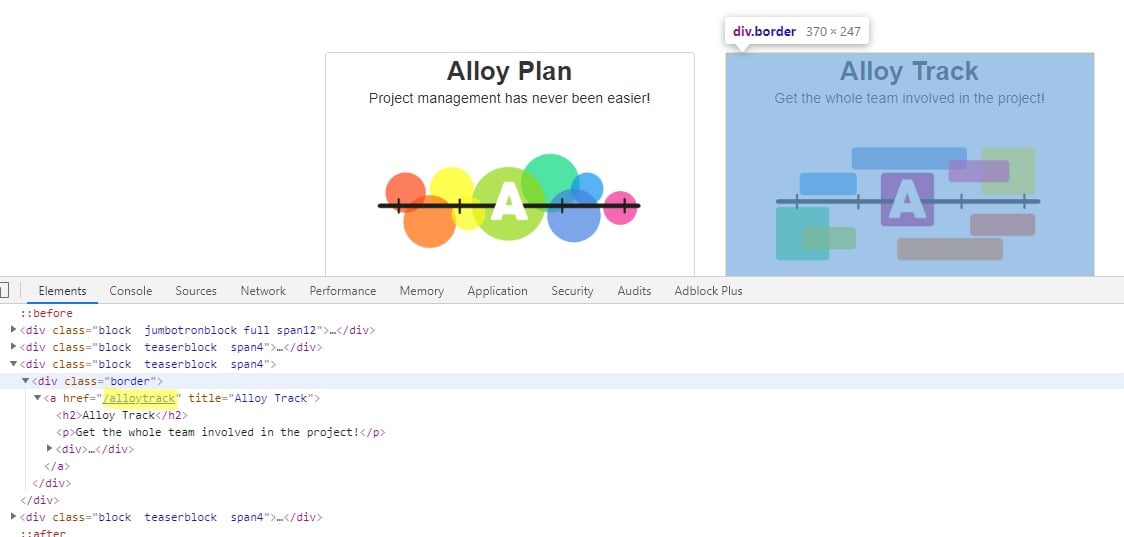
When you have the external/Simple Address defined in Episerver then the external URL would be used as the link address of that item. See Below
Cheers!

Exactly what I was looking to do, thanks!