
Add some color to your UI
Here is a little trick to spice up the editorial view when using simple selection lists in EPiServer:
The SelectItem Text property in selection factories can contain html, which means that you can easily make the editorial controls look a bit more exciting.
public class BlockColorSelectionFactory : ISelectionFactory
{
public IEnumerable<ISelectItem> GetSelections(ExtendedMetadata metadata)
{
yield return new SelectItem()
{
Text = "<span class='colorselector blue'></span>Blue",
Value = "blue"
};
yield return new SelectItem()
{
Text = "<span class='colorselector white'></span>White",
Value = "white"
};
yield return new SelectItem()
{
Text = "<span class='colorselector gray'></span>Gray",
Value = "dark"
};
yield return new SelectItem()
{
Text = "<span class='colorselector black'></span>Black",
Value = "black"
};
}
}
In this case, the colorselector css classes are defined in a style sheet that is registered as a client resource.
[SelectOne(SelectionFactoryType = typeof(BlockColorSelectionFactory))]
public virtual string ColorTheme { get; set; }
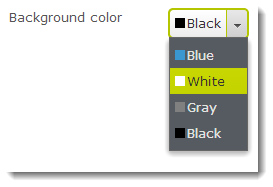
Here is another example, where I’ve used an image tag:
public class LanguageSelectionFactory : ISelectionFactory
{
public IEnumerable<ISelectItem> GetSelections(ExtendedMetadata metadata)
{
var languageBranches = ServiceLocator.Current.GetInstance<ILanguageBranchRepository>().ListEnabled();
return languageBranches.Select(branch => new SelectItem()
{
Text = string.Format("<img class='flag' src='/App_Themes/Default/Images/flags/{0}.gif'/>{1}", branch.LanguageID, branch.Name),
Value = branch.LanguageID
});
}
}
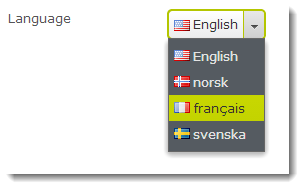
… And when using SelectMany:

Mar 21, 2014
Nice! I like it! :)
I can't get this to work in the latest version.
It just displays the HTML markup instead of an image.
Any ideas?
I've got the same issue as Kristoffer Av Ekenstam , did you ever find a resolution?
This will only work for CMS 7.x, I'm afraid.