
Creating an admin tool - unused assets
Let's make an admin tool to clean unused assets and see how to extend your favorite CMS with custom tools and menues!
We will build a tool step by step to locate unused assets in the CMS and make it possible for an editor to throw these into wastebasket to keep it clean. The amount of unused assets tend to grow to become a big problem for large sites over time. An image for how the tool will look below.
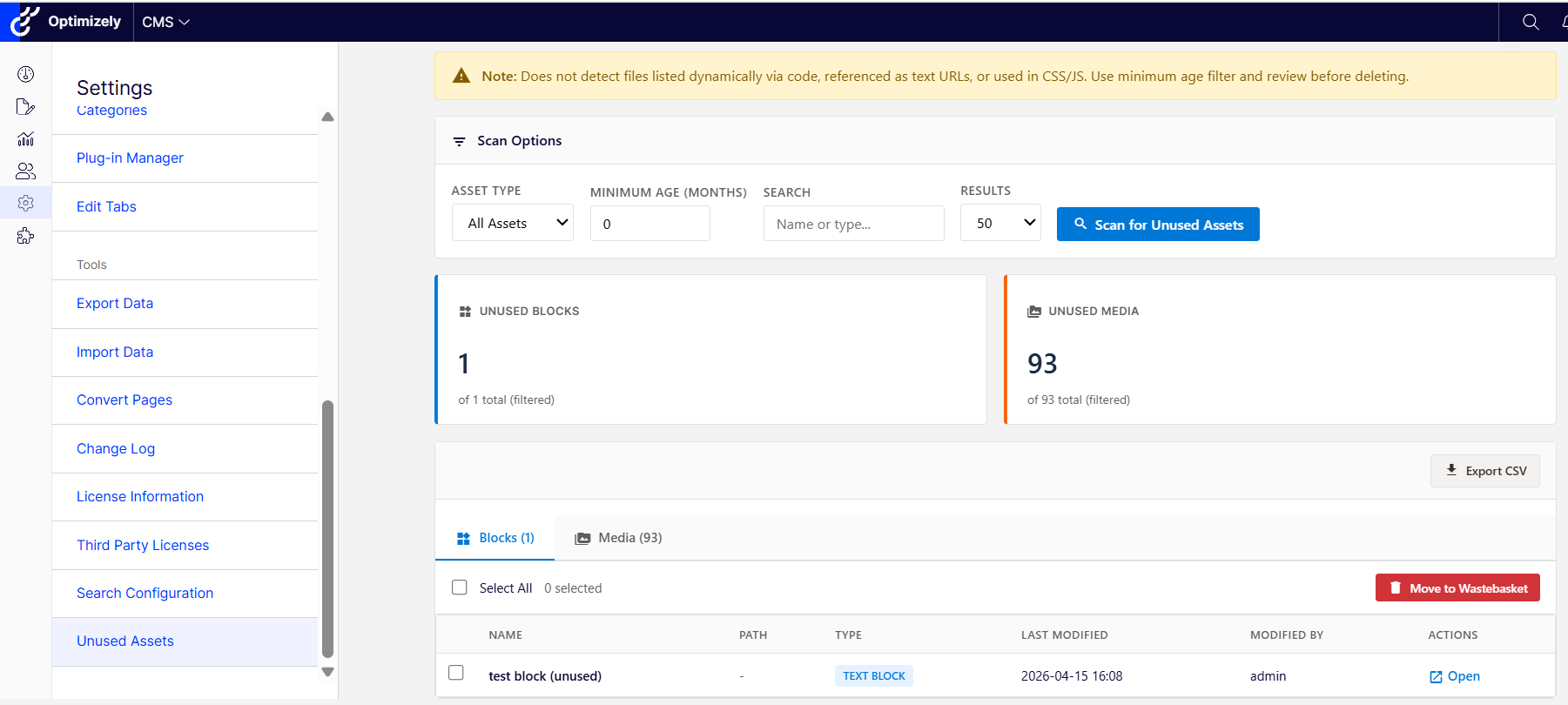
Let's start by extending the menu system in the admin. This is done by a MenuProvider from 12+. Earlier versions it was done by the GuiPlugin attribute.
We only want to let admins use this tool so setting the AuthorizationPolicy to CmsAdmin makes sense.
 /// <summary>
 /// Registers the Unused Assets tool in the CMS Admin menu under Tools section.
 /// </summary>
 [MenuProvider]
 public class UnusedAssetsMenuProvider : IMenuProvider
 {
     public IEnumerable<MenuItem> GetMenuItems()
     {
         // Place under existing Tools section in Admin menu
         var menuItem = new UrlMenuItem("Unused Assets", "/global/cms/admin/tools/unusedassets", "/EPiServer/Cms/Admin/unused-assets")
         {
             IsAvailable = context => true,
             SortIndex = 100, // After other tools like Search Configuration
             AuthorizationPolicy = CmsPolicyNames.CmsAdmin
         };

         return new List<MenuItem> { menuItem };
     }
 }
Let's then create a controller that will respond on that url:
 /// <summary>
 /// Admin tool for finding and managing unused blocks and media in global assets.
 /// Restricted to Administrators and CmsAdmins only.
 /// </summary>
 [Route("EPiServer/Cms/Admin/unused-assets")]
 [Authorize(Policy = CmsPolicyNames.CmsAdmin)]
 public class UnusedAssetsReportController : Controller
 {
     private readonly UnusedAssetsService _unusedAssetsService;

     public UnusedAssetsReportController(UnusedAssetsService unusedAssetsService)
     {
         _unusedAssetsService = unusedAssetsService;
     }

     /// <summary>
     /// Returns true if the current UI culture is Swedish.
     /// </summary>
     private bool IsSwedish => Thread.CurrentThread.CurrentUICulture.TwoLetterISOLanguageName.Equals("sv", StringComparison.OrdinalIgnoreCase);

     [HttpGet("")]
     public IActionResult Index(string assetTypeFilter = null, int? minAgeMonths = null, string searchTerm = null, int pageSize = 50, bool scan = false)
     {
         // If scan=true (redirect from delete), run the scan
         if (scan && !string.IsNullOrEmpty(assetTypeFilter))
         {
             return RunScan(assetTypeFilter, minAgeMonths, searchTerm, pageSize);
         }

         var model = new UnusedAssetsReportViewModel
         {
             HasScanned = false,
             AssetTypeFilter = "all",
             MinAgeMonths = 24,
             PageSize = 50
         };

         return View("~/Features/UnusedAssets/Index.cshtml", model);
     }
Doublecheck that the menu provider actually points to that Route that is set on the controller and use the index action to set some default values and return the view.
To get support for the Optimizely menu, the view can contain:
<body>
@Html.Raw(Html.CreatePlatformNavigationMenu())
<div @Html.ApplyPlatformNavigation()>
...
</div>
</body>
This will render that top and left Optimizely menu and keep the user from losing context when they click the tool. If you want the full width for your tool, feel free to skip them.
For some additional security we add antiforgery token to our post/deletes. This will protect against CSRF attacks.
  @using (Html.BeginForm("Index", "UnusedAssetsReport", FormMethod.Post, new { id = "scanForm", @action = "/EPiServer/Cms/Admin/unused-assets" }))
  {
      @Html.AntiForgeryToken()
     ...
              <button type="submit" class="btn btn-primary" id="scanButton">
                  <span class="material-icons">search</span> Scan for Unused Assets
              </button>
}
To actually search for assets that lacks references we create a service for that called UnusedAssetsService. Basically it loops through the content tree in the global assets and checks for any references to that content by using contentRepository.GetReferencesToContent(...) and softLinkRepository.Load(...). The first one handles direct references like if you select an image for a contentreference property / inside a content area. The other is used to check if you have any links inside the rich text editor.
  /// <summary>
  /// Service for finding unused blocks and media in global assets.
  /// </summary>
  [ServiceConfiguration(typeof(UnusedAssetsService), Lifecycle = ServiceInstanceScope.Transient)]
  public class UnusedAssetsService
  {
      private readonly IContentRepository _contentRepository;
      private readonly IContentSoftLinkRepository _softLinkRepository;
      private readonly IContentTypeRepository _contentTypeRepository;
      private const string CmsEditBaseUrl = "/episerver/cms";

      public UnusedAssetsService(
          IContentRepository contentRepository,
          IContentSoftLinkRepository softLinkRepository,
          IContentTypeRepository contentTypeRepository)
      {
          _contentRepository = contentRepository;
          _softLinkRepository = softLinkRepository;
          _contentTypeRepository = contentTypeRepository;
      }
/// <summary>
 /// Gets all unused blocks from global assets folder.
 /// </summary>
 public List<UnusedAssetItem> GetUnusedBlocks()
 {
     var unusedBlocks = new List<UnusedAssetItem>();
     var globalBlocksRoot = SiteDefinition.Current.GlobalAssetsRoot;

     if (ContentReference.IsNullOrEmpty(globalBlocksRoot))
         return unusedBlocks;

     var allBlocks = GetAllDescendantsOfType<IContent>(globalBlocksRoot, typeof(BlockData));

     foreach (var content in allBlocks)
     {
         if (IsContentUnused(content.ContentLink))
         {
             unusedBlocks.Add(CreateUnusedAssetItem(content, "Block"));
         }
     }

     return unusedBlocks.OrderBy(b => b.LastModified).ToList();
 }

/// <summary>
  /// Checks if content is referenced by any other content.
  /// Uses both GetReferencesToContent (for ContentReference/ContentArea properties)
  /// AND soft links (for references in TinyMCE/XhtmlString fields).
  /// </summary>
  private bool IsContentUnused(ContentReference contentLink)
  {
      if (ContentReference.IsNullOrEmpty(contentLink))
          return false;

      // Check 1: Use GetReferencesToContent for ContentReference/ContentArea properties
      try
      {
          var contentReferences = _contentRepository.GetReferencesToContent(contentLink, false);
          if (contentReferences != null && contentReferences.Any())
          {
              return false; // Content is in use
          }
      }
      catch
      {
          // Ignore errors and continue to soft link check
      }

      // Check 2: Use soft link repository for TinyMCE/XhtmlString references
      try
      {
          var softLinks = _softLinkRepository.Load(contentLink, true);

          // Check if there are any references TO this content (incoming references)
          var incomingReferences = softLinks
              .Where(link => link.ReferencedContentLink == contentLink &&
                            link.OwnerContentLink != contentLink &&
                            !ContentReference.IsNullOrEmpty(link.OwnerContentLink))
              .ToList();

          if (incomingReferences.Any())
          {
              return false; // Content is in use via soft link
          }
      }
      catch
      {
          // Ignore errors
      }

      // Content is unused - neither method found references
      return true;
  }
The user can then select multiple items which can then be sent to the wastebasket by using this service method in our UnusedAssetsService:
 /// <summary>
 /// Moves multiple content items to the wastebasket (soft delete).
 /// </summary>
 /// <param name="contentLinks">The content references to move to wastebasket.</param>
 /// <returns>Result containing success count and any errors.</returns>
 public DeleteResult DeleteAssets(IEnumerable<ContentReference> contentLinks)
 {
     var result = new DeleteResult();

     foreach (var contentLink in contentLinks)
     {
         try
         {
             // Verify the content is still unused before deleting
             if (!IsContentUnused(contentLink))
             {
                 result.Errors.Add(string.Format("Content {0} is now in use and was not moved to wastebasket.", contentLink));
                 continue;
             }

             // Move to wastebasket (soft delete) instead of permanent delete
             _contentRepository.MoveToWastebasket(contentLink);
             result.DeletedCount++;
         }
         catch (Exception ex)
         {
             result.Errors.Add(string.Format("Failed to move {0} to wastebasket: {1}", contentLink, ex.Message));
         }
     }

     return result;
 }
One thing to beware of is that if you use post / delete etc then it needs to be to the same url as specified in the menu provider above. Else the menu will start acting out. I'll append the actual code files if anyone wants to download the full solution. Just add them to your web project and you should be good to go: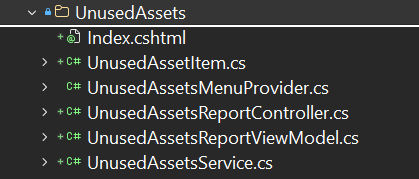
You can find the full source code here!
https://gist.github.com/danielovaska/e6abe7f197956bca99755f7179652560
Happy coding!
Nice one! Was in the idea mode of building something on the same topic but this is better than what I had in mind!