

Export/Import improvements
There have been some improvements done regarding Import/Export functionality in CMS 10.2.0. Since Copy is based on same functionality as Export/Import features like point 3 below will affect Copy as well.
Here is a summarized list of improvements:
1. Possible to select other source/destination than pages during export/import. Meaning it is for example possible to export/import parts of the asset structure.
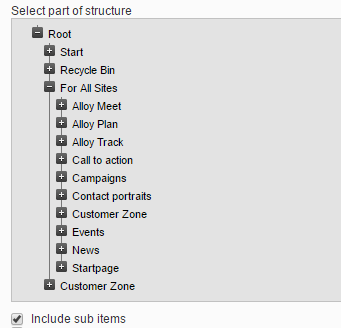
2. Possible to specify if export should include descendents or just take a single content item.
3. Better handling of "duplicate" content. For folders, it means no dupliate folders are created - instead content items are merged into the existing folder. For other items (like pages, media, blocks) the name will be unique. So for example if there already exists a page or block (at same location and language) named "News," then the imported will be named "News(2)" and for media it would be for example "SomeMedia(2).png".
4. Possible to specify to import a single language branch. Export will always include all language versions for content items. However during import it is possible to select to import a single language branch.
A bonus feature is a new admin tool "Manage Content"
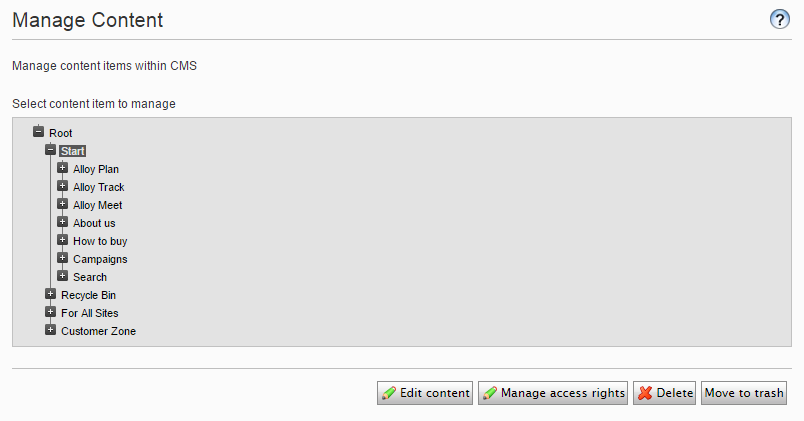
One use case is if the site uses custom content types (IContent implementations) since the edit UI by default only shows "known" types (like pages, media, blocks) there is no way to delete custom content items from the UI. The "Manage Content" tool will show custom content types as well, and hence make it possible to delete them.
Another use case: since export/import now can be done across the content structure, there may be cases where an import "goes wrong" meaning the content ends up in the wrong structure. There is validation that items should be imported in same "known" structure (for example is it not possible to export from page structure and import into asset structure.) But since the system has no knowledge about all custom types and custom structures, the validation might fail. In that case, the "Manage Content" tool can be handy.
Looks great!
I like this. Nice work. Been waiting for the single content item for a long time.
Great work!
With assets you include both blocks and media I guess? Just to clarify... :)
Yes assets include both media and blocks. In CMS blocks and media are stored in same structure (what I refered to as asset structure).
Awesome feature, will be so helpful while moving content(Media/Blocks) from one environment to another.