
Unified search and culture specific MediaData
I was creating a search page for a customer using EPiServer Find. As they have plenty of page types, I decided to use unified search. However, they also have a lot of documents (PDFs) that should also be searchable .No problem, unified search takes care of that out of the box. But this site also had several languages, and since MediaData in EPiServer 7.5 is not localizable, I had to write some code as Find has no way of knowing which language the different files should be part of. Here is what I did:
First, a string property should be added to a MediaData base class, which will store the language ID.
[ContentType(GUID = "EE3BD195-7CB0-4756-AB5F-E5E223CD9820")]
public class GenericMedia : MediaData
{
[SelectOne(SelectionFactoryType = typeof(LanguageSelectionFactory))]
public virtual string LanguageBranch { get; set; }
}
To make it more editor friendly, the SelectOne attribute could be used on the property(Check out Linus’s blog post for more information regarding the SelectOne attribute). In this case it uses a selection factory that returns all available languages on the site:
public class LanguageSelectionFactory : ISelectionFactory
{
public IEnumerable<ISelectItem> GetSelections(ExtendedMetadata metadata)
{
// Get all the languages branches
IList<LanguageBranch> languageBranches =
ServiceLocator.Current.GetInstance<ILanguageBranchRepository>().ListEnabled();
foreach (var branch in languageBranches)
{
// and then return them as SelectItem
yield return new SelectItem()
{
Text = branch.Name,
Value = branch.LanguageID
};
}
// finally, return an option which will be used to make the MediaData searchable across all languages
yield return new SelectItem()
{
Text = "All languages",
Value = null
};
}
}
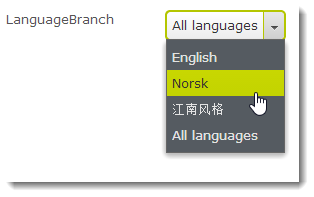
Neato!
Then, an extension method that will use the language property and do the appropriate filtering. The extension method should only filter non-localizable items, so that it will not affect pages.
public static FilterExpression<ISearchContent> ApplyMediaLanguageFilter(this ISearchContent content)
{
var currentLanguage = ContentLanguage.PreferredCulture.Name;
return new FilterExpression<ISearchContent>(x => x.MatchTypeHierarchy(typeof(ILocalizable))
| ((GenericMedia)x).LanguageBranch.Match(currentLanguage)
| !((GenericMedia)x).LanguageBranch.Exists());
}
And finally, use the extension method in the Find query
var query = SearchClient.Instance
.UnifiedSearchFor(q)
.Filter(x => x.ApplyMediaLanguageFilter())
That’s it! Culture specific file search is now working. Setting the languages property on the files will be required though.
Related super quick tip:In this case I also saw the need to remove image files from the result
.Filter(x => !x.MatchTypeHierarchy(typeof(ImageData)))
Nice one.
I prefer to search over all languages though, but then maybe have filters for languages instead. I mean, it's more important to find what your're searching for, then get results it in the same language as the visiting page.
I guess that depends on the content and the customer, Johan. But I do agree that having filters for languages is preferable in a lot of cases. With that in mind,the extension could easily be modified to accept a language parameter instead of using the current language
Nice post. Thanks for sharing.
Don't really know if this has been added later, but EPiServer contains a SelectionFactory that almost replicates this identically
GetSelections(ExtendedMetadata metadata)
inside EPiServer.Cms.Shell.UI.ObjectEditing.EditorDescriptors.SelectionFactories.
Instead of creating your own "LanguageSelectionFactory", for reduced type ambiguity, I would recommend overriding the existing and
adding an "all languages" option like below.
public override IEnumerable
{
yield return new SelectItem() { Text = "All languages", Value = null };
var selections = base.GetSelections(metadata);
if (selections == null) yield break;
foreach (var selection in selections)
{
yield return selection;
}
}
Of course naming it something different than the existing one.