


An (unofficial) MCP server for Optimizely Data Platform (ODP)
I wanted to ask Claude some questions about session setup data in Optimizely Data Platform (ODP) without writing GraphQL every time. There's no official ODP MCP server (yet?), so I built one.
It's on GitHub as Opti.ODP.MCP. MIT-licensed and unofficial - so don't expect more than what can be done with the official public APIs.
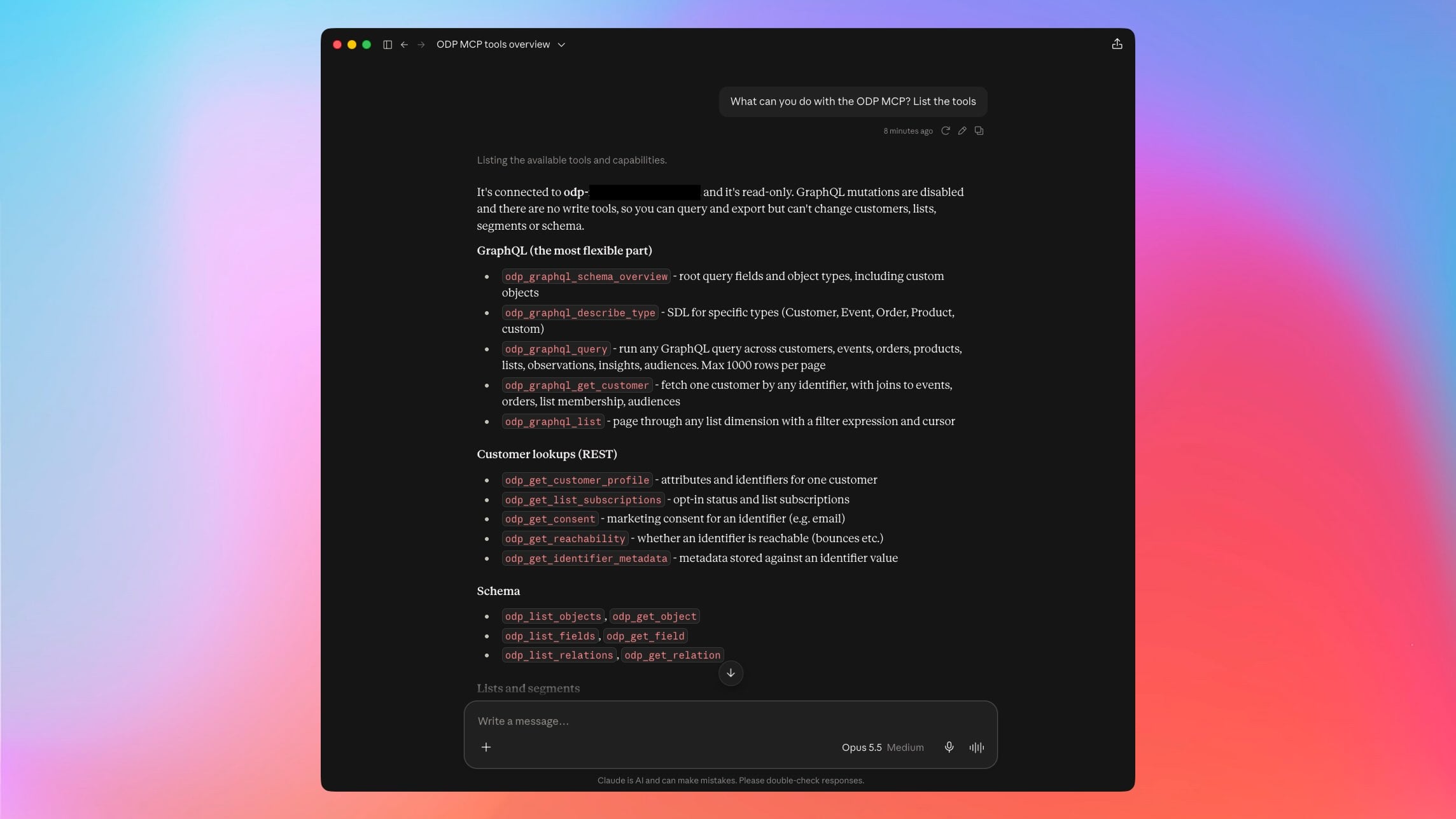
What can it do?
It gives an MCP client read access to ODP through the GraphQL API and the read endpoints of the REST API. That works out to about 25 tools covering customers, lists, schema, real-time segments, product recommendations, GDPR/CCPA/LGPD request status and bulk exports.
GraphQL does most of the heavy lifting. The server introspects each account's schema, so custom objects and fields show up with no setup.
A GraphQL page tops out at 1,000 records. For anything bigger there are export tools that write to ODP's S3 bucket, and segment exports hand back presigned download URLs.
It's read-only by default. The REST endpoints that change data aren't done yet since I don't need them (for now).
Setup
The MCP server runs in a Docker container. It holds no config or secrets on the server to keep IT and security teams off my back.
Each client sends its own ODP private API key and region as headers on each request, so the running server can handle any number of ODP accounts. The key gets forwarded to ODP and never stored or logged.
Start it locally with:
docker run -d --name odp-mcp --restart unless-stopped -p 127.0.0.1:3000:3000 ghcr.io/jacobpretorius/opti.odp.mcp:latest
There's a multi-arch image (`linux/amd64`, `linux/arm64`) on GHCR that the above will use, or clone the repo and run `docker compose up -d --build`.
Claude Code
Claude Code can connect directly:
claude mcp add --transport http odp http://localhost:3000/mcp \
  --header "X-ODP-API-Key: your-odp-private-api-key" \
  --header "X-ODP-Region: us"
Claude Desktop
Claude Desktop can't send custom headers to an HTTP MCP server, and custom connectors run from Anthropic's cloud so they can't access localhost.
We can use mcp-remote as a local bridge:
- Find the full path to `npx` e.g. with `which npx` in terminal
- Open Claude Desktop > Settings > Developer > Edit Config. This opens `~/Library/Application Support/Claude/claude_desktop_config.json` on macOS, or `%APPDATA%\Claude\claude_desktop_config.json` on Windows.
- Add your MCP server details and API key
{
  "mcpServers": {
    "odp": {
      "command": "npx",
      "args": [
        "-y", "mcp-remote@latest",
        "http://localhost:3000/mcp",
        "--transport", "http-only",
        "--header", "X-ODP-API-Key:${ODP_API_KEY}",
        "--header", "X-ODP-Region:${ODP_REGION}"
      ],
      "env": {
        "ODP_API_KEY": "your-odp-private-api-key",
        "ODP_REGION": "us"
      }
    }
  }
}
If you use nvm that path changes every time you switch Node versions. Or just ask Claude to create a nice symlink like mine so "npx" always works.
Things to ask it
- "Describe the Customer type in the ODP schema."
- "Find testuser@example.com with their last orders and whether they are on the newsletter list."
- "Which real-time segments exist, and is this vuid in `active_visitors`?"
- "Export all customers with an email and their CCPA opt-out status, then tell me when it's done."
Caveats
A private ODP key can read all the customer data in its account. If traffic leaves localhost, put it behind HTTPS.
Without `ODP_MCP_AUTH_TOKEN` set, anyone who can reach the port can use the server as a relay. They'd still need a valid ODP key to get anything, but keep it in mind.
It's a community project. If it breaks, send a fix 🙂.
Write tools are the obvious next step. If you try it on your own ODP account, issues and PRs are very welcome on GitHub.
Great initiative Jacob