


Visual Builder without Next.js, Part 1: What Astro Has to Rebuild on CMS 13 PaaS
Series: Part 1: What Astro Has to Rebuild on CMS 13 PaaS · Part 2: Does It Survive DXP? (Redis-backed ISR, Graph webhooks, Cloudflare and preview at scale)
Status: built and tested in October 2026 against an Alloy-based CMS 13.4.2, then 13.5.0, with Optimizely Graph, @optimizely/cms-sdk and @optimizely/cms-cli 3.1.0-beta.0, Astro 7.4.2 and Node 24.19.0. The three problems that cost the most were reproduced again on 29 October against the packages as published on npm. Everything here is either measured, read in the SDK's source and guides, or a design choice; where it matters, the text says which. The code, the checks and the CMS setup notes are in the companion repository, pino-labs/astro-visual-builder-cms13.
The question
Do we have to pick Next.js to get Visual Builder? No. Astro renders it. But rendering was the easy part. Taking Next.js away also takes away what it quietly does around the SDK, and each of those pieces has to be supplied by hand: who owns the content model, how a composition becomes HTML, how a draft reaches the preview frame, which application a path belongs to, and how one editor's preview stays out of a visitor's page.
"Without Next.js" does not mean without React: the demo deliberately mixes .astro, React and Svelte components behind one registry. This part is about what had to be rebuilt. Part 2 asks whether the same architecture survives production on DXP: Redis-backed ISR, Graph webhooks, Cloudflare and preview at scale.
What changed, and what I found in practice
Two releases opened the door. On 31 August Optimizely added Astro to DXP front-end hosting, and on 24 September the CMS (SaaS) release notes for JavaScript SDK 3.0 called the SDK core framework-neutral and published an Astro sample. The SDK's README still positions React and Next.js as its first-class integrations; what the core offers Astro is primitives, not an integration.
The version boundary matters in practice. At the time of testing, the framework-neutral entry point, @optimizely/cms-sdk/core, and the platform: 'paas' option were only available in the 3.1.0 beta: latest is 3.0.2, and its package exports neither. In the packages I inspected, both first appear in 3.1.0-beta.0, published on 20 October under the beta tag. The Astro sample takes the SDK from its own monorepo (workspace:*). Copy it into a project with 3.0.2 and its Svelte route, which is built on @optimizely/cms-sdk/core, does not resolve, because 3.0.2 does not export that entry point. Everything below runs on the beta, pinned to the exact version; when 3.1.0 ships, re-run the checks before you upgrade.
Before you start: CMS 13 PaaS with Graph, 13.4.2 or later, and Node 22.23.4 or later on the 22 line, or Node 24 or 26 (Astro 7.4.0 raised the floor to 22.22.0, and the 7.4.2 patch to 22.23.4). The 13.4.2 minimum is not an Astro requirement: 13.4.1 fixes a culture-specific data-loss bug (CMS-57780), and the 13.4.2 database update restores the values lost before the fix. I tested on CMS 13.4.2 and 13.5.0 with Astro 7.4.2 on Node 24.19.0. DXP front-end hosting is needed only for the production checks in part 2. This is not a CMS 12 tutorial: the implementation depends on the CMS 13 REST API and the CMS 13 Graph schema.
The architecture
CMS 13 owns composition: editors arrange sections, rows, columns and elements in Visual Builder and pick display templates. Graph serves that composition as data. Astro turns it into HTML through one component registry, where .astro, React and Svelte components sit side by side and render on the server; only components marked as islands (client:*) are hydrated in the browser.
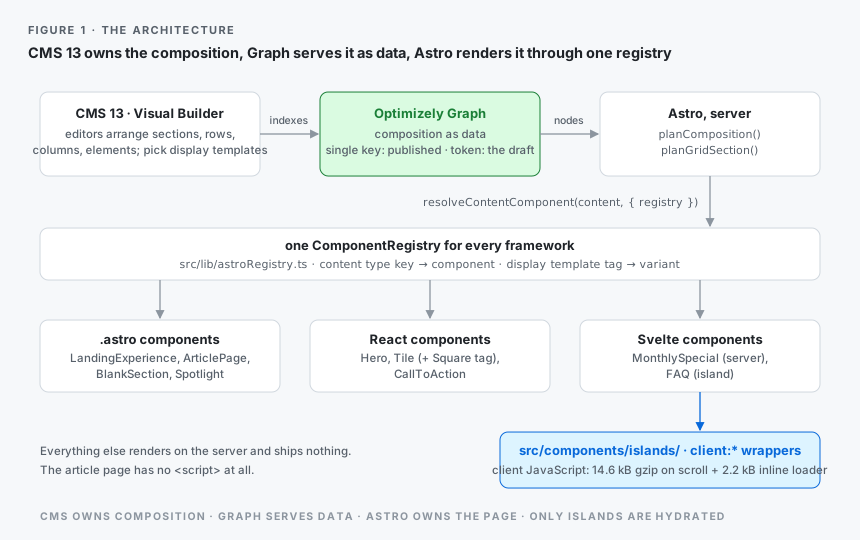
Who owns the content model?
This is the first architectural decision, and CMS 13 gives you two answers. A content type can be owned by C# and mirrored into TypeScript, or owned by TypeScript and pushed into the CMS.
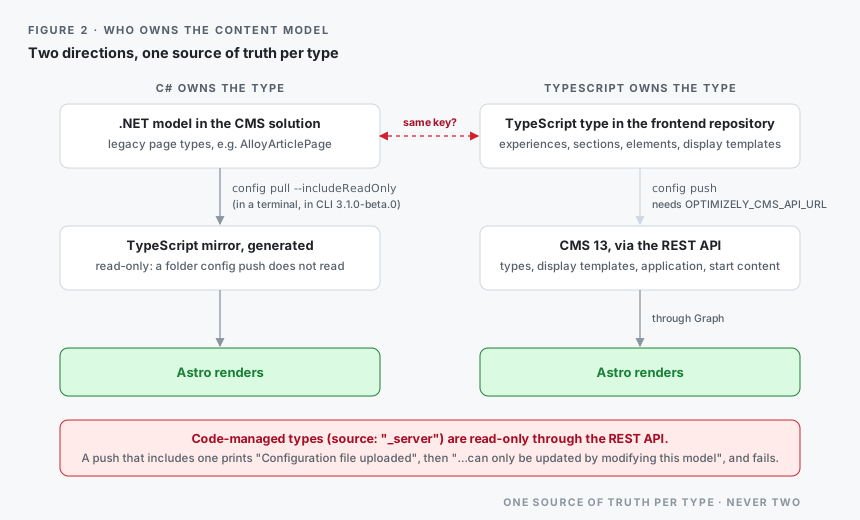
Both work. Pick one per type. The CMS REST API treats code-managed types as read-only: config pull gets them, and generates typed files for them, only with --includeReadOnly, and the CMS rejects a push that includes one. My recommendation after testing both models: keep legacy page types in C#, model everything Visual Builder needs (experiences, sections, elements, display templates) in the frontend repository, and regenerate the TypeScript mirror of the C# types with config pull. In CLI 3.1.0-beta.0 that has to happen in a terminal (ask me how I know): without one, the CLI prints the manifest as JSON and writes no files, even with --output. The fix (CMS-57658) is on the SDK's main branch, so with the next CLI release CI can regenerate the mirror too.
One source of truth per type, never two.
On the Alloy-based CMS I tested against, the rule was not theoretical. Alloy ships a C# ArticlePage, the same name as the TypeScript ArticlePage, so I renamed the C# type to AlloyArticlePage before the first push. Same GUID, content untouched.
Optimizely's FAQ for CMS 13.0.0 recommends managing types where they are primarily used, names .NET code as the typical case for PaaS headless, and calls full PaaS headless support an area of ongoing development. API-managed Visual Builder types worked in the CMS 13 setup I tested; the broader PaaS headless story is still evolving. Two PaaS gotchas are easy to miss. OPTIMIZELY_CMS_URL is the runtime and preview URL, while the CLI talks to the CMS REST API through OPTIMIZELY_CMS_API_URL (or --host). And the token the CMS issues to the CLI's OAuth client carries the client id and the api:admin scope, but no roles (decoded on 13.4.2, with a client defined in configuration): enough for content types, display templates and the application, but config push also creates the application's start content, which is checked against the content ACL. On a root that grants Everyone only Read, the push stops with a 403 until the client gets Read and Create there. Everything on the CMS side (the Graph instance, the OAuth client and its access, the Headless application and its preview URL) is in the repository's web/docs/cms13-setup.md; the code paths below are relative to web/.
Configure the SDK for PaaS
// src/lib/optimizely.ts (excerpt)
  config({
    apiKey: OPTIMIZELY_GRAPH_SINGLE_KEY,
    graphUrl: OPTIMIZELY_GRAPH_GATEWAY, // a URL with no path gets /content/v2 appended
    platform: 'paas', // CMS 13 PaaS; the SDK does not detect the product. Needs SDK >= 3.1.0-beta.0.
    fragment: { richTextFormat: 'both' }, // 3.x fetches json only by default
    // Path lookups also match _metadata.url.base. Without it every application on the CMS answers for
    // the same path, and the first hit may be another site's start page. The value is the Headless
    // application's primary host as Graph stores it, scheme included (https://localhost:3001).
    ...(OPTIMIZELY_APPLICATION_HOST ? { query: { host: OPTIMIZELY_APPLICATION_HOST } } : {}),
  });
The SDK does not infer the hosting model from the Graph endpoint, so select the PaaS platform explicitly; the SDK's PaaS guide gives the reason: without it, queries that use a SaaS-only feature fail against PaaS. In 3.1.0-beta.0 the two adapters still build the same queries. A comment in the SDK source says why the PaaS adapter is a copy of the SaaS one: so that SaaS changes don't reach PaaS.
query.host matters as soon as the CMS has more than one application. Astro often joins a CMS that already serves a site, as a second application. Every application's start page then matches the same path. The SDK's troubleshooting guide covers this case (I get content from the wrong site); on my test CMS the symptom was less obvious: the first hit was Alloy's start page, a type Astro does not register. The page rendered empty. Bind the Headless application's host to a language as well (locale: 'en' in optimizely.config.mjs). Otherwise CMS 13 puts the start page at /en/.
Rendering Visual Builder without React
This is the heart of the series. The official sample's main routes render a composition with React's OptimizelyComposition from @optimizely/cms-sdk/react/server, which renders every node through the async server component OptimizelyComponent. It works, but it hands the whole page to one React render, and Astro cannot place an island anywhere inside it. The sample's newer /svelte/ route uses the core's planning, but again hands the whole page to one framework and does not cover preview. The core entry point exposes the same planning as plain functions, so Astro can own the page instead.
The bridge is one registry for every framework:
// src/lib/astroRegistry.ts
import { ComponentRegistry } from '@optimizely/cms-sdk/core';
import LandingExperience from '@/components/LandingExperience.astro';
import ArticlePage from '@/components/ArticlePage.astro';
import BlankSection from '@/components/BlankSection.astro';
import Hero from '@/components/react/Hero';
import Tile, { SquareTile } from '@/components/react/Tile';
import CallToAction from '@/components/react/CallToAction';
import MonthlySpecial from '@/components/svelte/MonthlySpecial.svelte';
import FAQIsland from '@/components/islands/FAQIsland.astro';
import Spotlight from '@/components/Spotlight.astro';

// One registry for .astro, React and Svelte components. Everything renders on the server;
// the only client JavaScript comes from the wrappers in src/components/islands/.
export const registry = new ComponentRegistry({
  LandingExperience,
  ArticlePage,
  BlankSection,
  Hero,
  Tile: { default: Tile, tags: { Square: SquareTile } },
  CallToAction,
  MonthlySpecial,
  FAQ: FAQIsland,
  Spotlight,
});
resolveContentComponent(content, { registry }) looks components up in this registry and nothing else (passing a registry replaces the SDK's global component registries, with no fallback), so nothing in the application imports @optimizely/cms-sdk/react/server. A display template with a tag selects a variant. When the Square style is picked on a tile, the node carries that display template's key. The planner (planGridSection() for a tile inside a section, planComposition() at the top level) maps it to the tag Square through the templates registered with initDisplayTemplateRegistry(). That registry is global, and the registry option does not replace it. tags.Square renders the tile.
The composition itself is about twenty lines of Astro:
---
// src/components/OptimizelyComposition.astro
import { planComposition, resolveContentComponent, isWrappedComponent, type ExperienceNode } from '@optimizely/cms-sdk/core';
import { registry } from '@/lib/astroRegistry';

interface Props { nodes: ExperienceNode[] }
const { nodes } = Astro.props;
const items = planComposition(nodes);
---
{items.map((item) => {
  if (item.kind === 'unknown') return null;
  const r = resolveContentComponent(item.content, { tag: item.tag, registry });
  if (!r.component) return null;
  const Component = r.component as any;
  const props = { content: r.contentProps, displaySettings: item.displaySettings };
  // A component node gets the preview wrapper; a section node carries its own data-epi-* attributes.
  return isWrappedComponent(item)
    ? <div {...(item.previewAttrs ?? {})}><Component {...props} /></div>
    : <Component {...props} {...(item.previewAttrs ?? {})} />;
})}
planComposition() turns the experience's nodes into a flat plan; isWrappedComponent() separates component nodes, which get a <div> carrying the preview attributes, from sections, which take the attributes themselves. Sections hand their rows and columns to planGridSection(), and a recursive GridItems.astro renders the grid; row and column display templates arrive as displaySettings and become CSS classes, so the design system, not the editor, decides what "large padding" looks like.
One Astro rule shapes the rest. A dynamic tag such as <Component /> cannot carry a client:* directive, because Astro must know at build time what to bundle. So each island is a small static wrapper in src/components/islands/, registered under its content type, and grep -rn "client:" src/components lists every component that ships JavaScript. In the demo that is one Svelte FAQ, while the React tiles, a Svelte price card and an .astro Spotlight next to them render on the server and ship nothing.
The practical consequence is the one that matters for a CMS team: the CMS content model no longer has to be tied to a single frontend framework. A component can be reimplemented in React, Svelte or .astro while its content type and the Visual Builder composition stay the same, as long as the replacement keeps the props contract the registry passes it.
Live preview
Preview is one route, src/pages/preview.astro. The CMS opens it in an iframe with the content key, version, locale, context and a short-lived preview token; getPreviewContent() fetches the draft through Graph, and the page renders it through the same registry as the public site, so editors see exactly the components visitors get.
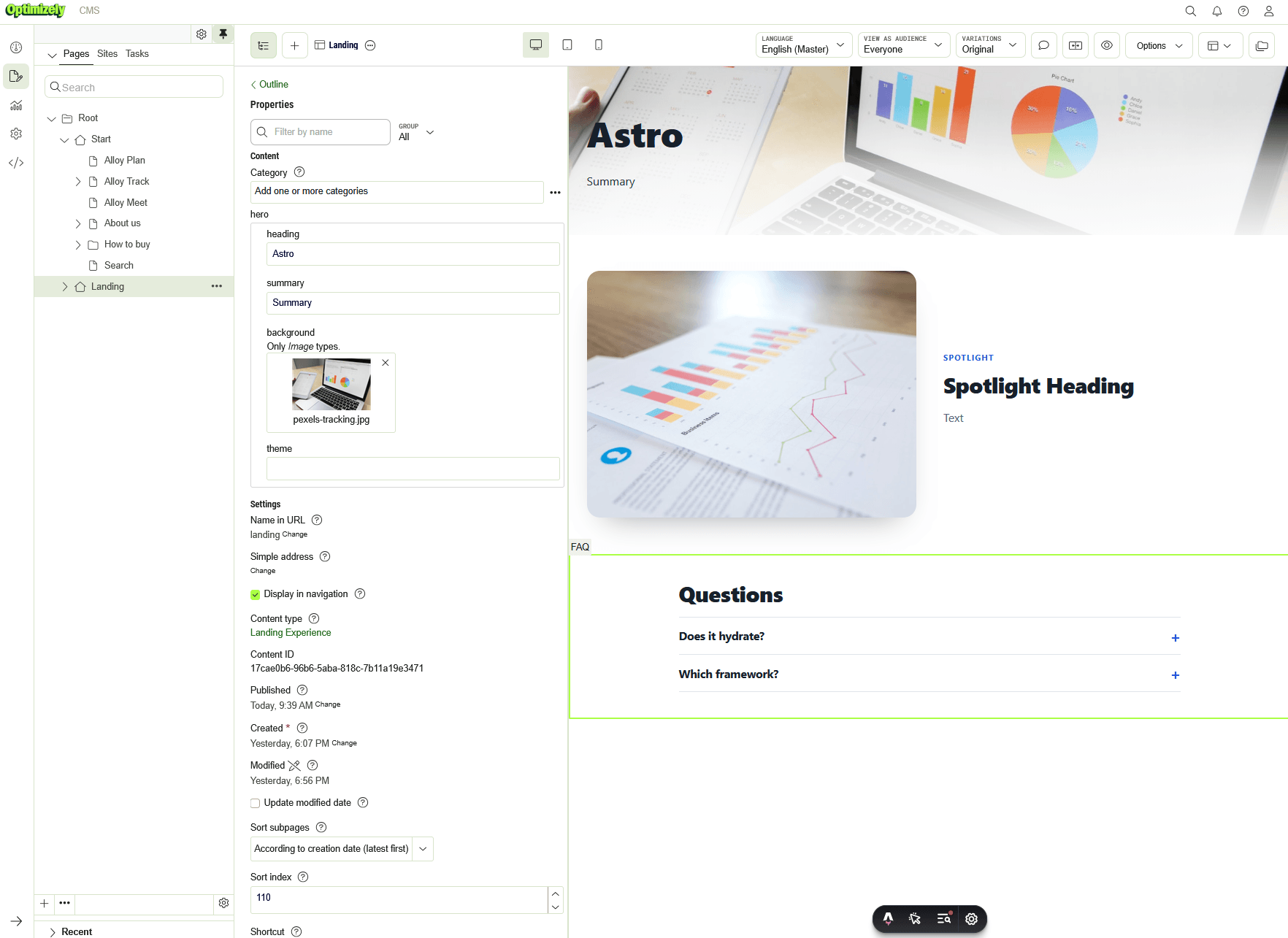
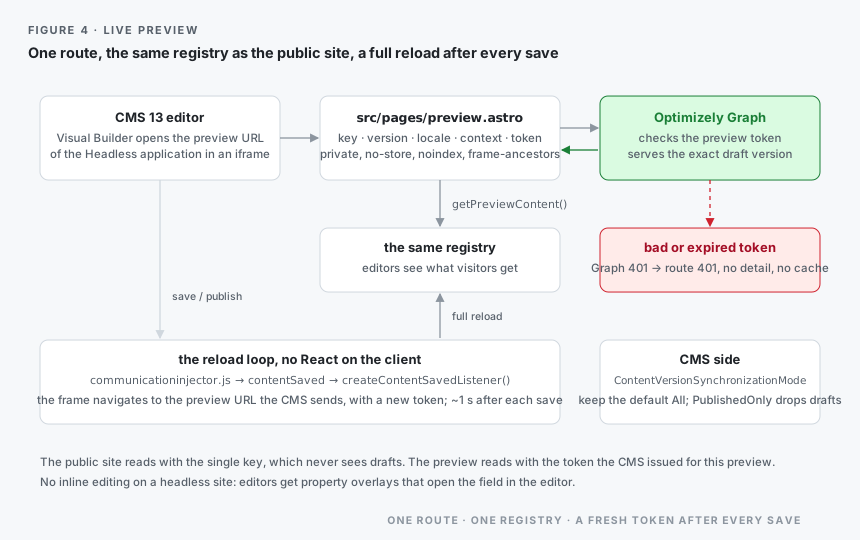
The CMS's communicationinjector.js connects the frame to the editor, and createContentSavedListener() from the core entry point navigates the frame, after each save, to the preview URL the CMS sends with the event, which carries a new token. It is a plain <script> with no React on the client, and the reload is a full one, since this page does not use Astro's client router. The route sends private, no-store, noindex and a frame-ancestors policy for the CMS origin. Graph checks the token: a bad or expired one gets a 401 from Graph, and the route answers 401 without detail and caches nothing. It does the same for any other failure to fetch the draft; the reason goes to the server log.
On the CMS side, keep Graph's ContentVersionSynchronizationMode at its default, All: the preview reads the exact version the CMS asks for, and PublishedOnly would leave drafts out of the index. The public site reads with the single key, which by design never sees drafts, and here the unpublished start page was visible with the app key and secret and invisible with the single key.
One expectation to set with editors coming from CMS 12: headless sites have no inline editing on the page. They get property overlays that open the field in the editor, as Optimizely's CMS 13 FAQ notes.
Request isolation: one observation
Without a per-request scope preview still renders, so nothing looks wrong. With adapter.run() removed from the middleware of the built site (the adapter itself still configured), a sequential test against the real CMS 13.5.0 and Graph showed the problem: after one preview request with a token issued by the CMS, the next public render of the same article carried that token in a rich-text image URL (?preview_token=…). On this Astro server path, the SDK's request context, where getPreviewContent() keeps the token, was not scoped per server request. That shows preview context reaching public output; it does not show that the token could be used to read drafts, and I did not try. A preview token does not belong in public HTML either way. With adapter.run() back, the same sequence leaves no token in public HTML.
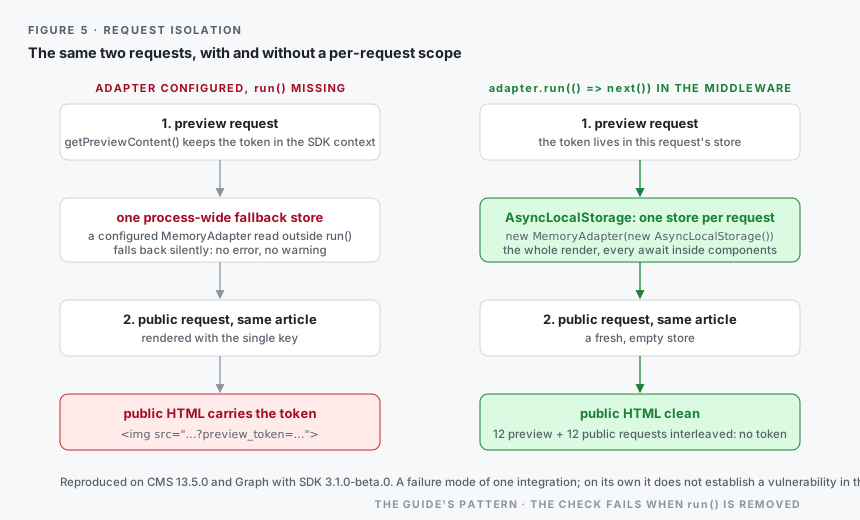
The SDK's request-context and framework-agnostic core guides prescribe exactly this: in frameworks other than React, configure an adapter and run each request inside it. Neither guide says what happens when a configured adapter is read outside run(); only a doc comment in the adapter's source does. The adapter falls back to one process-wide store. No error, no warning. That is how a token set by one request reached another. On the SDK's main branch (CMS-58169, merged on 28 October, not yet on npm) media URLs no longer carry the token unless the preview opts in with forceMediaToken, which narrows this symptom; the shared fallback is still there. In short, this is a reproduced failure mode of one integration: SDK 3.1.0-beta.0 in an Astro server, with the adapter configured but run() missing. On its own, it does not establish a vulnerability in the SDK. With the documented request-scoping pattern, the token stayed out of public HTML in every test described here.
In this project the fix is the guide's pattern: an AsyncLocalStorage, configured once and entered for every request:
// src/lib/context.ts
import { AsyncLocalStorage } from 'node:async_hooks';
import { configureAdapter, MemoryAdapter } from '@optimizely/cms-sdk/core';

export const adapter = new MemoryAdapter(new AsyncLocalStorage());
configureAdapter(adapter);
// src/middleware.ts
import { defineMiddleware } from 'astro:middleware';
import { adapter } from '@/lib/context';

// Wraps the whole render, so every await inside components still sees this request's context.
export const onRequest = defineMiddleware((_context, next) => adapter.run(() => next()));
A check guards it: 12 preview requests interleaved with 12 public requests to the freshly purged article put no preview_token in public HTML, the preview HTML still carries it, and the check fails when adapter.run() is removed. Part 2 looks at the mechanism in depth: where the SDK keeps this context, how that differs between runtimes, and how it behaves on DXP.
So, why Astro?
- Visual Builder: framework-neutral planning lets Astro, React and Svelte components take part in the same composition. Only components marked as islands are hydrated in the browser.
- Measured: the article page ships no <script>; the landing experience loads 14.6 kB gzip (14,647 bytes), the Svelte runtime and the FAQ, only when the FAQ scrolls into view, plus 2.2 kB of inline island loader; the React client that @astrojs/react builds (68.2 kB gzip) is loaded by no page.
- Architecture: React becomes optional. The content model survives a change of framework.
This does not make Astro a replacement for Next.js. I would still choose Next.js for a site that is mostly application (authenticated dashboards, heavy client state), for a team already invested in React Server Components, or for a component library that is React-only and has no reason to change.
Caveats
- Beta SDK. The /core entry point this design rests on, and the platform option, need 3.1.0-beta.0; the SDK itself has supported CMS 13 since 2.0 (May 2026), and I did not test 3.0.2 against PaaS. Pin the beta exactly and re-test at 3.1.0.
- PaaS headless is still evolving. The FAQ for CMS 13.0.0 describes it as an area of ongoing development. In 3.1.0-beta.0, platform: 'paas' selects an adapter that builds the same queries as SaaS; that is true of this version, and later ones may differ.
- CMS 13 only. CMS 12 with Graph does not qualify.
- Version mismatch to watch. Astro 7.4.2 requires Node 22.23.4 or later. Below it the astro CLI (dev, build, preview) exits with an error; the built server does not check. Optimizely's front-end hosting documentation still lists Node 22.12.0 or later for Astro. That is a mismatch in the documentation, and I have not seen an actual incompatibility; part 2 checks the Node version the DXP build slot actually runs.
- Expect no inline editing on headless sites; editors get overlays.
- Not exercised here: Opti ID, the DXP build slot, Redis and Cloudflare. Part 2 covers DXP, with the checks to run on Test1.
The problems that cost the most
Three problems cost the most. Before publishing I reproduced each of them again, on 29 October, against the CMS 13 instance and the packages as published on npm:
| Problem | Why | Fix |
|---|---|---|
| npm install @optimizely/cms-sdk installs 3.0.2; importing @optimizely/cms-sdk/core fails (ERR_PACKAGE_PATH_NOT_EXPORTED in Node), and nothing in that version knows platform: 'paas' | the /core entry point and the platform option first ship in 3.1.0-beta.0, under the beta tag; latest is still 3.0.2 | pin @optimizely/cms-sdk and @optimizely/cms-cli to exactly 3.1.0-beta.0 |
| config push answers The client credentials are invalid, although the CMS issues that client a token | without OPTIMIZELY_CMS_API_URL or --host, the CLI requests its token from the default SaaS gateway (api.cms.optimizely.com), which does not know a PaaS client; it never reads OPTIMIZELY_CMS_URL. Documented in the CLI reference, but the error reads as a credentials problem | OPTIMIZELY_CMS_API_URL=https://<cms-host>; the CLI also loads .env from the directory it runs in |
| A TypeScript type with the key of a C# class is not saved: the CLI prints ✔ Configuration file uploaded, then …can only be updated by modifying this model, and exits with an error | types registered from .NET models (source: "_server") are read-only through the REST API; the CMS answers 200 with an errors list, and the CMS leaves those types out of config pull unless you pass --includeReadOnly | change the type in C#, or give the TypeScript type its own key; pull C# types only into a folder that config push does not read |
The full list, with the CMS setup and every version I pinned, is in the repository. That includes the 403 on the start content, the start-page routing and the relative media URLs.
How I tested it
Every code excerpt is from the companion repository. It type-checks with astro check (0 errors) and passes 10 unit tests for the cache provider of part 2. Its 28 checks (HTTP-level assertions in eight groups) ran against the real CMS 13.5.0 and Optimizely Graph, on a test article whose draft has an image in its rich text, with a preview token issued by the CMS REST API (GET /_cms/v1/content/{key}/versions/{version}/previews). Checks 1 to 6 ran through the repository's test/checks.sh. The repository's versions of checks 7 and 8 are written for local runs, so I ran those two with a separate script, whose logic is now in the repository as test/real-checks-7-8.mjs: a real publish through the same REST API, after which Graph served the new version within about two seconds on this test instance (polled once a second; 1.5 to 1.6 s in three runs), and a scan of the client bundle for the real key values.
The checks that matter for this part: the article page ships no <script>, the landing page stays under 20 KiB of JavaScript, images load from the CMS, a bad preview token gets a 401 with no-store, and no preview token leaks into public HTML under concurrency. That run also caught a bug. It was in my own code: on the stored-query path the SDK uses (?stored=true), Graph returns rich text's json as a string. Without that parameter it is an object, and behind Graph's CDN either shape can come back. The SDK's RichText accepts both shapes, but my media rewrite walked the raw value and missed images inside rich text until it parsed the string first.
The instance is an Alloy-based CMS 13 on .NET 10 with ASP.NET Identity, with Astro added as a second, Headless application. On 13.4.2, config push created the model, the start content and the application through the CMS REST API, and the pages rendered from Graph; the 403, start-page routing and media URLs came from that run. After upgrading the same CMS to 13.5.0, the preview frame in Visual Builder showed the Astro page (figure 3), and the server log showed the frame reloading about a second after every save and again after publishing. Two things I have not yet confirmed in the editor: the Square style switching the component, and click-to-field focus. What the run does not cover (Opti ID, DXP, Redis and Cloudflare) is part 2's job, measured on Test1.
Verdict
Yes: with the 3.1.0 beta, Astro can render Visual Builder content on CMS 13 PaaS, but it is not a drop-in replacement for the Next.js integration. The framework-neutral SDK provides the primitives; the application still has to provide the integration around them: one registry for its components, a preview route and its reload, routing that knows which application a path belongs to, and a request scope for the SDK's context. For the platform team, the useful feedback is about failure modes. The SDK's guides cover each of these pieces. What they don't show is where a missing piece fails silently: a configured MemoryAdapter read outside run() falls back to a shared store, the CLI without OPTIMIZELY_CMS_API_URL asks the SaaS gateway for its token and reports a credentials error, and config push prints ✔ Configuration file uploaded before the CMS's errors.
The interesting part is not replacing Next.js. It is separating Optimizely's content composition model from the frontend framework, and knowing what you have to rebuild when you do.
Part 2 takes a closer look at request isolation and asks the production question: can the same architecture survive DXP (Redis-backed ISR, Graph webhooks, Cloudflare and preview) without a redeploy for every publish?
Repository: pino-labs/astro-visual-builder-cms13, the code, the checks and the CMS 13 setup notes.
Series: Part 1: What Astro Has to Rebuild on CMS 13 PaaS · Part 2: Does It Survive DXP? (Redis-backed ISR, Graph webhooks, Cloudflare and preview at scale)
Sources
All links checked on 2026-10-29. The release notes moved from support.optimizely.com to docs.optimizely.com; the old addresses redirect.
- 2026 Optimizely CMS 13 release notes: DXP support for Astro (31 Aug 2026), the JavaScript SDK on CMS 13, the CMS-57780 culture-specific data-loss fix in 13.4.1 and the restore of deleted values in 13.4.2 (26 Oct 2026), 13.5.0 (27 Oct 2026)
- 2026 CMS (SaaS) release notes: JavaScript SDK 3.0, the framework-neutral SDK core and the Astro sample (24 Sep 2026)
- @optimizely/cms-sdk on npm: latest 3.0.2, beta 3.1.0-beta.0 (20 Oct 2026); release notes on GitHub
- FAQs for CMS 13: where content types live on PaaS headless, and no inline editing on headless sites
- episerver/content-js-sdk: Astro sample, CMS PaaS guide, framework-agnostic core, request context, CLI reference and troubleshooting; on the main branch, changes CMS-58169 (media preview token opt-in, merged 28 Oct 2026) and CMS-57658 (config pull output flags outside a terminal, merged 26 Oct 2026)
- Host a frontend with Optimizely: Node.js 22.12.0 or later for Astro on DXP front-end hosting
- Astro ISR caching and Optimizely Graph webhooks: the DXP page for Astro, also listing Node.js 22.12.0 or later
- Prior work on SaaS CMS: Jacob Pretorius, Build a headless blog with Astro and Optimizely SaaS CMS Part 4 - SSR & Visual Builder Experiences (21 July 2025)
Stack: Optimizely CMS 13.4.2 and 13.5.0 (Alloy-based, .NET 10, ASP.NET Identity) with Optimizely Graph, @optimizely/cms-sdk and @optimizely/cms-cli 3.1.0-beta.0, Astro 7.4.2 on Node 24.19.0, React and Svelte components behind one registry. Optimizely, Astro, Next.js, React and Svelte are trademarks of their respective owners; this article is not affiliated with them.
Comments