
What's new in Language Manager 5.3.0
In Language Manager (LM) version 5.2.0, we added an option in appsettings.json called TranslateOrCopyContentAreaChildrenBlockForTypes. It does exactly what its name suggests, when LM translates or duplicates a content of declared types, the content in ContentArea property will be translated or duplicated with it.
Building upon said option, 5.3.0 update offers users a more intuitive and customizable approach to managing content translation and duplication, allow users to configure the translation or duplication process directly, eliminating the need to declare specific types in the appsettings.json file.
Let us start with what is new, when you click on Auto translate/Duplicate function, a new dialog will appear:
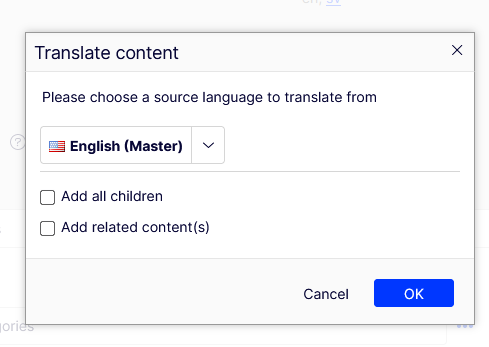
It is the same as the pop up we use for “Add to translation project” feature, but better! Notably, the source language selection has been upgraded to a more intuitive dropdown menu, replacing the previous radio buttons.
Add all children, does exactly what its name suggests. Enabling this option entails the inclusion of all children, or subpages, of a given parent page within the translation process.
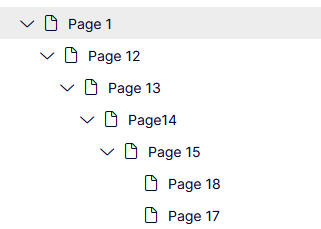
For example: Selecting this option when translating Page 1 will translate all the pages in the above image to the translation process as well.
Add related content(s), this one is a bit more complicated. Reflecting on the TranslateOrCopyContentAreaChildrenBlockForTypes option, it previously encompassed all contents within the ContentArea property exclusively.
However, with the advent of version 5.3.0, we expanded this feature to not only include all the content in ContentArea, but also in ContentReference and XhtmlString. This expansion naturally includes Ilist<ContentReference> and Ilist<XhtmlString> as well. This will also include all related content of the subpages if you have the option Add all children checked.
If either of the two options above is selected, the third option Publish added content(s) will be revealed accordingly:
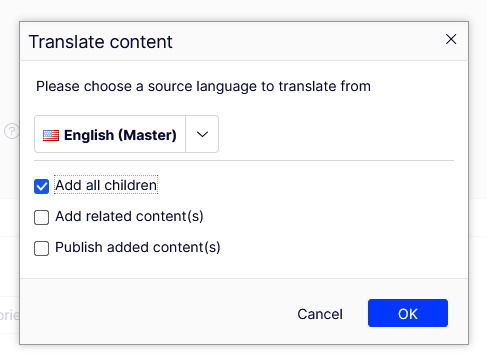
This option grants users the ability to decide whether to publish the newly added content or retain it as a draft. Notably, the root content will remain in draft status, ensuring that it undergoes further review before publication.
However, our efforts to enhance LM's flexibility don't conclude there, the default implementation merely scratches the surface. To provide users with even greater adaptability, we're introducing a brand-new interface: IChildrenContentLoader.
public interface IChildrenContentLoader
{
    /// <summary>
    /// Get children from a parent/root content
    /// </summary>
    /// <param name="content">The parent or root content</param>
    /// <param name="languageId">Id of the source language</param>
    /// <param name="includeDescendents">Flag to indicate whether including descendants or not</param>
    /// <param name="includeRelatedContents">Flag to indicate whether including related content or not</param>
    /// <returns>List of content link that will get translated alongside root</returns>
    IEnumerable<ContentReference> GetChildrenContentsNeedToCopyOrTranslate(ContentReference content, string languageId, bool includeDescendents, bool includeRelatedContents);
}
Naturally, users have the liberty to customize this behavior to suit their specific requirements. This can be accomplished by overriding the default implementation and registering a service of type IChildrenContentLoader with the desired modifications.
That's it for now. Feel free to devise your own logic and provide us with your valuable feedback on this new feature. Your insights will be instrumental in our ongoing efforts to further enhance Language Manager.
Comments