

Avoiding spam with XForms
Simple instructions: If you are using a WebForms based EPiServer 7 site, Install this AddOn then add a text box to your form of type ‘Maths Problem’. Save your form and you should be up and running!
More detail:-
We all have a love-hate relationship with XForms in EPiServer. They are quick, easy, standard… but not very flexible. One such issue with flexibility is the need to put some kind of spam-catching filter onto forms. Traditionally, we’d use a CAPTCHA or reCAPTCHA, but using this with XForms has three drawbacks:
- You need to put in on the page or block that embeds the form, so it’s not very flexible as to when you show it (although you could add a ‘show spam catching’ flag if you wanted – it’s a bit of work)
- Because it’s not part of the XForm, you need to put it above your form or at the bottom below your submit, which is ugly
- It’s hard to do client-side validation with a reCAPTCHA, so you have to do it server-side which is a nuisance
As using these is quite a heavy thing to implement, I decided to find a simpler solution. One alternative that is cropping up in a few places is the ‘maths problem’ approach. It’s a very simple sum (one that even my six year old son could do easily) but one that the spammers haven’t fully exploited yet with an automatic solver. I’m sure they will, but right now if you avoid the big company implementations which are targeted for cracking, then you can avoid the worst of the bot-based spam form submissions. Because it’s so simple, it’s easy to write an AddOn that intercepts the XForm calls and sets up a sum to solve.
This implementation adds a new XForm data type of ‘Maths Problem’ which you can put on your form:

When the form is rendered, some code will intercept this field and add a sum to it, along with validators to ensure the sum is filled in correctly:
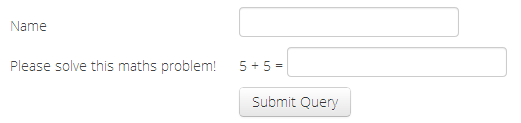
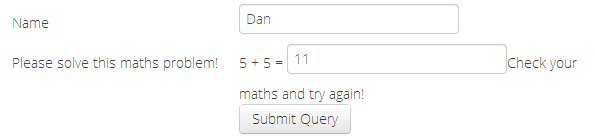
With this solution, you can decide where your maths problem goes and how it is styled.
Known issues:-
- Will probably only work with WebForms, haven’t tried with MVC yet
- Currently the validation error is fixed and only in English
Disclaimer:-
This AddOn is provided As-Is. I haven’t tested it fully and it was a quick throw-together for another project I’m working on. Use it at your own risk!
this is exactly what I was looking for, however, I am on EPiServer 6 - What do you suggest to do?
Hey Eva - I only just picked up your question, sorry! I think this should work on EPiServer 6 as well but I'd have to recompile a version for you to copy in directly. Let me know if you still need it ;)
I am on Episerver 7.1 and I have installed this add on but I don't see "Maths Problem" in the drop down.
Did you restart your site, Radhu?
Hi Dan,
The link to the code is not left.
Do you have it left would be grateful for it
/Camilo