

Page thumbnails in EPiServer CMO
What it is about?
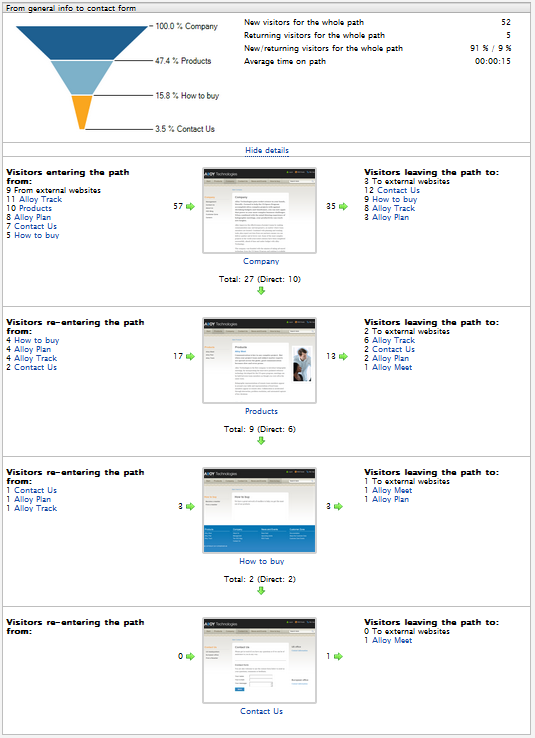
CMO user can see thumbnails of pages that are part of some campaign or LPO test. It is pretty important for visualization and should improve user experience.
When page thumbnails are created?
The system creates thumbnails when user opens report/settings of existing LPO test or campaign. If thumbnail generation takes too long, the system displays default image and continues the operation asynchronously. You will see new thumbnail later.
Who creates thumbnails?
Component called Thumbnail service does it for CMO. It is windows service application that is installed with the module on the same machine by default.
Thumbnail service can be installed and configured manually, for example it is possible to have the one Thumbnail service for the number of site instances in load balancing environment.
What if someone updates the page in CMS?
It is too expensive to generate snapshots every time when user opens settings or report in CMO, so the system caches the pictures and thumbnail can look outdated if CMS page has been changed.
There is special button for this case: Refresh thumbnails.

Click that button and the system will try to create new thumbnails for pages in your test or campaign.
Any settings?
Settings are available when CMO is being deployed on web site and later in CMO / Settings / Page Thumbnails section.
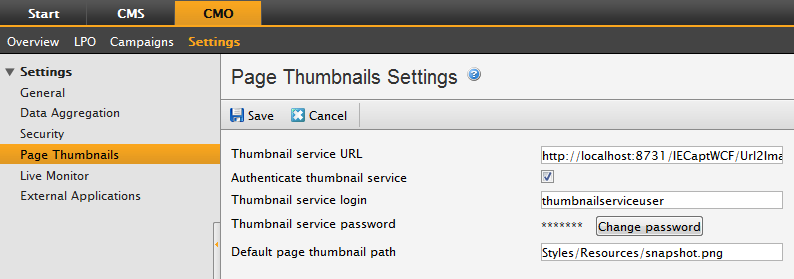
You should update default Thumbnail service URL in case of more advanced system configuration. For example if Thumbnail service is installed on another machine or uses another port.
Make sure that option Authenticate thumbnail service is checked and provide login and password to enable the system to access unpublished page versions. This is required to create thumbnails of LPO test variation. Specified user account must have corresponding access rights.
Important: Additional configuration is required if Thumbnail service is installed on Windows Server 2008 R2, otherwise login page screenshot is displayed instead of variation thumbnail in LPO reports.
You can find solution in this document: http://world.episerver.com/Documentation/Items/Installation-Instructions/EPiServer-CMO/CMO-20/Configuring-the-Thumbnail-Service-on-Windows-Service-2008-R2/
What if I still don’t see correct thumbnail of my page?
Clear browser cache or use Ctrl+F5. Try to refresh thumbnails. Check your configuration and settings in CMO / Settings / Page Thumbnails section. Verify that Thumbnail service is alive and available. Check that web site is accessible for Thumbnail service.
It's also possible to utilize the thumbnail service for external snapshots, like we've done on our customer reference page: http://www.sublime.se/Vara-referenser/ :). Screenshots are updated daily by a scheduled job. Pretty neat.