

Blog Template for EPiServer CMS 7.5
The Alloy Templates are widely used by partners and customers as well as internally at EPiServer. They create a good starting point for projects and showcase some simple page types. Blogs is something available in the EPiServer Social Packages but the blogs I built are made in EPiServer CMS and available in both MVC and Webforms. These blogs are based on a hierarchical placement with the year and month being listing pages. Read more about the advantages of hierarchical content and large scale sites here http://joelabrahamsson.com/building-large-scale-episerver-sites/.
The templates come with three page types, Blog Start, Blog List and Blog Item. It also comes with three block types, Blog Listing, Blog Archive and Blog Tags. 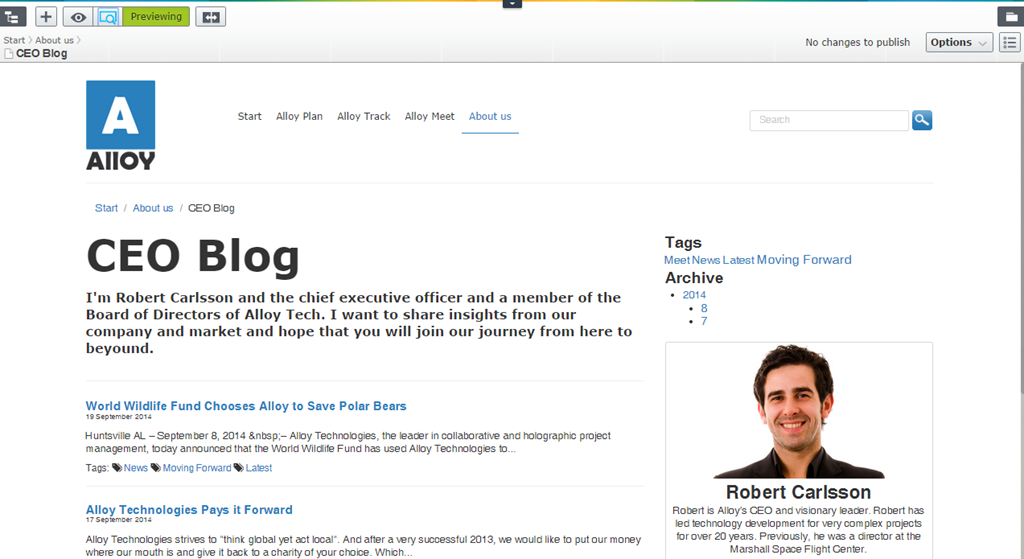
I also created a walkthrough video of package from a users perspective.
https://www.youtube.com/watch?v=CSAZkUPd7VM
Best way to install the code is to setup a new Alloy Project using the VS integration and add the code in the root of your site, Include in project and build. Email me if you have any questions or issues.
Where's the MVC version? :)
The file upload plugin was freaking out. Thanks Frederik
Are there functionality for comments and to get e-mail notifications when someone has made a comment?
Thank you Jacob. Same question as huba0002. Also, your video says there will be a separate video for the technical perspective. Did that ever happen?
There is no included functionality for comments and rating. I would suggest either implementing http://world.episerver.com/blogs/Jonas-Bergqvist/Dates/2014/10/Comments-and-Ratings-in-Commerce-80/ or using external integration such as http://dmytroduk.com/techblog/disqus-for-episerver-7-5. I dont think I got the technical video. Will make sure to upload in the near future
Thanks! I hope this is an appropriate place for this type of question. In the BlogListBlock view it renders a Preview partial view for each blog post using this code: @Html.Action("Preview", "BlogItem", new { currentPage = page , blogModel = Model}). I'm noticing the controller parameter is "BlogItem", however when I debug the app, it seems to use BlogListBlockController.Preview and not BlogItemController.Preview. Can you shed any light on what the "BlogItem" parameter does or why it is ignored?
Hi All,
I started to integrated the code base to a website which is created using episerver 7.0 version.
I am stuck with many issues, not sure if the reason is that it just because of compatibility issue with older version or something else.
1. When i created Blog item the hierarchy is created but as folder and not pages.
2. Tag cloud and Archieve is not working at all.
Please provide some guidance.