

Content development improvements May '22
Lately we have had a slew of notable releases that we would like to highlight. The work of migrating packages to .NET Core continues and more packages are now cross-compiled to .NET5 and .NET6. Note that you can target .NET6 even though not all packages are cross-compiled yet. You can follow our work here https://world.optimizely.com/resources/net5/add-ons/. Clicking on an add-on will take you to the NuGet package details page where you can subscribe to and get notified when it’s updated.
Updated Templates
This work is now reflected in our templates. Latest version (1.2) is now targeting .NET6 and uses the latest dependencies. You should be presented with the following message if you have an outdated version installed when trying to apply a template:
An update for template package 'EPiServer.Templates::1.1.0' is available.
To update the package use:
   dotnet new --install EPiServer.Templates::1.2.0
You can also do a manual check for updated versions:
dotnet new --update-checkIf you want to stay on top of what happens in our templates, we recommend staring the GitHub repository at https://github.com/episerver/content-templates. We recommend doing this even though you do not use the templates, since we will continue to update them with the latest syntax and configuration that you also might want to use in your own templates or projects.
Note that we do not support the new host configuration model yet. This means you still need to have a separate startup class and cannot use WebApplication and WebApplicationBuilder.
Content Delivery Search
Search and Navigation (formerly known as Find) is now supported in Content Delivery again. See https://docs.developers.optimizely.com/content-cloud/v1.5.0-content-delivery-api/docs/content-search-api for documentation.
OpenID Connect UI
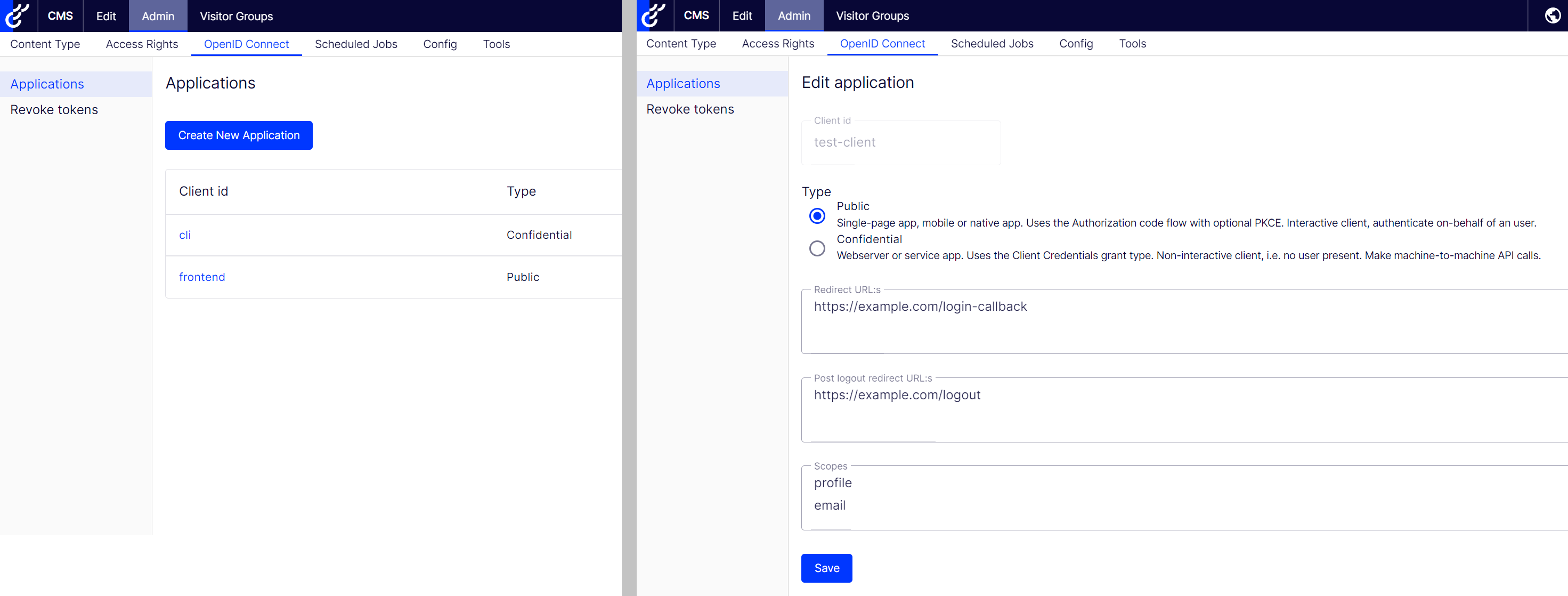
Last year we released support for OpenID Connect, see https://docs.developers.optimizely.com/content-cloud/v1.5.0-content-delivery-api/docs/api-authentication for the documentation. The initial release also included a small UI for managing refresh tokens. This UI is now updated to include the possibility to manage applications without the need to deploy code. Applications that are defined in code, or via configuration, are also displayed but only as read-only.
New sample site in JS SDK
The old sample site has been updated to .NET6 and we have also made a new sample available, see https://github.com/episerver/content-delivery-js-sdk/tree/master/samples/music-festival-vue-coupled. This sample is hosting the client app, built with Vue CLI, in the same dotnet process. But during development the front-end app is hosted in a separate Node.js process and the backend is proxied to the dotnet process using the new ASP.NET SPA Proxy. This means you get all the nice Node.js tooling, such as webpack’s hot reload, during development.
Thanks for the update. Good to know that minimal hosting is not yet supported.
You must mean May '22.
Could you not use WbApplication and add the ConfigureCmsDefaults to the host to allow skipping the startup class or am I missing something?
@Wallmark, there's no syntax issues with the new model, but our initialization doesn't work with the new model. Your code will compile and the application will sort of work, but the shell UI won't work.