
K Khan
May 10, 2015
  2701
(0 votes)

using prices from external sources as ERP

If a business is using an ERP system for its activities then it is high likely that for their E-Commerce section, they are managing product prices also in ERP system. To use those prices in EPiServer Commerce (7.5+) is very straight forward. In EpiServer Commerce pricing modules are provider based so it can be replaced with any custom module pulling prices from ERP or some external system. Commerce platform allows this price data from custom pricing­ module to be used in all display and calculation locations. All we need to do is, implement IPriceService and IPriceDetailService and register them in the commerce initialization module. If you want to see this action you can download code from GitHub , ammend, compile and register those classes into commerce initialization module.

// I assume some expert level episerver developer is working at this module
// use XPriceParser to setup test prices (apologize in advance for this hassle)
// Embed this code into your Commerce site.
public class CommerceIntialization : IConfigurableModule
{
...
public void ConfigureContainer(ServiceConfigurationContext context)
        {
            context.Container.Configure(c => c.For<IPriceService>().Use<DummyPriceService>()); 
            context.Container.Configure(c => c.For<IPriceDetailService>().Use<DummyPriceDetailService>());
        }
...
}

Below price is from external source in Online Center Catalog UI
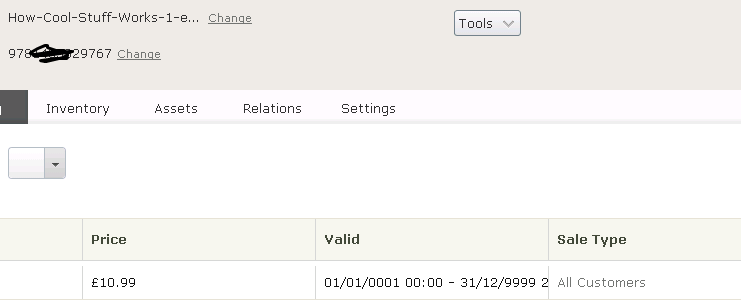
Image cool.png       


May 10, 2015

Comments

Please login to comment.
Latest blogs
Announcing new library: SettingsManager

When you run .net app, there have been a few ways to store settings. Those can be set via appSettings.json, or via Azure Portal AppService...

Quan Mai | Apr 30, 2026

From Prompting to Production: Optimizely Opal University Cohort and the Future of Agentic MarTech

Most organizations today are still playing with AI. They experiment with prompts, test ideas in isolated chats, and occasionally automate a task or...

Augusto Davalos | Apr 28, 2026

Six Compelling Reasons for Upgrading to CMS 13

Most software updates ask you to keep up. Optimizely CMS 13 asks something different — it asks whether your digital strategy is built for a world...

Muhammad Talha | Apr 28, 2026

Optimizely CMS 13 breaking changes: GetContentTypePropertyDisplayName

When upgrading from CMS 12 to 13, resolving property display names may not work as before. Here’s what changed.

Tomas Hensrud Gulla | Apr 27, 2026 |

Accelerate Optimizely DAM Adoption: Unlocking Business Value with Metadata Bulk Import

Accelerating Optimizely DAM Adoption How a Metadata-Driven Bulk Import Utility Unlocks Real Business Value Executive Summary For enterprises runnin...

Vaibhav | Apr 27, 2026

Optimizely CMS 13 breaking changes: IValidate<T>

Custom IValidate validators in Optimizely CMS 13 are no longer auto-discovered. They must be registered explicitly when upgrading from CMS 12.

Tomas Hensrud Gulla | Apr 27, 2026 |