
Keeping track of the EPiServer Community user limit
The license model for EPiServer Community has a restriction on the maximum number of users that can register for a community based website. If the number of registered community users exceeds the license user limit a license error will be thrown.

As a website’s community grows additional license upgrades can be made to suit the number of community users. Depending on the initial budget and estimated need for “user licenses” there is a tiered price ladder that permits the Community to grow.
- 0 - 10 000 members
- up to 30 000 members
- up to 60 000 members
- up to 100 000 members
- up to 200 000 members
- up to 500 000 members
- up to 700 000 members
- up to 1 000 000 members
- up to 1 500 000 members
- up to 2 000 000 members
- up to 3 000 000 members
- up to 5 000 000 members
Other options may apply. Always check with your EPiServer Solution Partner for a price list.
So how does one know when to upgrade, and on time as well?
A quick way to find out how many users there are is to tap into the database and query the EPiServer Community table, tblEPiServerCommonUser. This simple query returns the number of active users:
SELECT COUNT(*)FROM [dbo].[tblEPiServerCommonUser]WHERE [blnRemoved] = 1
A more convenient way in the long run though, would be to create a Scheduled Job in EPiServer that automatically sends an e-mail to the customer (or EPiServer partner) with the current number of community users.
Basically it’s only one line of code to find the current number of users:
EPiServer.Community.CommunitySystem.CurrentContext.DefaultSecurity.UserCount
Putting it all together, the Scheduled Job Plugin could look something like this (error handling omitted and strings hard coded for the sake of brevity).
1: using System.Globalization;2: using System.Net.Mail;3: using EPiServer.PlugIn;4:5: namespace MySite.Common.ScheduledJobs6: {7: [ScheduledPlugIn(DisplayName = "EPiServer Community user counter")]8: public class CommunityUserLicenseCounter9: {10: const string EMAIL_SUBJECT = "{0} - Current number of EPiServer Community users";11: const string EMAIL_BODY = "Current number of EPiServer Community users: {0} for site: {1}.";12:13: public static string Execute()14: {15: string body = string.Format(EMAIL_BODY, CurrentUserCount, SiteUrl);16: SendEmailMessage(body);17: return body;18: }19:20: private static string CurrentUserCount21: {22: get23: {24: int userCount = EPiServer.Community.CommunitySystem.CurrentContext.DefaultSecurity.UserCount;25: return userCount.ToString("N0", CultureInfo.CreateSpecificCulture("sv-SE"));26: }27: }28:29: private static string SiteUrl30: {31: get { return EPiServer.Configuration.Settings.Instance.SiteUrl.AbsoluteUri; }32: }33:34: private static string SiteDisplayName35: {36: get { return EPiServer.Configuration.Settings.Instance.SiteDisplayName; }37: }38:39: private static void SendEmailMessage(string body)40: {41: string to = "info@mysite.com";42: string from = "info@mysite.com";43: string subject = string.Format(EMAIL_SUBJECT, SiteDisplayName);44: MailMessage message = new MailMessage(from, to, subject, body);45: SmtpClient client = new SmtpClient();46: client.UseDefaultCredentials = true;47: client.Send(message);48: }49: }50: }51:
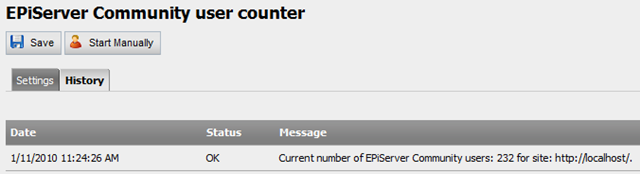
The result after running the scheduled job looks like this:
Some final touch up
I nice addition would be to extract the UserLimit from the license file and only notify the website owner when a certain threshold has been reached, e.g. when the current number of users passes 90% of the UserLimit. I’ve yet to find a way of extracting the MaxUsers in the EPiServer.Community.License namespace. Maybe someone can contribute with a solution?
The user limit setting can be found in the EPiServerRelateLicense.config file in the <UserLimit /> section.
More information on how to create a custom scheduled job can be found on Ted’s blog.
Nice post! A small reflection though, in the first case where you just query the database you should use blnRemoved=0 to get the active users.
/ Tom Stenius
Thanks for pointing that out Tom! That would make more sense. :-)