


Altering the XForm email body to make it look more like the actual form
Back from a half year of parental leave I started yesterday reading some forum posts. One old thread that had been added to recently contained several requests to alter the appearance of the email body when sending a form posting as an email (the standard functionality is just to write the data as a textual name value collection). I had a feeling that this could be done without putting that much effort into it so I started coding and have come up with a solution that can be used to get started implementing this for your site. There are some issues that as not dealt with in this example:
- Styles are not included in this solution which might give the form a different appearance than on the site. (This can of course be solved but requires some knowledge of the actual site)
- This example is implemented on local events on the public templates XForms user control. If using EPiServer CMS 5 SP1 or later this should be implemented in the global events in the file global.asax.cs instead to support forms that are inserted as dynamic content.
- Validators are removed from the form that is used to render the email body. You might want to remove any Submit Controls as well.
The following needs to be added to the using section in the xform user control:
using formControl = EPiServer.XForms.WebControls.XFormControl;using System.Web.UI.WebControls;
The following methods/event handlers are additions or changed versions of the xforms user control:
private void SetupForm(){FormControl.FormDefinition = Form;FormControl.AfterSubmitPostedData += new SaveFormDataEventHandler(FormControl_AfterSubmitPostedData);FormControl.BeforeSubmitPostedData += new SaveFormDataEventHandler(FormControl_BeforeSubmitPostedData);}private bool _isEmailActivated = false;public void FormControl_BeforeSubmitPostedData(object sender, SaveFormDataEventArgs e){//Replace standard email handling with custom method if email action is selected for form.if ((e.FormData.ChannelOptions & ChannelOptions.Email) == ChannelOptions.Email){_isEmailActivated = true;//We still might want to save the form to the database to just remove the email optione.FormData.ChannelOptions &= ~ChannelOptions.Email;}}public void FormControl_AfterSubmitPostedData(object sender, SaveFormDataEventArgs e){if (EnableStatistics){SwitchView(null, null);SwitchButton.Visible = false;}if (_isEmailActivated){SendFormattedEmail();}}private void SendFormattedEmail(){//We create a writer to use to render a copy of the form to a stringStringBuilder sb = new StringBuilder();sb.Append("<html><head><title>Form post</title></head><body><form action=\"#\">");StringWriter sw = new StringWriter(sb);//Create a copy of the form and make it load the currently posted dataformControl copyOfFormControl = new formControl();copyOfFormControl.Data = FormControl.Data;copyOfFormControl.FormDefinition = FormControl.FormDefinition;//We temporary add the copy of the form control to the page to avoid some problems//that appear with global xform events otherwiseFormPanel.Controls.Add(copyOfFormControl);copyOfFormControl.DataBind();//We remove any validators from the form as they are not interresting in the emailRemoveFormValidatorsRecursive(copyOfFormControl);using (HtmlTextWriter writer = new HtmlTextWriter(sw)){copyOfFormControl.RenderControl(writer);}FormPanel.Controls.Remove(copyOfFormControl);sb.Append("</form></body></html>");string html = sb.ToString();//Create an email and copy the email settings from the current form dataMailMessage message = new MailMessage();message.IsBodyHtml = true;message.Body = html;message.From = new MailAddress(FormControl.Data.MailFrom);message.Subject = FormControl.Data.MailSubject;message.To.Add(FormControl.Data.MailTo);SmtpClient client = new SmtpClient();client.Send(message);}private void RemoveFormValidatorsRecursive(Control control){for (int i = control.Controls.Count - 1; i >= 0; i-- ){Control childControl = control.Controls[i];if (childControl is BaseValidator){control.Controls.Remove(childControl);}else{RemoveFormValidatorsRecursive(childControl);}}}
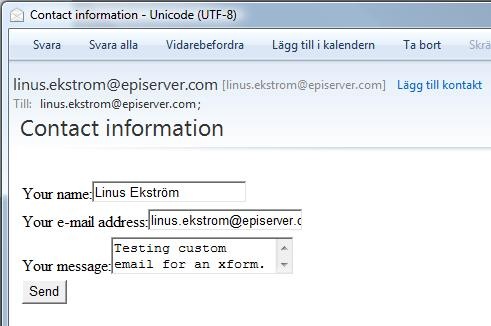
Here is the result for the standard “Contact information” form that is included in the public templates:

Thanks alot! Realy helped me out! As I understand, the data from the form is saved in the table tblItem. But when I use the sql profiler, I cant see the data in clear text. It looks like its encrypted. Is it possible to use the form data stored in the database directly, using another system, for example Reporting Services?
/ David Einebrant
Welcome back mr XForms!
/ Mattias Nordgren
Thanks Linus!
/ David Einebrant
Wonderful. I also removed the submit button, as you suggested. Our customer uses redirection to another page after submit, so I had to call SendFormattedEmail() in the BeforeSubmitPostedData event instead. Thanks you.
/ Kjetil Myhre