

EPiServer 7: Startup Performance
One of the areas we have improved is the startup time of EPiServer 7, there is a lot of new functionality that requires initialization but it actually starts faster that previous versions.
Some of the changes we have done is using parallelization where a single initialization module runs multiple independent tasks in parallel or run some tasks asynchronously. Another change to speed up typed pages is that we precompile the Castle proxies that is backing your custom models , that processes starts in the background before the the first page is accessed. We also enabled the optimizeCompilations by default which I blogged about a few years back, that does a big difference. We also rewrote assembly scanning and implemented a disk based cache and centralized discovery of types to avoid doing reflection over and over again.
To make it easier to debug startup performance there is a hidden gem that displays the last startup and how long time each initialization module needed at http://[site]/[UI]/Shell/Debug/ShowTimeMeters.
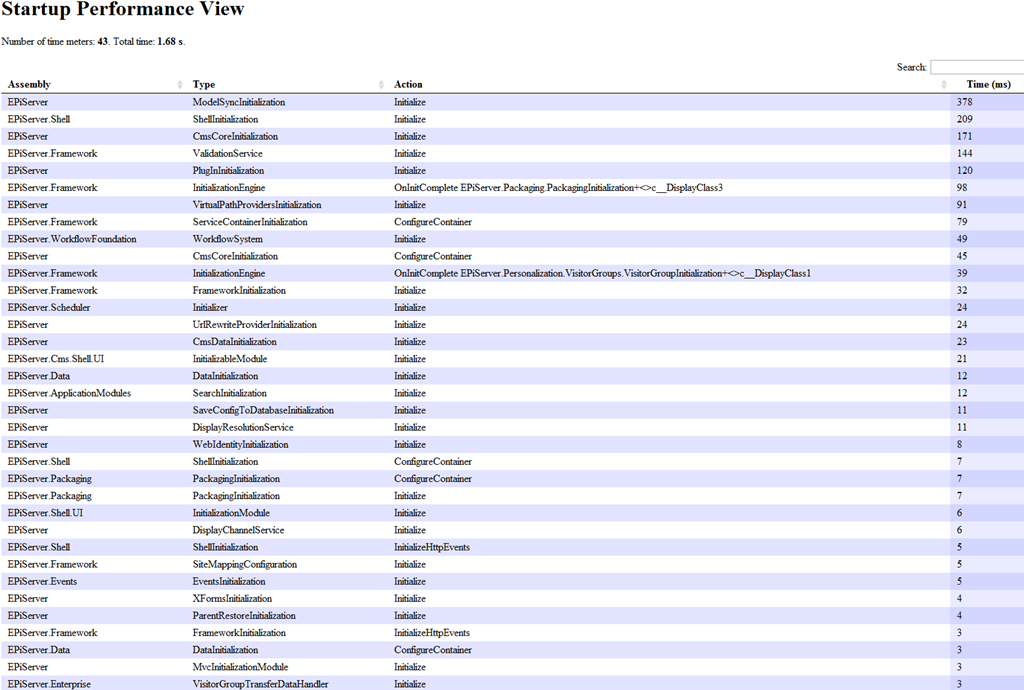
There is a web.config setting in appSettings that enables this debug view, you get the name of the key that goes into web.config when you access the url the first time.
Update: If you are running one of the EPiServer 7 preview versions then the URL will be http://[site]/[UI]/modules/Shell/Debug/ShowTimeMeters instead. Thanks Steve for noticing.
Fantastic work Per! This will make developing with EPiServer 7 a dream. All tough it offers less "I am just going to grab a coffee while it warms up" breaks :-)
Utterly cool! Startup time is amazing in my vm test bench.
This built-in type of diagnostics are great, thanks a lot for adding that!
That is wicked cool! Great work!
Very nice!
Great to see you are targeting startup performance. +1 for the diagnostics view.
Great stuff!
Hi, for some reason when I try to access this "showTimeMeters" I get login screen and even though logging in with webAdmins member account I still can't get in. Any idea why?
UPDATE: when testing with local admin account I was able to access, so what special group is used to secure this "ShowTimeMeters"?
For new bees, add the below settings in the web.config app settings file
@Janne Kuusela You probably have some (or possibly deeper down also) that might give you an idea of what groups are used to secure it (since it resides beneath /Shell/....
Have the same problem as @Janne Kuusela. And I don`t have anything to fancy in the access restriction to Epi locations. Any other ideas?
@Michal Grzegorzak, you need to be member of group named "Administrators" to be able to see EPiServer debug pages, this is from the controller in question:
[Authorize(Roles="Administrators")] public class EPiDebugController : ControllerThanks Janne, it`s working now!