
Content Providers 101 – Part III: Finishing Touches
This is the final part of my blog post series Content Providers 101. Make sure you’ve read Part I and Part II before reading this!
The provider is now almost complete, we just need to put the finishing touches to it.
Searching: In the component, there is a search box. In order to get it to return actual items, a search provider is needed
[SearchProvider]
public class AttendeeSearchProvider : ContentSearchProviderBase<Attendee, ContentType>
{
private readonly AttendeeProvider _attendeeProvider;
public AttendeeSearchProvider(LocalizationService localizationService, SiteDefinitionResolver siteDefinitionResolver,
IContentTypeRepository<ContentType> contentTypeRepository, IContentProviderManager contentProviderManager)
: base(localizationService, siteDefinitionResolver, contentTypeRepository)
{
_attendeeProvider = contentProviderManager.GetProvider(AttendeeProvider.Key) as AttendeeProvider;
}
public override IEnumerable<SearchResult> Search(Query query)
{
IEnumerable<Person> people = PersonService.Search(query.SearchQuery);
foreach (var attendee in people.Select(x => _attendeeProvider.ConvertToAttendee(x)))
{
yield return this.CreateSearchResult(attendee);
}
}
public override string Area { get { return AttendeeProvider.Key; } }
public override string Category { get { return AttendeeProvider.Key; } }
protected override string IconCssClass { get { return "attendee-search-icon"; } }
}
To connect the search provider to the attendee component, override and match the SearchArea property on the repository descriptor (AttendeeRepositoryDescriptor) to the Area property in the search provider:
public override string SearchArea { get { return AttendeeProvider.Key; } }
The search provider will work for both the component and for the global navigation search
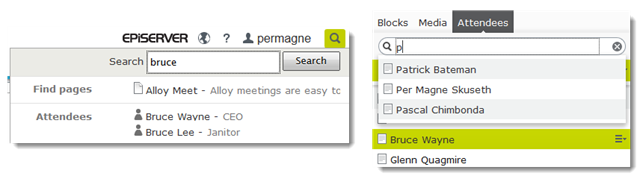
Speaking of search, if you are using EPiServer Find, the attendee data will automatically be indexed to Find when when running the content indexing job. This happens as Find will traverse the entire content tree and index all the IContent there is, including the “attendees” content folder beneath the root node.
This means that you can get attendees as a part of UnifiedSearch with just a single line of code:
SearchClient.Instance.Conventions.UnifiedSearchRegistry.Add(typeof(Attendee));
Preview: EPiServer offers a great on-page editing experience, so we should enable this for attendee content as well.
The preview controller in Alloy only works with BlockData, but can easily modified to work with attendees as well:
[TemplateDescriptor(
Inherited = true, TemplateTypeCategory = TemplateTypeCategories.MvcController,
Tags = new[] { RenderingTags.Preview, RenderingTags.Edit },
AvailableWithoutTag = false, ModelType = typeof(BlockData))]
[TemplateDescriptor(
TemplateTypeCategory = TemplateTypeCategories.MvcController,
Tags = new[] { RenderingTags.Preview, RenderingTags.Edit },
AvailableWithoutTag = false, ModelType = typeof(Attendee))]
[VisitorGroupImpersonation]
public class PreviewController : ActionControllerBase, IModifyLayout
What I’ve done is to remove the IRenderTemplate<BlockData> interface, and instead specified the model type in the TemplateDescriptor. Since TemplateDescriptors allows multiple attributes, I’ve added one for attendees as well.
Change context: When double-clicking blocks or media in the assets pane, the clicked item will be loaded and displayed. In order to get the same behavior for our attendees, we need to specify this in the AttendeeRepositoryDescriptor:
public bool ChangeContextOnItemSelection{get{return true;}}
The HierarchialList component will look for a matching property. If it does not exists or is set to false, the context will not change when double clicking the item, and you will have to use the edit button from the drop down menu in order to load and see the item.
Custom icon: In the assets pane, the icon that is being used for attendees is the standard content icon. In order to get one step closer to UX nirvana, a more descriptive icon should be used instead. This is done by creating a UIDescriptor:
[UIDescriptorRegistration]
public class AttendeeUiDescriptor : UIDescriptor<Attendee>
{
public AttendeeUiDescriptor()
{
IconClass = "epi-iconUser";
}
}

Tip: See lists of icons and corresponding css class names at ux.episerver.com
Try it!
Want to try it out? Get the source code here
Also: A big thanks to Linus Ekström for being super helpful!
Thank you for posting this!
Tried your example modifying the Attendee class to inherit PageData so the results get displayed in a ContentPage container as pages.
The issue is we can't get the ContentProviderResult using DataFactory.FindPagesWithCriteria.
Snippet