
Sebastian Lundh
Nov 30, 2009
visibility 7809
star star star star star
(7 votes)

Request Monitor Gadget

The idea behind this gadget is to be able to pinpoint slow pages and see activity on the site. Then analyze why these pages takes long time to load. You can also on specific pages see all requests to compare performance of the site to earlier. The gadget will show activity for the day with updates every 20min.
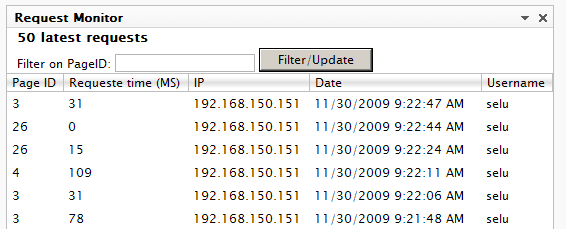
 

latest
Shows 50 latest requests to the site with page id, request time, ip, date and username if logged in. You can filter on Pageid, if thextbox is empty it will just refresh table.
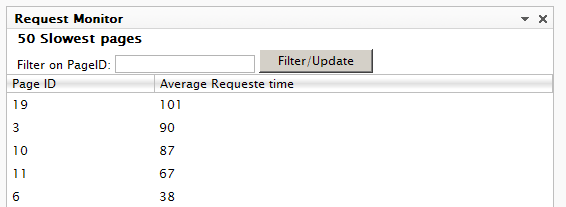
 

 slowest

Shows the 50 slowest pages with page id and average request time for it. Here you can also search by page id to get data for specific pages.
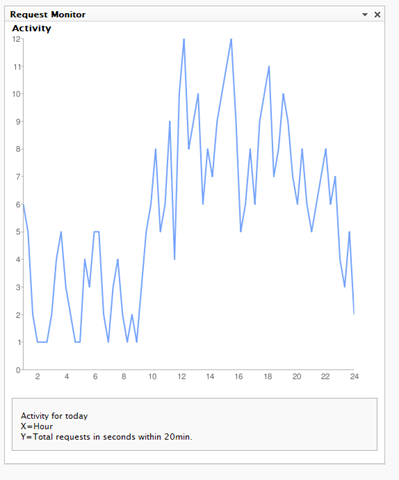
 

 Activity

Shows activity for today over 24h. With all requests grouped within 20min. Google chart is used.


Configuration will let you empty all data.


Installation

Download the install package and install it with EPiServer Deployment Center.

You will also have to update web.config also with the http module that listens to PreRequestHandlerExecute and PostRequestHandlerExecute to capture request times.

Add to <httpModules> (IIS6) and <Modules> (IIS7):
<add name="RequestModule" type="RequestMonitorGadget.Modules.RequestModule, RequestMonitorGadget"/>


Download


Nov 30, 2009

Comments

Nicklas Israelsson
Nicklas Israelsson Sep 21, 2010 10:32 AM

Sweet gadget Sebastian

Sep 21, 2010 10:32 AM

Nice, and you where able to get it out before todays deadline =)

Sep 21, 2010 10:32 AM

Super work Dost!

error Please login to comment.
Latest blogs
Finding Thomas Part 3 - The Moment of Recognition

Remember Thomas? In digital landscape, Thomas is the returning visitor who reads everything, opens every email, converts on nothing. In standard...

Ritu Madan | Jun 26, 2026

Add more scheduled job settings from the Optimizely CMS 12 admin UI -- with OptiScheduledJob.ExtraParameters

  Optimizely (EPiServer) CMS 12 ships a great scheduled-jobs framework, but it has one frustrating gap: a job has nowhere to store its own...

Binh Nguyen Thi | Jun 25, 2026

Automated Search & Navigation to Graph Migration with Claude Code

A Claude Code plugin that scans your S&N codebase, applies Graph SDK transformations, and validates the result. Install once, run one command. CMS ...

Connor Fortin | Jun 24, 2026

Migrating from Find to Graph: Lessons Learned from a Real CMS 13 Project

While migrating a search solution from Optimizely Search & Navigation (Find) to Optimizely Graph in CMS 13, I encountered several issues that were...

Binh Nguyen Thi | Jun 24, 2026