

MoM Server
Summary
The MoM server or Monitoring on Mirroring server monitors mirroring jobs during mirroring. The MOM server notifies about status of an individual package, warnings, errors messages and etc. This article describes anatomy of the MOM Server and in continue shows an example of client to the MOM Server.
MOM Server or Publisher
The MOM server is based on WCF and uses Duplex Communication channel. The concept is based on Publisher (MOM Server) and Subscribers (MoM Clients). The MoM server belongs to the Mirroring Server whom creates and activates it. The MOM server has a list of subscribers and as soon as a state of mirroring job changes then the MOM server sends a notification to subscribers. If the subscriber is unreliable or is not active then the MOM Server removes the client from the subscriber list. The MOM Server has working thread for sending events to subscriber which does not causes blocking on the mirroring server during state notifying. All events are cached on the monitoring server and the size of it is 10000 events in memory.
Mirroring States
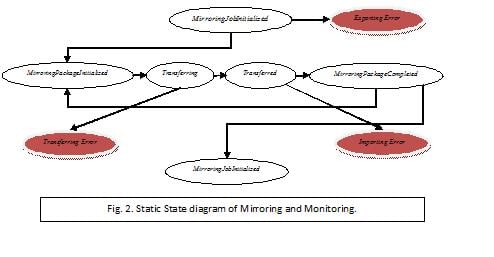
There is a state machine inside mirroring server and for each state changing sends an event. For instance when mirroring job initialized and pass validation then sends the MirroringJobInitialized event or when one of mirroring packages is completed sends the MirroringPackageCompleted event and etc. The MoM Server sends corresponding event for each state changing.
MirroringStatusEventArgs
All necessary information about a mirroring job can be found in the MirroringStatusEventArgs.
For a subscriber might all information is not necessary.
The MirroringStatusEventArgs contains a Guid which is the mirroring job id or channel id and MirroringTransferData.
The MirroringTransferData contains of MirroringInitializeData, MirroringPackageBody, MirroringPackageHeader and MirroringStatus.
The MirroringInitializeData contains Name, DestinationPageGuid, DestinationPath, DestinationRoot, LastExecution, NrOfFilesinPackage, NrOfPagesInPackages and etc.
The MirroringPackageHeader contains FileSize, TargetFilePath, SizeOfSentData, SizeOfReceiveData.
The MirroringStatus contains MirroringState and StatusLog (contains information about Warning and Error etc).
SentTime time of start of state changing, ReceivedTime time of end of state changing.
Subscriber
A subscriber can use the EPiServer.MirroringService.MirroringMonitoring .MirroringMonitoringClient helper class. The subscriber receives events via the MirroringTransferStatusEventHandler. The subscriber subscribes on all mirroring jobs by calling Subscribe () . To make a subscription against the MOM server there are two approaches. The first approach is the application has responsibility to call Subscribe when the monitoring server restarts. The application creates an instance of MirroringMonitoringClient with an endpointName which is defined in app.config and call subscribe on it. See code example blow.
1: MirroringMonitoringClient momClient = new MirroringMonitoringClient(endPointName); // endPointName is defined in web config
2: momClient.MirroringTransferStatusEventHandler += new MirroringStatusEventHandler(TransferEventCatcher);
3: momClient.Subscribe(); 4:
Or creates an instance of MirroringMonitoringClient with autoReconnect flag which check if the monitoring server is alive. And with this approach the application does not need to act on monitoring server failure scenarion. See code example blow.
1: bool autoReconnect = true;
2: MirroringMonitoringClient momClient = new MirroringMonitoringClient(endPointName, autoReconnect);
3: momClient.MirroringTransferStatusEventHandler += new MirroringStatusEventHandler(TransferEventCatcher);
4: momClient.Period=20000; // 20 sec.
To receive status of the MoM server the application has to add event handler to the static ServiceConnectionEventHandler event.
1: MirroringMonitoringClient.ServiceConnectionEventHandler += new ServiceConnectionEventHandler(MirroringMonitoringClient_ServiceConnectionEventHandler);
2:
Comments