
Page Provider – Part one
A task that that keeps appearing more and more is the case of integrating information from some other data source into EpiServer. One way to solve this is to mirror the content and create corresponding Epi-pages programmatically but this clearly violates the DRY principle. Another approach is to write custom logic for the furl handling to be able to present your data that way. This is quite a nice solution in some cases but it’s for example hard to use built in episerver controls like the page list in this scenario. Ted made an excellent blog post about this here.
Another solution that’s available in CMS R2 (running on an enterprise license) is to create a page provider. Page Providers gives you a way of letting EpiServer treat your custom data as though they were normal episerver pages. During the course of the next few posts I'll create a page provider that's used to present a product catalogue.
The database
The company we're creating the site for already has a database with all their product data so that should be the base of all the product information.
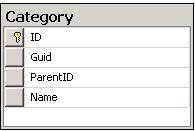
Luckily enough for us the company has both an integer based ID as well as an Guid for each of the categories which will make creating the page provider a bit easier. You might suspect that I designed the database this way for this example because I’m slightly lazy… and that’s a 100% correct assumption. Why this makes our lives easier will be explained in a later post.
Looking forward to your upcoming posts!