
Dac Thach Nguyen
Feb 20, 2019
visibility 5597
star star star star star
(8 votes)

Custom validation message for Forms

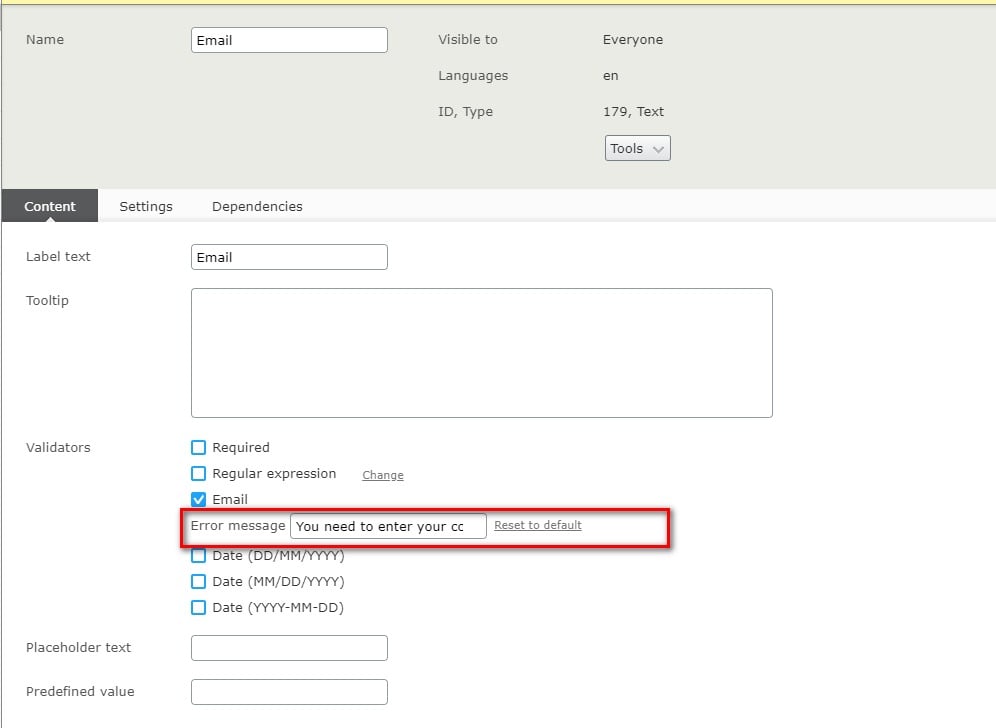
In Forms 4.23 we have released a feature that allows user can enter a custom validation message for each validator. Let say that you have some forms which used the same some validators (ex: RequiredValidator). When visitor enter something not correct, by default the form will display message stored in xml lang files. And there's no way to custom that message for different elements in different forms. But now it is easily done by editor.

First go to edit the field and enter the message on textbox next to it:
Publish the element, form and go to view mode to see the result:
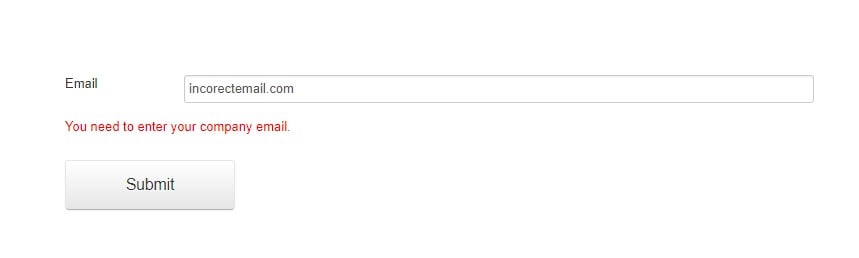
That is, it's simple, right?

Feb 20, 2019

Comments

Praful Jangid
Praful Jangid Feb 21, 2019 06:33 AM

Nice feature.

Are we going to need something (just like we use @Html.ValidationMessage) to render this message?

Dac Thach Nguyen
Dac Thach Nguyen Feb 27, 2019 06:55 AM

No, the message come along with the validator and display using js. You don't need to modify template to have that feature.

error Please login to comment.
Latest blogs
Copies vs. Connections: Modeling Content Areas for Multilingual Success

Starting With the Simple Question Most multilingual content modeling conversations start with a deceptively simple question from a client: "If we s...

Vipin Banka | Aug 23, 2026

Content Transfer coming to Optimizely SaaS CMS

Back in June I released Content Transfer on the Optimizely nuget feed – today I’m releasing version 1.0 , because we’ve had it running out in the...

Matt Pallatt | Aug 23, 2026

Improving Optimizely Product Information in LLM Tools

Tools like Claude Code can be great for working with Optimizely CMS, but when they index outdated or incomplete information about developing a...

Nicholas Sideras | Aug 21, 2026 |

How to Get a Bacpac Out of DXP (And Never Do It By Hand Again)

Every Optimizely DXP project eventually runs into the same task: getting production data onto a local machine so you can actually troubleshoot...

KennyG | Aug 20, 2026