

Ryan Bare
Ryan Bare  -  CMS
Feb 25, 2019
visibility 5918
star star star star star
(7 votes)

Date picker improvements

In the next release of CMS UI (version 11.18.0), we have added two improvements to the date picker. 

1. Time zone and GMT offset data for selected date
The date picker will now display the time zone (Firefox and Chrome only) and the GMT offset at the bottom of the date picker.
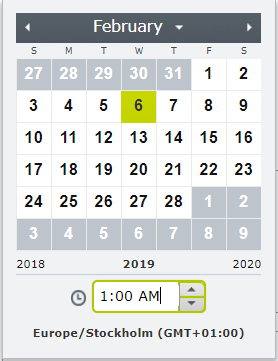

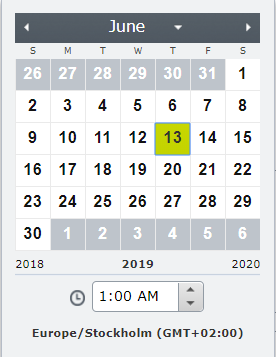
If the user is in an area that observes daylight savings time, the offset will change according to the currently selected date in the date picker.
2. Clear button for nullable DateTime fields
This addition allows users to clear dates quickly.

Feb 25, 2019

Comments

nitin anand
nitin anand Jul 10, 2019 09:07 AM

Hi

Is it possible for the editor to select dates that are available/not available and those dates shall be greyed-out/disabled on form?

regards

Nitin

error Please login to comment.
Latest blogs
Composition Over Inheritance: Why Your Content Contract Is Not a Base Class

Inside the structural conformance pattern in SaaS CMS — from server-side inheritance to pipeline governance. A contract in Optimizely SaaS CMS is...

Vipin Banka | Sep 19, 2026

Optimizely Opti ID Integration: Why the API Key Was Missing from the DXP Management Portal

While working on an Optimizely CMS 12 Opti ID integration recently, we ran into an issue that initially appeared to be related to SSO authenticatio...

Madhu | Sep 18, 2026 |

Extending a Contract: What You Can Override

Contracts share fields across content types — but not every field setting can be overridden. Push the same contract onto several components, and CM...

Chirag Khanna | Sep 18, 2026 |

Building a Blazor Server UI Inside the Optimizely CMS 13 Admin Shell

What I learned shipping a Blazor Server UI inside Optimizely CMS 13 — Razor components in a NuGet package, the Blazor hub next to MapContent(),...

Stanisław Szołkowski | Sep 17, 2026 |