

Lionbridge CMS 12 SQL Fix for Property Definitions
We have a client that upgraded to CMS 12. They were using Lionbridge previously for translations, but when we installed the newest version (2.0.0.1200) we got the following exception on Startup:
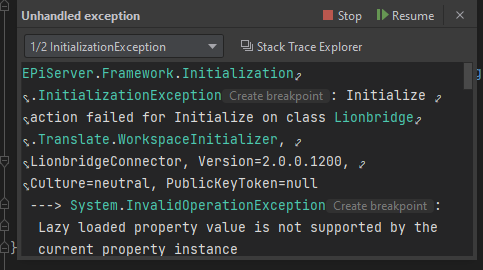
Full stack trace:
EPiServer.Framework.Initialization.InitializationException: Initialize action failed for Initialize on class Lionbridge.Translate.WorkspaceInitializer, LionbridgeConnector, Version=2.0.0.1200, Culture=neutral, PublicKeyToken=null
---> System.InvalidOperationException: Lazy loaded property value is not supported by the current property instance
   at EPiServer.DataAccess.Internal.LazyPropertyValueLoader.SetValue(PropertyData property, PropertyDataRecord dataRecord, Func`3 valueConverter)
   at EPiServer.DataAccess.Internal.JsonPropertyValueConverter.SetValue(PropertyJson property, PropertyDataRecord dataRecord, PropertyValueConverterContext context)
   at EPiServer.DataAccess.Internal.JsonPropertyValueConverter.EPiServer.DataAccess.Internal.IPropertyValueConverter.SetValue(PropertyData property, PropertyDataRecord dataRecord, PropertyValueConverterContext context)
   at EPiServer.DataAccess.Internal.ContentDB.ReadPropertyData(PropertyData prop, DbDataReader reader, ContentReference contentLink, CultureInfo language)
   at EPiServer.DataAccess.Internal.ContentListDB.ReadCustomProperties(DbDataReader reader, Dictionary`2 allFetchedItems, Boolean isReadingVersions)
   at EPiServer.DataAccess.Internal.ContentListDB.ReadPublishedList(DbCommand cmd)
   at EPiServer.DataAccess.Internal.ContentListDB.<>c__DisplayClass19_0.<LoadSpecificContentInstances>b__0()
   at EPiServer.Data.Providers.Internal.SqlDatabaseExecutor.<>c__DisplayClass24_0`1.<Execute>b__0()
   at EPiServer.Data.Providers.SqlTransientErrorsRetryPolicy.Execute[TResult](Func`1 method)
   at EPiServer.Data.Providers.Internal.SqlDatabaseExecutor.Execute[TResult](Func`1 action)
   at EPiServer.DataAccess.Internal.ContentListDB.LoadSpecificContentInstances(IList`1 contentLinks, Int32 languageBranchID)
   at EPiServer.Core.Internal.DefaultContentProviderDatabase.LoadSpecificContentInstances(IList`1 contentLinks, Int32 languageBranchID)
   at EPiServer.Core.Internal.DefaultContentProvider.<>c__DisplayClass13_0.<LoadContents>b__1(IList`1 refs)
   at EPiServer.Core.Internal.DefaultContentProvider.BatchLoad(IList`1 contentLinks, Func`2 dbLoader)
   at EPiServer.Core.Internal.DefaultContentProvider.LoadContents(IList`1 contentReferences, ILanguageSelector selector)
   at EPiServer.Core.ContentProvider.GetContentBatch(IList`1 batch, ILanguageSelector selector, List`1& contents, Dictionary`2& contentMap)
   at EPiServer.Core.ContentProvider.GetScatteredContents(IEnumerable`1 contentLinks, ILanguageSelector selector)
   at EPiServer.Core.ContentProvider.LoadBatched(IList`1 contentReferences, ILanguageSelector selector)
   at EPiServer.Core.Internal.ProviderPipelineImplementation.GetItems(ContentProvider provider, IList`1 contentLinks, LoaderOptions loaderOptions)
   at EPiServer.Core.Internal.DefaultContentLoader.GetChildren[T](ContentReference contentLink, LoaderOptions loaderOptions, Int32 startIndex, Int32 maxRows)
   at EPiServer.Core.Internal.DefaultContentLoader.GetChildren[T](ContentReference contentLink, LoaderOptions loaderOptions)
   at EPiServer.Core.Internal.DefaultContentLoader.GetChildren[T](ContentReference contentLink)
   at Advanced.CMS.ExternalReviews.DraftContentLoader.GetChildren[T](ContentReference contentLink)
   at EPiServer.Core.Internal.DefaultContentRepository.GetChildren[T](ContentReference contentLink)
   at Lionbridge.Translate.WorkspaceInitializer.Initialize(InitializationEngine context)
   at EPiServer.Framework.Initialization.Internal.ModuleNode.<>c__DisplayClass4_0.<Initialize>b__0()
   at EPiServer.Framework.Initialization.Internal.ModuleNode.Execute(Action a, String key)
   at EPiServer.Framework.Initialization.Internal.ModuleNode.Initialize(InitializationEngine context)
   at EPiServer.Framework.Initialization.InitializationEngine.InitializeModules()
   --- End of inner exception stack trace ---
   at EPiServer.Framework.Initialization.InitializationEngine.InitializeModules()
   at EPiServer.Framework.Initialization.InitializationEngine.ExecuteTransition(Boolean continueTransitions)
   at EPiServer.Framework.Initialization.InitializationEngine.Initialize()
   at EPiServer.Hosting.Internal.EPiServerFrameworkHost.StartAsync(CancellationToken cancellationToken)
   at Microsoft.Extensions.Hosting.Internal.Host.StartAsync(CancellationToken cancellationToken)
   at Microsoft.Extensions.Hosting.HostingAbstractionsHostExtensions.RunAsync(IHost host, CancellationToken token)
   at Microsoft.Extensions.Hosting.HostingAbstractionsHostExtensions.RunAsync(IHost host, CancellationToken token)
   at Microsoft.Extensions.Hosting.HostingAbstractionsHostExtensions.Run(IHost host)
   at BBSCatalyst.Web.Program.Main(String[] args) in C:\Users\Sam\source\repos\neogen-episerver\WebsiteSolution\BBSCatalyst.Web\Program.cs:line 15
After much digging, we found the issue had to do with these property definition types: Analysis Code List, Project Configuration

These old property definition types were still assigned to the property definitions for the Lionbridge content types, we fixed the issue ourselves manually using the following script:
/* Update Lionbridge Property Definitions to have the new property definition types*/
DECLARE @OldAnalysisCodeTypeId AS INT = (SELECT Top 1 pkId FROM [dbo].[tblPropertyDefinitionType] WHERE TypeName = 'Lionbridge.Translate.AnalysisCodeListProperty')
DECLARE @NewAnalysisCodeTypeId AS INT = (SELECT Top 1 pkId FROM [dbo].[tblPropertyDefinitionType] WHERE TypeName = 'LionbridgeConnector.EPiServer.Workspace.Models.AnalysisCodes')

DECLARE @OldProjectConfigTypeId AS INT = (SELECT Top 1 pkId FROM [dbo].[tblPropertyDefinitionType] WHERE TypeName = 'Lionbridge.Translate.ProjectConfigurationListProperty')
DECLARE @NewProjectConfigTypeId AS INT = (SELECT Top 1 pkId FROM [dbo].[tblPropertyDefinitionType] WHERE TypeName = 'LionbridgeConnector.EPiServer.Workspace.Models.ProjectConfigurations')


UPDATE [dbo].[tblPropertyDefinition] SET fkPropertyDefinitionTypeID = @NewAnalysisCodeTypeId WHERE fkPropertyDefinitionTypeID = @OldAnalysisCodeTypeId
UPDATE [dbo].[tblPropertyDefinition] SET fkPropertyDefinitionTypeID = @NewProjectConfigTypeId WHERE fkPropertyDefinitionTypeID = @OldProjectConfigTypeId
I'm assuming this must have been overlooked in the newest version of Lionbridge Connector, although I'm not 100% sure why this occurred for our client.
Apr 05, 2023
One of the things we observed with propertydefinitiontypes with CMS 12 upgrade, is that if there is a change in namespace on these and they don't have a GUID, then when synching with DB, it doesn't find a match for them and hence creates new types in DB. To be able to update namespaces (TypeName) on property definition types, ensure to have a GUID on the plugins in code in CMS 11 and have it synced with DBs, so that when you upgrade to CMS 12 with new type name, when syncing with DB, it matches on GUID, finds the existing property definition type and updates the type name on it.
You can read more in detail here.
Thanks for the reply Ritu,
We have seen this before with property definitions in custom code. For this situation specifically, we did not change any namespaces on our end. The property definitions that caused problems were part of the Lionbridge 3rd party code that we do not have access to change. I believe the changes were made by Lionbridge in the upgrade from version 1.x to 2.x.
For example, one of the problems had to do with Workspace.AnalysisCodeList, this is not something we have ability to edit:
Perhaps we need to inform Lionbridge so they can make sure these properites have a GUID so that the namespace change doesn't result in DB sync errors. If I'm missing something, please let me know.
Thanks again
-Sam