
Tahir Naveed
Feb 23, 2016
visibility 2909
star star star star star
(1 votes)

EPiServer model object browser

The Object Browser lets you examine the .net models available for use in EPiServer solution. It is a simple admin plugin in MVC that displays the EPiServer Model Inhertiance Hierarchy. It can also (eventually but not currently :) ) be used to delete the orphan properties (properties with no codebase) & their assosiated content. 

All the code needed for this object browser is in this gist. The code is self explainatory, it just gets all the page types using EPiServer API and then using Reflection get the C# class hierarchy.

If you deploy this plugin into AlloyTech and browse the url "/ObjectBrowser/Index", you will see all the models (blocks/PageData/MediaData) available within solution and their corresponding properties. The properties with no codebase will be highlighted in red. 

Example for one of the page type is shown below.
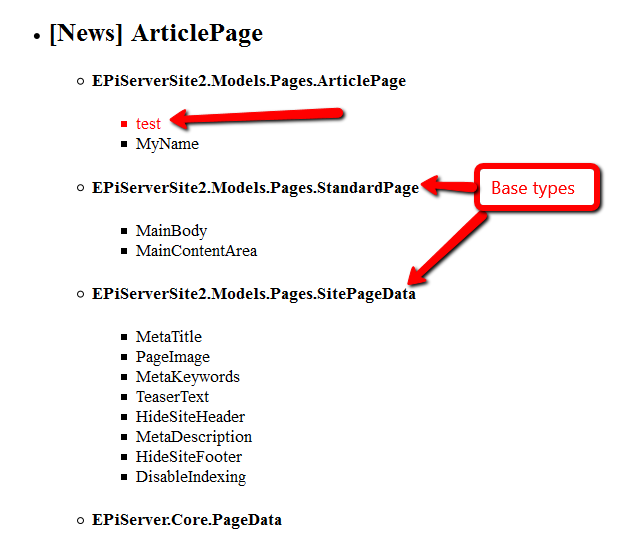
Image Model2.png

Hope this will be useful to someone :)

Feb 23, 2016

Comments

Feb 23, 2016 03:37 PM

Cool :)

Daniel Ovaska
Daniel Ovaska Feb 23, 2016 03:42 PM

Nice tool :)

valdis
valdis Feb 24, 2016 01:48 PM

Cool. I've seen pretty nice code browser developer here: http://dotnetapis.com/

error Please login to comment.
Latest blogs
Finding Thomas Part 3 - The Moment of Recognition

Remember Thomas? In digital landscape, Thomas is the returning visitor who reads everything, opens every email, converts on nothing. In standard...

Ritu Madan | Jun 26, 2026

Add more scheduled job settings from the Optimizely CMS 12 admin UI -- with OptiScheduledJob.ExtraParameters

  Optimizely (EPiServer) CMS 12 ships a great scheduled-jobs framework, but it has one frustrating gap: a job has nowhere to store its own...

Binh Nguyen Thi | Jun 25, 2026

Automated Search & Navigation to Graph Migration with Claude Code

A Claude Code plugin that scans your S&N codebase, applies Graph SDK transformations, and validates the result. Install once, run one command. CMS ...

Connor Fortin | Jun 24, 2026

Migrating from Find to Graph: Lessons Learned from a Real CMS 13 Project

While migrating a search solution from Optimizely Search & Navigation (Find) to Optimizely Graph in CMS 13, I encountered several issues that were...

Binh Nguyen Thi | Jun 24, 2026

Optimizely: Upgrade Opti-ID and .NET 10 in CMS 12

Many Optimizely customers are planning their roadmap around a future migration to Optimizely CMS 13. As a result, upgrades such as Opti ID adoption...

Madhu | Jun 23, 2026 |

Understanding Optimizely Graph: Caching, Webhooks & Avoiding Stale Content (Optimizely SaaS CMS)

📌 Scope: This post covers Optimizely CMS (SaaS) only — using the official @optimizely/cms-sdk and @optimizely/cms-cli packages with Next.js 15. If...

Kiran Patil | Jun 23, 2026 |