
Anders Hattestad
Sep 21, 2010
visibility 7035
star star star star star
(0 votes)

Dynamicproperties in a tree view

In a project I’m working on we need to view/change/delete some dynamic properties. You can say many things about the edit view of dynamic properties, but I guess most of the statements shouldn't be quoted.

I put some code together that shows one property, and what value it has in a tree view. The code is pretty ugly thou :)

You can select from a dropdown one dynamic property and then hit view. This will show all places where that property has value in a tree view. It’s then possible to mark elements and delete them, or even mark them and change all the marked to a specified value.
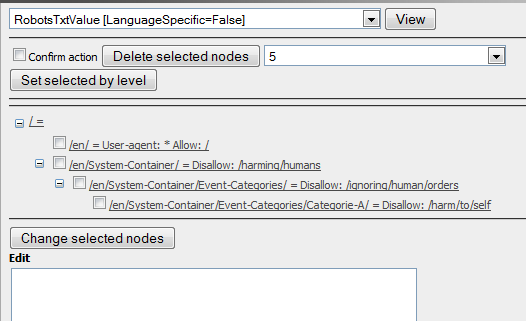
image

You have to check the confirm action to actually do the change or delete.

Some code

var list = DynamicProperty.ListTree()

gives a list over all dynamic properties. It is unique by propertyname and page link

if you have one DynamicProperty you can change it’s value and do a .Save() and it will be stored. if you add null as the value it will be deleted.

It’s also possible to set Override=true to change all child elements to use this one.

The code is available here

Sep 21, 2010

Comments

Per Nergård (MVP)
Per Nergård (MVP) Sep 22, 2010 09:33 AM

Nice work.

Anders Hattestad
Anders Hattestad Sep 22, 2010 10:34 AM

Thanks.
Its a bit dirty, but I only needed it to delete some 3. level dynamic properties that was wrongfull set :)

error Please login to comment.
Latest blogs
Finding Thomas Part 3 - The Moment of Recognition

Remember Thomas? In digital landscape, Thomas is the returning visitor who reads everything, opens every email, converts on nothing. In standard...

Ritu Madan | Jun 26, 2026

Add more scheduled job settings from the Optimizely CMS 12 admin UI -- with OptiScheduledJob.ExtraParameters

  Optimizely (EPiServer) CMS 12 ships a great scheduled-jobs framework, but it has one frustrating gap: a job has nowhere to store its own...

Binh Nguyen Thi | Jun 25, 2026

Automated Search & Navigation to Graph Migration with Claude Code

A Claude Code plugin that scans your S&N codebase, applies Graph SDK transformations, and validates the result. Install once, run one command. CMS ...

Connor Fortin | Jun 24, 2026

Migrating from Find to Graph: Lessons Learned from a Real CMS 13 Project

While migrating a search solution from Optimizely Search & Navigation (Find) to Optimizely Graph in CMS 13, I encountered several issues that were...

Binh Nguyen Thi | Jun 24, 2026