
A critical vulnerability was discovered in React Server Components (Next.js). Our systems remain protected but we advise to update packages to newest version. Learn More

Anders Hattestad
Sep 21, 2010
  6896
(0 votes)

Dynamicproperties in a tree view

In a project I’m working on we need to view/change/delete some dynamic properties. You can say many things about the edit view of dynamic properties, but I guess most of the statements shouldn't be quoted.

I put some code together that shows one property, and what value it has in a tree view. The code is pretty ugly thou :)

You can select from a dropdown one dynamic property and then hit view. This will show all places where that property has value in a tree view. It’s then possible to mark elements and delete them, or even mark them and change all the marked to a specified value.
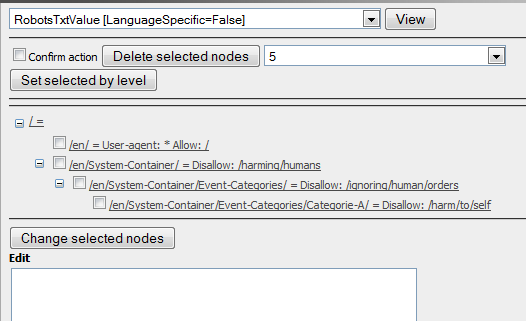
image

You have to check the confirm action to actually do the change or delete.

Some code

var list = DynamicProperty.ListTree()

gives a list over all dynamic properties. It is unique by propertyname and page link

if you have one DynamicProperty you can change it’s value and do a .Save() and it will be stored. if you add null as the value it will be deleted.

It’s also possible to set Override=true to change all child elements to use this one.

The code is available here

Sep 21, 2010

Comments

Per Nergård (MVP)
Per Nergård (MVP) Sep 22, 2010 09:33 AM

Nice work.

Anders Hattestad
Anders Hattestad Sep 22, 2010 10:34 AM

Thanks.
Its a bit dirty, but I only needed it to delete some 3. level dynamic properties that was wrongfull set :)

Please login to comment.
Latest blogs
Troubleshooting with Azure Application Insights Using KQL

Users at least get access to Azure Application Insights even within minimum access level if you are requesting access to DXP management portals at...

K Khan | Dec 21, 2025

Looking back at Optimizely in 2025

Explore Optimizely's architectural shift in 2025, which removed coordination cost through a unified execution loop. Learn how agentic Opal AI and...

Andy Blyth | Dec 17, 2025 |

Cleaning Up Content Graph Webhooks in PaaS CMS: Scheduled Job

The Problem Bit of a niche issue, but we are building a headless solution where the presentation layer is hosted on Netlify, when in a regular...

Minesh Shah (Netcel) | Dec 17, 2025

A day in the life of an Optimizely OMVP - OptiGraphExtensions v2.0: Enhanced Search Control with Language Support and Synonym Slots

Supercharge your Optimizely Graph search experience with powerful new features for multilingual sites and fine-grained search tuning. As search...

Graham Carr | Dec 16, 2025