

Enabling the EPiServer CMS Workflows
EPiServer CMS 5 ships with four out of the box workflows; Parallel Approval, Sequential Approval, Ready for Translation, and Request for Feedback.
The workflows are disabled by default and can easily be enabled for a CMS site by un-commenting their definitions in web.config.
If the workflows have not been enabled yet, you will see a “There are no instances or tasks related to this page available” message on the “Workflow” tab and a “There are no workflow definitions available” message in the Action Window in Edit Mode.
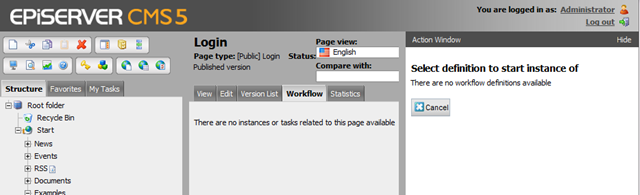
To enable the workflows…
Open web.config and uncomment the following snippet under configuration/episerver/workflowSettings/definitions:
<!--
<definition
name="Sequential Approval"
description="A sequential approval workflow for pages"
type="EPiServer.WorkflowFoundation.Workflows.SequentialApproval,EPiServer.WorkflowFoundation"/>
<definition
name="Parallel Approval"
description="A paralell approval workflow for pages"
type="EPiServer.WorkflowFoundation.Workflows.ParallelApproval,EPiServer.WorkflowFoundation"/>
<definition
name="Request for feedback"
description="Assigns request for feedback tasks to users/roles"
type="EPiServer.WorkflowFoundation.Workflows.RequestForFeedback,EPiServer.WorkflowFoundation"/>
<definition
name="Ready for translation"
description="Assigns translation tasks to users/roles"
type="EPiServer.WorkflowFoundation.Workflows.ReadyForTranslation,EPiServer.WorkflowFoundation"/>
-->
Once enabled, the EPiServer workflows can be started from the “Workflow” tab or the “Action Window” in Edit Mode.
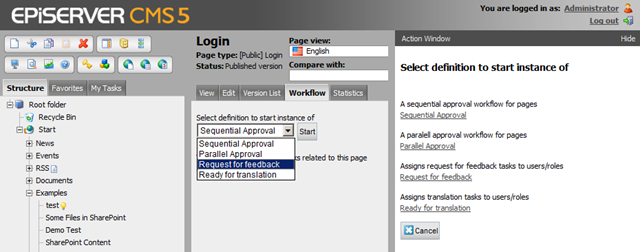
Hi
I have added the above section and added 4 of the default workflows to workflow section of the admin view. Is there any other steps are that are needed?
thanks
John Burns
Hi!
I've done a brand new installation of the Episerver CMS 5 with the demo site and I could not find that code snippet in the web.config.
Is there something that I'm missing on?
thanks & regards
Noel Fernandes