
Upgrade to EPiServer Commerce 7.5 : Part 2– MVC Areas Support For EPiServer 7 & above
In our company, we have a cms project framework that built on top of EPiServer CMS using asp.net MVC 4. This acts as a starting project for many of our EPiServer CMS projects consisting a lot included features, with many template blocks. However, when building Commerce or Relate project on top of our CMS project, we always wanted to separate the code base so that these pages, blocks and all the components are not in the same place as the CMS components. Therefore, implementing MVC Areas was kind of the best solution for this. This however is not yet supported on EPiServer 7 & Above.
Nevertheless, as a saying “There is always a way”, one of our senior team member came up with the solution using a custom view engine. We saw on the forum mentioning that it may be an over-killed idea, but when actually implement it, it rather quite straightforward. It gives you a lot more flexibility in handling your project structure.
Here is the structure that we wanted:
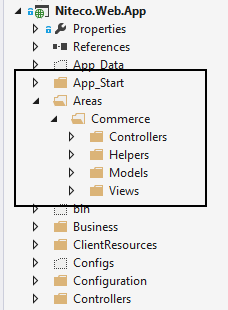
Here is the magic bit of code that we used on our custom View engine to achieve the above:
public class NitecoViewEngine : RazorViewEngine { public NitecoViewEngine() { ViewLocationFormats = new[] { "~/Areas/%1/Views/{1}/{0}.cshtml", "~/Areas/%1/Views/{1}/{0}.vbhtml", "~/Areas/%1/Views/" + Constants.ViewPath.PaymentMethodsFolder + "/{1}/{0}.cshtml", "~/Areas/%1/Views/" + Constants.ViewPath.PaymentMethodsFolder + "/{1}/{0}.vbhtml", "~/Areas/%1/Views/Shared/{0}.cshtml", "~/Areas/%1/Views/Shared/{0}.vbhtml", "~/Areas/%1/Views/{1}/{0}.cshtml", "~/Areas/%1/Views/{1}/{0}.vbhtml", "~/Areas/%1/Views/Shared/{0}.cshtml", "~/Areas/%1/Views/Shared/{0}.vbhtml" }; MasterLocationFormats = new[] { "~/Areas/%1/Views/{1}/{0}.cshtml", "~/Areas/%1/Views/{1}/{0}.vbhtml", "~/Areas/%1/Views/Shared/{0}.cshtml", "~/Areas/%1/Views/Shared/{0}.vbhtml", "~/Areas/%1/Views/{1}/{0}.cshtml", "~/Areas/%1/Views/{1}/{0}.vbhtml", "~/Areas/%1/Views/Shared/{0}.cshtml", "~/Areas/%1/Views/Shared/{0}.vbhtml" }; PartialViewLocationFormats = new[] { "~/Views/Shared/" + Constants.ViewPath.BlockFolder + "/{0}.cshtml", "~/Views/Shared/" + Constants.ViewPath.BlockFolder + "/{0}.vbhtml", "~/Views/Shared/" + Constants.ViewPath.PaymentMethodsFolder + "/{0}.cshtml", "~/Views/Shared/" + Constants.ViewPath.PaymentMethodsFolder + "/{0}.vbhtml", "~/Views/Shared/" + Constants.ViewPath.PagePartialsFolder + "/{0}.cshtml", "~/Views/Shared/" + Constants.ViewPath.PagePartialsFolder + "/{0}.vbhtml", "~/Views/Shared//{0}.cshtml", "~/Areas/%1/Views/{1}/{0}.cshtml", "~/Areas/%1/Views/{1}/{0}.vbhtml", "~/Areas/%1/Views/Shared/{0}.cshtml", "~/Areas/%1/Views/Shared/{0}.vbhtml", "~/Areas/%1/Views/{1}/{0}.cshtml", "~/Areas/%1/Views/{1}/{0}.vbhtml", "~/Areas/%1/Views/Shared/{0}.cshtml", "~/Areas/%1/Views/Shared/{0}.vbhtml", "~/Areas/%1/Views/Shared/" + Constants.ViewPath.BlockFolder + "/{0}.cshtml", "~/Areas/%1/Views/Shared/" + Constants.ViewPath.BlockFolder + "/{0}.vbhtml", "~/Areas/%1/Views/Shared/" + Constants.ViewPath.PaymentMethodsFolder + "/{0}.cshtml", "~/Areas/%1/Views/Shared/" + Constants.ViewPath.PaymentMethodsFolder + "/{0}.vbhtml", "~/Areas/%1/Views/Shared/" + Constants.ViewPath.PagePartialsFolder + "/{0}.cshtml", "~/Areas/%1/Views/Shared/" + Constants.ViewPath.PagePartialsFolder + "/{0}.vbhtml", "~/Views/Shared/DisplayTemplates/{0}.cshtml", "~/Views/Shared/DisplayTemplates/{0}.vbhtml", "~/Views/Shared/DisplayTemplates/{1}/{0}.cshtml", "~/Views/Shared/DisplayTemplates/{1}/{0}.vbhtml" }; } protected override IView CreatePartialView(ControllerContext controllerContext, string partialPath) { var areaName = this.GetAreaFromNameSpace(controllerContext); return base.CreatePartialView(controllerContext, partialPath.Replace("%1", areaName)); } protected override IView CreateView(ControllerContext controllerContext, string viewPath, string masterPath) { var areaName = this.GetAreaFromNameSpace(controllerContext); return base.CreateView(controllerContext, viewPath.Replace("%1", areaName), masterPath.Replace("%1", areaName)); } protected override bool FileExists(ControllerContext controllerContext, string virtualPath) { var areaName = this.GetAreaFromNameSpace(controllerContext); if (!string.IsNullOrEmpty(areaName)) { return base.FileExists(controllerContext, virtualPath.Replace("%1", areaName)); } return base.FileExists(controllerContext, virtualPath); } private string GetAreaFromNameSpace(ControllerContext controllerContext) { if (controllerContext.Controller != null) { var nameSpace = controllerContext.Controller.GetType().Namespace ?? string.Empty; var namespaceSegments = nameSpace.Split('.'); if (namespaceSegments.Length >= 2) { for (var i =0; i < namespaceSegments.Length; i++) { if ((namespaceSegments[i] == "Controllers") && i > 0) { return namespaceSegments[i-1]; } } } } return null; } }You then need to register this view engine on initialize module , as below:
[ModuleDependency(typeof (InitializationModule))]
    public class CustomizedRenderingInitialization : IInitializableModule
    {
        public void Initialize(InitializationEngine context)
        {
            ViewEngines.Engines.Insert(0, new NitecoViewEngine());
        }
    }
}
Now you could add any part of the project that you want to separate from the other areas, like how we did we our EPiServer Commerce Project as above.Just need to make sure that you keep the correct consistent naming for all the namespaces within the areas. This works for both EPiServer 7 & EPiServer 7.5 as we have examined.
Happy coding , stay tune for the next part.

I implemented areas on a site and the only thing really needed to enable them was to get an area name into the DataTokens collection. This makes the default RazorViewEngine find area views just fine. I did this by having this in an OnActionExecuting method in the base controller class for each area:
filterContext.RouteData.DataTokens["area"] = "SomeArea";
That can of course be put in some other place as well (such as a route), but I already had a base controller class so I used that.
I was facing this same issue, and Matti's solution worked for me nicely.
@Matti, I'm new to EPiServer. Can you expand on how you would put that in a route in EPiServer?