
Virtual Path Provider for Amazon S3
Many of our customers have requested a better solution for tackling large campaigns that have high demand to both server capacity and speed. We considered several different cloud services before choosing the most popular one Amazon Web Services. This was largely because of their great API, documentation and community.
The goal was to create a seamless integration between Amazon Cloud and EPiServer CMS. The result was a Virtual Path Provider (VPP) for Amazon S3. The editor should have the same capabilities as the built-in Virtual Path Provider from EPiServer.
Amazon Simple Storage Service
The Provider is using Amazon Simple Storage Service (S3). S3 is Amazon’s cloud storage solution. It’s versatile, reliable, fast and scalable. For more information read http://aws.amazon.com/s3/ and http://en.wikipedia.org/wiki/Amazon_S3
Important thing to mention is that S3 doesn’t use the traditional file structure like folders and files, instead S3 uses “buckets” in which you store objects. You can think of a bucket as a separate hard drive where you’ll store your files.
“Getting Started Guide” from Amazon is a good starting point.
Use Amazon S3 as CDN (Content Delivery Network)
AWS S3 is not a CDN. A CDN delivers files from a distribution of servers around the world. Visitors get access to file from the fastest resource available (most likely the closest server). Amazon S3 only has a few centers around the world and your bucket will be located in only one of these centers.
Amazon CloudFront is a service for content delivery. CloudFront is optimized to work with Amazon S3 and it’s very easy to set it up. With the “Getting Started Guide” you will get all the help you need to get started.
Thanks to my colleague, Frederik Vig, we have created a NuGet packet. You will find it on EPiServer’s NuGet feed.
Because of a reported bug in NuGet’s XML transformation (we need your vote to fix it) you’ll have to manually configure episerver.config for now.
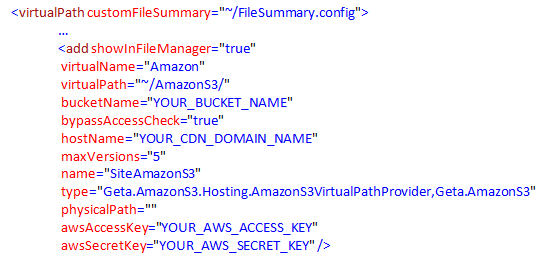
You’ll find AWS access key and secret key under “Security Credentials” located in your “Account”.
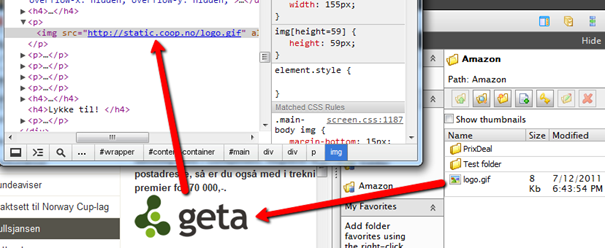
You can download the code from Coderesort.
Thanks to Coop Norge Handel for given us the opportunity to develop this provider and share it with the community.

Just tried this module and it works like a charm! EPiServer + CDN/Cloud have never been easier.
Thanks for sharing!
Hello,
I have installed the AWS S3 library from NuGet, but when i try to set the pathprovider for pagefiles i get the error:
""The VirtualPathProvider configured to handle page files must return directories that implement IPageDirectory"."
Any tip regarding this problem?
See my problem here:
http://world.episerver.com/Modules/Forum/Pages/Thread.aspx?id=64587&epslanguage=en