
crli
Nov 21, 2009
  7891
(2 votes)

Exploring the data lair

Arm yourself with the DDS Explorer and venture into the dark bowels of your EPiServer CMS 6 site.

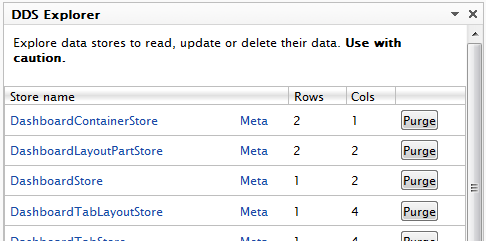
Find what stores there are.
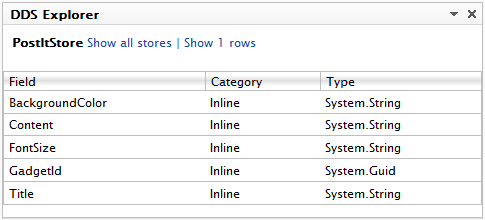
Learn the kinds and sizes of shelves in the store
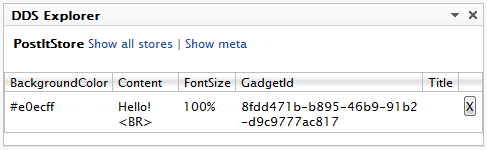
Take a peek at what lies in store for you.
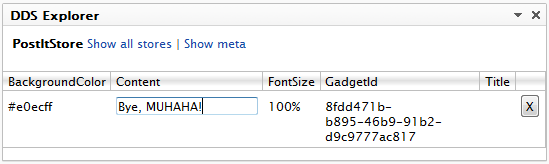
And change it!
Download DDS Explorer (Take care not to do anything nasty with this)

In summary

The dynamic data store is a great new feature. The setup cost is almost zero and using it is so easy you almost forget you're using a database. The (almost) fixed schema operation also promises a nice deployment scenario.

Nov 21, 2009

Comments

Sep 21, 2010 10:32 AM

Awesome!!
Me like bigtime!!

Sep 21, 2010 10:32 AM

Me too like bigtime!

Bye, MUAHAHA!
/ Joel Abrahamsson

Sep 21, 2010 10:32 AM

Awesome gadget. I also like it bigtime!
/ Jacob Khan

Sep 21, 2010 10:32 AM

I like it the biggest time!
/ Paul Smith

Sep 21, 2010 10:32 AM

Look out for a much improved meta API in the next version:

var stores = StoreDefinition.GetAll();

foreach (var store in stores)
{
foreach (var inlineMapping = store.InlineMappings)
{
}

.. etc
}


/ Paul Smith

Please login to comment.
Latest blogs
A First Look at Optimizely Remote MCP Server for Experimentation

Optimizely just released a Remote MCP Server for Experimentation and I've been trying it out to see what it can do. If you don't know, MCP (Model...

Jacob Pretorius | May 1, 2026

Promoted and Certified

What a busy week

Andy Blyth | May 1, 2026 |

Announcing new library: SettingsManager

When you run .net app, there have been a few ways to store settings. Those can be set via appSettings.json, or via Azure Portal AppService...

Quan Mai | Apr 30, 2026

From Prompting to Production: Optimizely Opal University Cohort and the Future of Agentic MarTech

Most organizations today are still playing with AI. They experiment with prompts, test ideas in isolated chats, and occasionally automate a task or...

Augusto Davalos | Apr 28, 2026