
enba
Apr 14, 2010
  10091
(1 votes)

Symbols for EPiServer CMS 6 available

As from yesterday pdb files for EPiServer 6 are available at http://symbols.episerver.com. To configure symbols for debugging in your visual studio follow these steps:

  • Open Visual Studio –> tools –> options –> debugging –> symbols
  • Click on the folder symbol and add http://symbols.episerver.com
  • Add the local folder where pdbs will be cached(ex. c:\symbols)
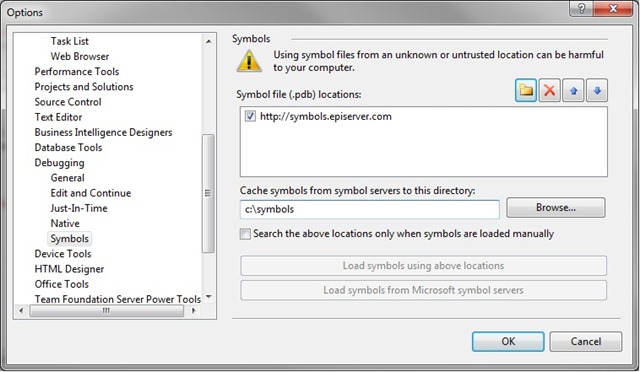
symbols1

  • To check that symbols have been loaded, when debugging, open Debug –> Windows –> Modules and find EPiServer assemblies and check status, it should look as following.
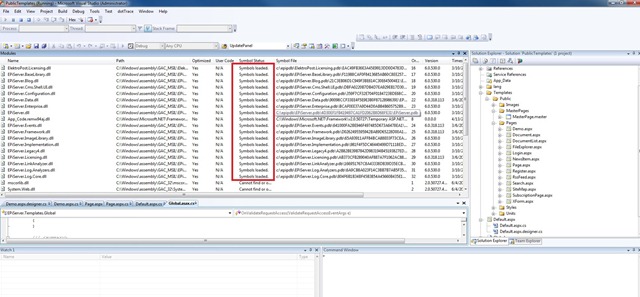
Symbols

Besides EPiServer CMS 6 you can also find symbols for EPiServer CMS 5 R2, EPiServer CMS 5 R2 SP1 and EPiServer CMS 5 R2 SP2.

You can read more on setting up symbols in this article by Jonas

Happy programming and of course your feedback is very welcome.

Apr 14, 2010

Comments

per
per Sep 21, 2010 10:33 AM

Great work.

Frederik Vig
Frederik Vig Sep 21, 2010 10:33 AM

Great! Was just about to ask :). Do you also have the XML files with the documentation for the EPiServer CMS assemblies available?

Dec 4, 2010 11:08 AM

I get a "403 - Forbidden: Access is denied" when trying to the symbols-url above. Is it not accessible for everyone?

Mar 18, 2011 10:21 AM

The current symbols are for 6.0.318.113, any chance of getting them updated to 6.0.530.1 please?

Mads Storm Hansen
Mads Storm Hansen Apr 20, 2011 11:45 AM

Still "403 - Forbidden: Access is denied."

Was this project "forgotten" ?

Apr 17, 2015 11:26 AM

I'm missing episerver.scheduler.pdb
The symbol link http://symbols.episerver.com
only says ACCESS DENIED ???

Using EPiServer 6 R2, which is giving me a lot of trouble...

and when editing this post, it resaves the post as HTML ?!?!?!?
If this shows how much we can count on EPiServer, I will advice my company to change CMS ASAP... this is hopeless...

Please login to comment.
Latest blogs
Creating an admin tool - unused assets

Let's make an admin tool to clean unused assets and see how to extend your favorite CMS with custom tools and menues! We will build a tool step by...

Daniel Ovaska | Apr 15, 2026

Running Optimizely CMS on .NET 11 Preview

Learn how to run Optimizely CMS on the .NET 11 preview with a single-line change. Explore performance gains, PGO improvements, and future-proofing...

Stuart | Apr 15, 2026 |

Your Optimizely Opal Is Probably Burning Carbon It Doesn't Need To

Four patterns Optimizely practitioners could be getting wrong with Opal agents: inference levels, oversized tool responses, missing output...

Andy Blyth | Apr 15, 2026 |

Optimizely CMS 13: A Strategic Reset for Content, AI, and Composable Marketing

Optimizely CMS 13 is not just another version upgrade—it represents a deliberate shift toward a connected, AI-enabled, and API-driven content...

Augusto Davalos | Apr 14, 2026

The 74% Problem: Why Most Companies Are Getting AI Wrong

I’ve seen this before… The pattern. The rush, the excitement, the scramble to adopt something new before anyone has stopped to ask what problem it...

Mark Welland | Apr 14, 2026

Scheduled jobs with parameters

Scheduled jobs is an integral part of most Optimizely solution but the UI has, in my opinon, always been lacking in usability and features. Earlier...

Per Nergård (MVP) | Apr 14, 2026