


Using EPiServer Search in EPiServer 7 MVC
The Full-Text EPiServer 7 Search is a very simple but effective search solution and it should cover the needs of any basic search. The base is built upon the Lucene indexer.
This post will cover the basics of building a simple search page in EPiServer 7 using MVC with a simple pager, we will also allow for some fuzzy searching if the primary result isn’t good enough.
Search API’s
The query classes can be found in the EPiServer.Search.Queries.Lucene namespace. In this post I will use the following classes
- EPiServer.Search.Queries.Lucene.FieldQuery
- EPiServer.Search.Queries.Lucene.FuzzyQuery
Why FieldQuery + FuzzyQuery?
The idea is to fill a resultset with data, while the FieldQuery will require explicit hits the FuzzyQuery bends the qurey a bit. Fuzzy queries are excellent if someone is misspelling and do basically create a “similarity search” based on the Levenshtein algorithm.
The logic is set up to first do the FieldQuery, if it doesn’t fill the resultset to a certain degree we add the results from a FuzzyQuery in the end of the same resultset, excluding the ones we already have. We start at fuzziness 0.8f and step down to 0.4f, decreasing 0.1f for each turn until we either reach 0.4f (f for float) or the result set is filled. These values can be adjusted, however going below 0.4f isn’t recommended (by me) since the results tend to be a bit to fuzzy.
Pretty basic logic, it will handle the correct searches and have some tolerance for the faulty searches as well.
MVC Parts
As in any MVC project we will need a few parts to make this happen
- PageType carrying our PageData
- Controller
- ViewModel, to separate the model from the PageData
- View displaying our results
- Javascript for eventhandling
- Possible extensions to share our data
PageType with PageData
Since I’m creating a very simple search page there is no need for any Page Properties
using EPiServer.Core;
using EPiServer.DataAbstraction;
using EPiServer.DataAnnotations;
namespace MySite.Content.Pages
{
    [ContentType(
        DisplayName = "Söksida",
        GUID = "bd1eec3d-37d1-4717-b3eb-3f5agdf85216",
        Description = "Sida för sökresultat och sökning")]
    public class SearchPage : PageData
    { }
}
The Controller
The controller will handle the regular page requests as well as search requests. Please note that the controller sends an instance of the SearchPageViewModel to the view.
using EPiServer.Core;
using EPiServer.Web.Mvc;
using EPiServer.Web.Routing;
using System.Web.Mvc;
using MySite.Content.Pages;
using MySite.Models.Pages;
namespace MySite.Controllers.Pages
{
    public class SearchPageController : PageController<SearchPage>
    {
        /// <summary>
        /// Handle regular requests to view the search page
        /// </summary>
        /// <param name="currentPage"></param>
        /// <returns></returns>
        public ActionResult Index(SearchPage currentPage)
        {
            var model = new SearchPageViewModel
                            {
                                Name = currentPage.Name,
                                InvalidQuery = true
                            };   return View(model);
        }         /// <summary>
        /// Handle searches
        /// </summary>
        /// <param name="model"></param>
        /// <returns></returns>
        [HttpPost]
        public ActionResult Index(SearchPageViewModel model)
        {
            PageRouteHelper pageRouteHelper =
                EPiServer.ServiceLocation.ServiceLocator.Current.GetInstance<PageRouteHelper>();   PageData currentPage = pageRouteHelper.Page;   model.Name = currentPage != null ? currentPage.Name : "S?k";   if (ModelState.IsValid)
            {
                model.Search(model.SearchText, model.Page, model.PageSize);
                model.InvalidQuery = false;
                return View("~/Views/SearchPage/index.cshtml", model);
            }
            else
            {
                model.InvalidQuery = true;
                return View("~/Views/SearchPage/index.cshtml", model);
            }
        }
    }
}
ViewModel
The ViewModel keeps most logic and is the class the view is typed to.
using EPiServer.Globalization;
using EPiServer.Search;
using log4net;
using System.Collections.Generic;
using System.ComponentModel.DataAnnotations;
using System.Linq;
namespace MySite.Models.Pages
{
    public class SearchPageViewModel
    {
        private static readonly ILog Log =
            LogManager.GetLogger(typeof(SearchPageViewModel));            public string Name { get; set; }            [Required(ErrorMessage = "Du måste ange en söksträng")]
        [Display(Name = "Sök")]
        public string SearchText { get; set; }         /// <summary>
        /// Will store the modelstate
        /// </summary>
        public bool InvalidQuery { get; set; }         /// <summary>
        /// Storing the search results
        /// </summary>
        public List<IndexResponseItem> SearchResult { get; set; }         /// <summary>
        /// Number of search hits
        /// </summary>
        public int SearchHits { get; set; }         /// <summary>
        /// Current page in the result
        /// </summary>
        private int _page = 1;
        public int Page
        {
            get { return _page; }
            set { _page = value; }
        }             /// <summary>
        /// Number of posts to show on each search page
        /// </summary>
        public int PageSize = 10;         /// <summary>
        /// Main search method
        /// </summary>
        /// <param name="q"></param>
        /// <param name="page"></param>
        /// <param name="pageSize"></param>
        public void Search(string q, int page, int pageSize)
        {
            // Re-index
            //var reIndex = new EPiServer.Search.ReIndexManager();
            //reIndex.ReIndex();             // Current content language
            var culture = ContentLanguage.PreferredCulture.Name;             SearchResult = new List<IndexResponseItem>();             // Get the type of UnifiedDirectory, we want to skip this in our search results
            var unifiedDirectoryType = typeof(EPiServer.Web.Hosting.UnifiedDirectory);             // Do a fieldquery
            var fieldQuery = new EPiServer.Search.Queries.Lucene.FieldQuery(q);
            var fieldQueryResult = SearchHandler.Instance.GetSearchResults(fieldQuery, 1, pageSize + 20)
                .IndexResponseItems
                .Where(x =>
                    (x.Culture.Equals(culture) || string.IsNullOrEmpty(x.Culture))
                    && !x.ItemType.Contains(unifiedDirectoryType.FullName)
                    )
                .ToList();             // Count the result
            int fieldQueryCount = fieldQueryResult.Count();      // Add to the search result
            SearchResult.AddRange(fieldQueryResult);             // if less than pageSize results, lets do a fuzzy query
            if (fieldQueryCount < pageSize)
            {
                float startFuzzines = 0.8f;                for (float i = startFuzzines; i > 0.4f; i = i - 0.1f)
                {
                    //var fuzzyResult = DoFuzzySearch(q, page, pageSize + 20, i, culture);
                    var fuzzyResult = DoFuzzySearch(q, 1, pageSize + 20, i, culture);
                    SearchResult = MergeSearchResults(SearchResult, fuzzyResult);
                }
            }   SearchHits = SearchResult.Count;
        }         /// <summary>
        /// Merge search results
        /// </summary>
        /// <param name="left"></param>
        /// <param name="right"></param>
        /// <returns></returns>
        private List<IndexResponseItem> MergeSearchResults(List<IndexResponseItem> left, List<IndexResponseItem> right)
        {
            // Must remove some duplicates, stupid since union should fix this // EH
            foreach (var item in left)
            {
                right.RemoveAll(x => x.Id.Equals(item.Id));
            }   return left.Union(right).ToList();
        }         /// <summary>
        /// Stage some fuzzy searching
        /// </summary>
        /// <param name="q"></param>
        /// <param name="page"></param>
        /// <param name="pageSize"></param>
        /// <param name="fuzziness"></param>
        /// <param name="culture"></param>
        /// <returns></returns>
        private List<IndexResponseItem> DoFuzzySearch(string q, int page, int pageSize, float fuzziness, string culture)
        {
            // Get the type of UnifiedDirectory, we want to skip this in our search results
            var unifiedDirectoryType = typeof(EPiServer.Web.Hosting.UnifiedDirectory);   var fuzzyQuery = new EPiServer.Search.Queries.Lucene.FuzzyQuery(q, fuzziness);
            var fuzzyQueryresult = SearchHandler.Instance.GetSearchResults(fuzzyQuery, page, pageSize)
                .IndexResponseItems
                .Where(x =>
                    (x.Culture.Equals(culture) || string.IsNullOrEmpty(x.Culture))
                    && !x.ItemType.Contains(unifiedDirectoryType.FullName)
                    )
                    .ToList();   return fuzzyQueryresult;
        }
   }
}
A view
The view, typed to SearchPageViewModel. As simple as can be.
@using MySite.Business.Core
@model MySite.Models.Pages.SearchPageViewModel
@{
//ViewBag.Title = "Index";
Layout = "~/Views/Shared/Masters/_MainMaster.cshtml";
}
@section TitleContent{
}
@section MainContent{
<div id="leftContent">
@*Meny*@
<div id="subMenuHeader">
<h2>@Model.Name </h2>
</div>
<div id="subMenu">
</div>
</div>
<div class="middleSpacer"></div>
<div id="rightContent">
<div id="searchPage">
@using (Html.BeginForm("Index", "SearchPage", FormMethod.Post, new { id = "searchForm" }))
{
<div id="searchBox">
<ul>
<li>
@Html.LabelFor(m => m.SearchText, new { @class= "searchLabel" })
</li>
<li>
@Html.TextBoxFor(m => m.SearchText)
@Html.ValidationMessageFor(m => m.SearchText)
</li>
@*<li>
Välj språk
</li>*@
<li>
<input type="Submit" id="searchSubmitMain" value="Sök" />
</li>
</ul>
</div> if (!Model.InvalidQuery)
{
<div id="searchResult">
<h2>Sökresultat</h2>
<p>Din sökning gav ca @Model.SearchHits träffar</p>
<ul>
@foreach (var item in Model.SearchResult.Skip((Model.Page - 1) * Model.PageSize).Take(Model.PageSize))
{
<li class="searchResultHeader"><a href="@item.GetExternalUrl()"><h3>@item.Title</h3></a></li>
<li class="searchResultText">@item.DisplayText.TruncateAtWord(20)</li>
<li class="spacer"></li>
}
</ul>
<div id="searchPager">
@*@Html.Hidden("page")*@
@Html.HiddenFor(m => m.Page)
@Html.HiddenFor(m => m.SearchHits)
@Html.HiddenFor(m => m.PageSize)
<input type="button" id="prev" value="Föregående" />
<input type="button" id="next" value="Nästa" />
</div>
</div>
}
}
</div>
</div>
}
Javascript eventhandling
Some JS, customized to use prototyping and jQuery.
$(document).ready(function() {
    function search() {
        var that = this;         // Control handling
        that.PreviousControl();
        that.NextControl();         // Event handlers
        $(".searchBoxSmall").focus(function () {
            if ($(this).val() == "Sök") {
                $(this).val('');
            }
        });
        $(".searchBoxSmall").blur(function () {
            if ($(this).val().length == 0) {
                $(this).val('Sök');
            }
        });         // ... previous
        $("#searchResult #prev").click(function () {
            that.Paging("prev");
        });         // ... next
        $("#searchResult #next").click(function () {
            that.Paging("next");
        });         // ... snabbsök
        $("#header #headerTools #toolKit #searchIcon").click(function () {
            document.forms["searchFormSmall"].submit();
        });
    }     // Handle next control
    search.prototype.NextControl = function () {
        var searchHits = $("#searchResult #SearchHits").val();
        var pageSize = parseInt($("#searchResult #PageSize").val());
        var next = $("#searchResult #next");
        var page = parseInt($("#searchResult #Page").val());         if (!isNumeric(searchHits)
            || parseInt(searchHits) <= pageSize
            || (page * pageSize) >= parseInt(searchHits)) {
            // Hide
            next.hide();
        } else {
            // Show
            next.show();
        }
    };     // Handle previous control
    search.prototype.PreviousControl = function () {
        var page = $("#searchResult #Page");
        var prev = $("#searchResult #prev");
        if (!isNumeric(page.val()) || parseInt(page.val()) <= 1) {
            // Hide
            prev.hide();
        } else {
            // Show
            prev.show();
        }
    };     // Handle paging
    search.prototype.Paging = function (action) {       var page = $("#searchResult #Page");       switch (action) {
            case "prev":
                // If no value is set to page or page is equal to 1
                if (!isNumeric(page.val()) || parseInt(page.val()) <= 1) {
                    page.val(1);
                } else {
                    page.val(parseInt(page.val()) - 1);
                }
                break;            case "next":
                // If no value is set to page
                if (!isNumeric(page.val())) {
                    page.val(2);
                } else {
                    page.val(parseInt(page.val()) + 1);
                }   break;
        }   document.forms["searchForm"].submit();
    };
});
Extension methods
Some simple extension methods to keep the code clean in the view.
namespace MySite.Business.Core
{
    public static class ExtensionMethods
    {
	private static readonly ILog Log = LogManager.GetLogger(typeof(ExtensionMethods));   /// <summary>
        /// Truncate strings after n words
        /// </summary>
        /// <param name="input"></param>
        /// <param name="noWords"></param>
        /// <returns></returns>
        public static string TruncateAtWord(this string input, int noWords)
        {
            string output = string.Empty;
            string[] inputArr = input.Split(new[] { ' ' });   if (inputArr.Length <= noWords)
                return input;   if (noWords > 0)
            {
                for (int i = 0; i < noWords; i++)
                {
                    output += inputArr[i] + " ";
                }
                output += "...";
                return output;
            }
            return input;
        }   public static Uri GetExternalUrl(this IndexResponseItem item)
        {
            try
            {
                UrlBuilder url = new UrlBuilder(item.Uri);
                EPiServer.Global.UrlRewriteProvider.ConvertToExternal(url, item, System.Text.Encoding.UTF8);
                return url.Uri;
            }
            catch (Exception ex)
            {
                Log.Error("Can't create external url on the item because ", ex);
                return default(Uri);
            }
        }
    }
}
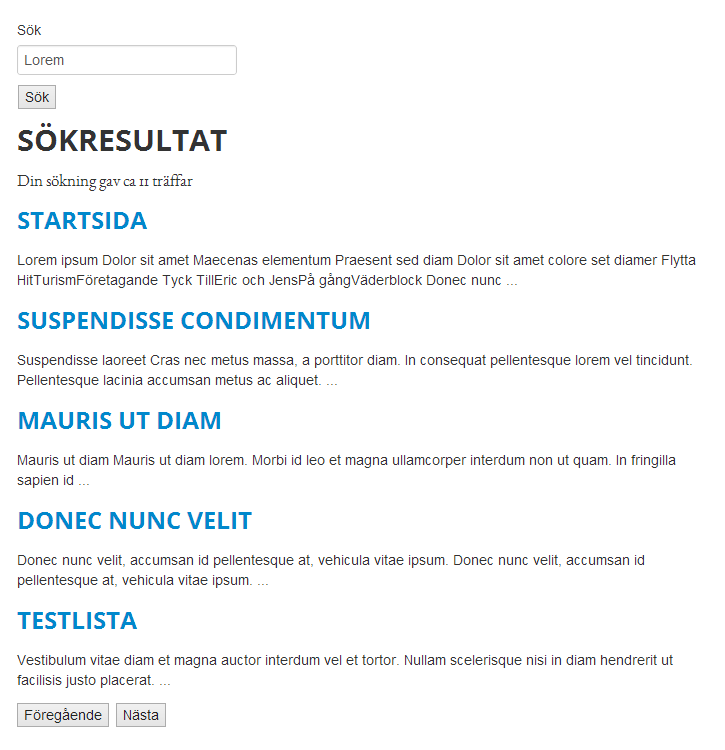
Expected result

:) Nice article, I enjoyed reading it. Thanks for sharing the JS/JQuery code as well.
Thanks, I've cleaned up the text and code formatting a bit!
Good one Eric :)
Shouldn't the Union return call be done outside of the loop in the MergeSearchResults-method to ensure that all duplicates are removed?
Linus, I did try that. It didn't work as expected and I had a deadline. I'll update this post when I have found a solution. The code posted works though, and it's fast enough :)
I have done exactly like your code, what I can see. But I got no hits at all in the SearchHandler.Instance.GetSearchResults call. Does anyone have an idea why? What have I missed?
Andreas,
Is your indexing service running?
Have a look in web.config and check the settings in
In example
Most likely it is but what's more imortant to see is if there are any data in your index at all. In the section episerver.search.indexingservice / namedIndexes / namedIndexes there should be a reference to your index. In my case this is the folder C:\EPiServer\Sites\SiteName\AppData\Index
Download the utility Luke and open the index and confirm that your dataindexing is up and running!
Thanks for your answer Eric!
I found the answer in this thread. http://social.msdn.microsoft.com/Forums/en-US/sqlmds/thread/80a6eec0-ac9e-4b0c-94b0-46f7b9bd2fa1
I had to install the "HTTP Activation" in Windows 8 and restart the site. Tada, search hits! :)
Great example Eric, thanks a lot for that!
I do have a question Eric, how can I prevent the index from displaying items that are in the recycle bin and pages that are "Containers" / "Templateless". Thanks for the code samples. Always nice to see strong post to bring strength to the community.
Hi Joshua,
Did you solve your problem with pages in the wastebasket?
When the editor moves a page to the wastebasket. Should the page automatic been removed from the index or do I have to re-index or overload a delete method to remove the page from the search-index?
Nice post! I've complemented with some info on adding custom data to the index to tweak how content can be searched: http://tedgustaf.com/blog/2013/4/add-custom-fields-to-the-episerver-search-index-with-episerver-7/