

Scheduling several versions of content for publishing in EPiServer 7 CMS
If you are running an online campaign, you might want several banner ads with different time spans to be shown on the landing page. This can be done by scheduling multiple versions of the landing page in EPiServer 7.
Let’s imagine the scenario “Campaign 2013” with two banners that are to be visible one day each.
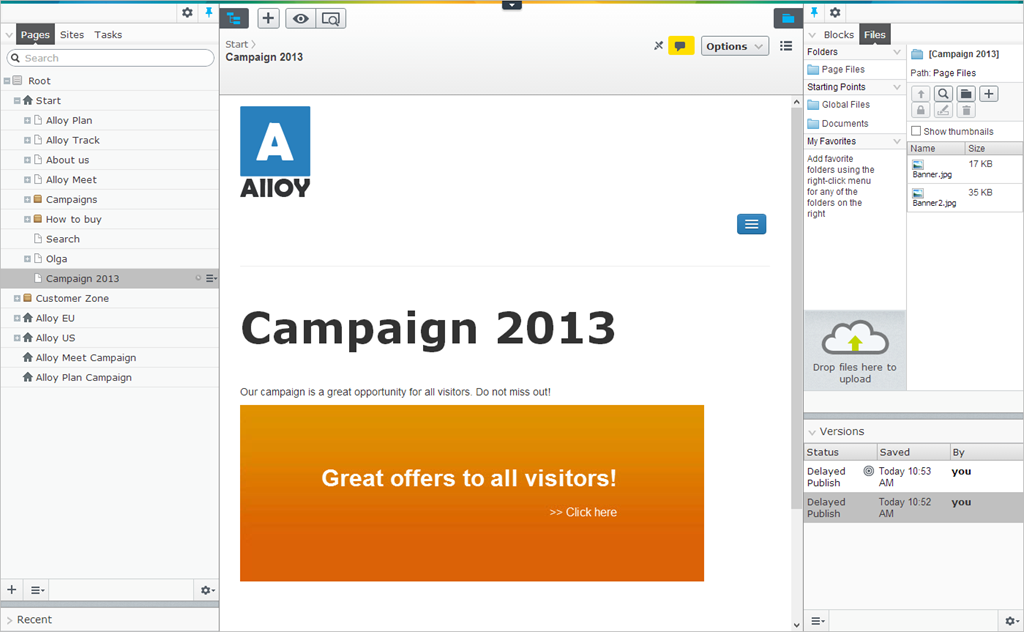
Do the following:
1. In edit view, upload the banners on the Files gadget.
2. Create a new page, and select a page type that has the rich-text editor in the main body.
3. Drag the first banner to the editor area of the landing page.
4. Select Options > Schedule for Publish. Select date and time for the content to be published and click Schedule.
5. Select New Draft from Here and replace the first banner with the other one.
6. Select Options > Schedule for Publish. Select date and time for the content to be published and click Schedule.
Adding more features to your campaign
This example shows a simple scenario. If you are running several campaigns using the same landing page, you can have the banner ads as blocks and drag them to the page. These blocks can then be scheduled in multiple versions for publishing in a similar way as for pages. Schedule an A/B test for a block by using the Self-Optimizing Block.
An overview of page or block versions can be found in the Versions gadget, which can be added to the left or right panes in the editorial interface. There you can access versions that have been previously published, are in draft mode or will be published in the future.
Before setting the page to be scheduled for publishing, you can also add Personalization to your banners if you want. For example, banners that differ depending on whether certain pages have been visited on the website.
If you want to test the campaign pages in draft version before publishing, you can run an A/B test in EPiServer CMO.
Additonal information
- How to schedule content for publishing, see EPiServer 7 CMS Editor’s User Guide
- How to use the Self-Optimizing Block, see EPiServer Add-ons User Guide

Comments