

Optimizely Graph Cache: The Power of "Item"
In the world of content delivery, speed is king. A high cache hit ratio is the secret weapon for delivering snappy performance and happy users. But how do you achieve that? One powerful trick lies in understanding the difference between "items" and "item" in your GraphQL queries.
The Cache Challenge: Lists vs. Specifics
GraphQL's flexibility often leads to queries fetching lists ("items"). While necessary for many scenarios, this can hinder caching. Why? Because even a list with one item requires the cache to consider potential changes to any content, leading to frequent cache invalidations.
The "Item" Advantage: Precision Caching
Enter the "item" query. When you request a single item by its unique identifier, you unlock granular, efficient caching.
How to Leverage "Item" for Optimal Caching:
- Improve Cache Hit Ratio: Swap "items" for "item" when fetching a single entity. It's a small change with big results.
- Unique Identifier-Driven Queries: Only use "item" when targeting a specific item via its unique identifier (relative paths, URLs, codes, etc.).
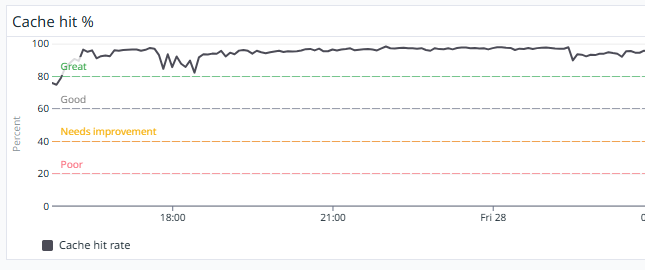
Cache hit example for query with "item"
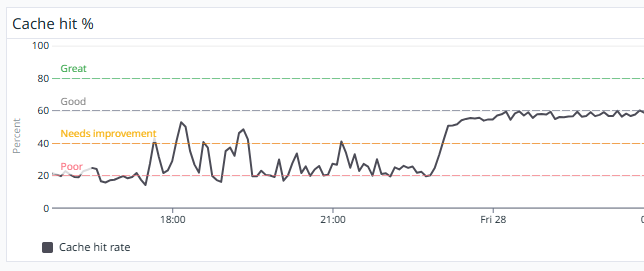
Cache hit example for query with "items"
Practical Example
Instead of
query GetItem($relativePath: String) {
  Content(limit:1 where: { RelativePath: { eq: $relativePath } }) {
    items { Name }
  }
}
Use
query GetItem($relativePath: String) {
  Content(where: { RelativePath: { eq: $relativePath } }) {
    item { Name }
  }
}
Conclusion
Using "item" for single entity retrieval based on unique identifiers dramatically improves cache hit ratios, enhancing performance and user experience. It's a simple, powerful technique to unlock the full potential of your GraphQL cache.

5 star tip. Thanks Jonas