
K Khan
May 10, 2015
  2685
(0 votes)

using prices from external sources as ERP

If a business is using an ERP system for its activities then it is high likely that for their E-Commerce section, they are managing product prices also in ERP system. To use those prices in EPiServer Commerce (7.5+) is very straight forward. In EpiServer Commerce pricing modules are provider based so it can be replaced with any custom module pulling prices from ERP or some external system. Commerce platform allows this price data from custom pricing­ module to be used in all display and calculation locations. All we need to do is, implement IPriceService and IPriceDetailService and register them in the commerce initialization module. If you want to see this action you can download code from GitHub , ammend, compile and register those classes into commerce initialization module.

// I assume some expert level episerver developer is working at this module
// use XPriceParser to setup test prices (apologize in advance for this hassle)
// Embed this code into your Commerce site.
public class CommerceIntialization : IConfigurableModule
{
...
public void ConfigureContainer(ServiceConfigurationContext context)
        {
            context.Container.Configure(c => c.For<IPriceService>().Use<DummyPriceService>()); 
            context.Container.Configure(c => c.For<IPriceDetailService>().Use<DummyPriceDetailService>());
        }
...
}

Below price is from external source in Online Center Catalog UI
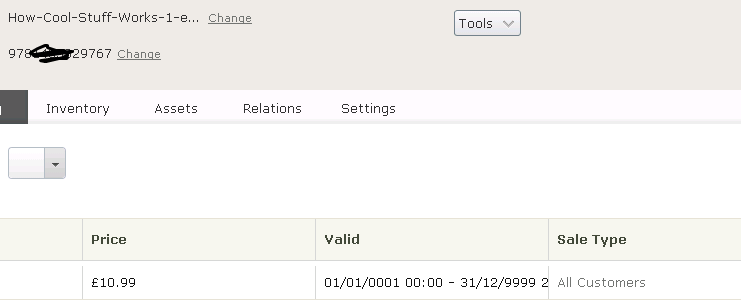
Image cool.png       


May 10, 2015

Comments

Please login to comment.
Latest blogs
Searchable settings page

In my current project which has been actively developed for quite some time we have a big classic settings page. Unfortunately the placement and...

Per Nergård (MVP) | Apr 6, 2026

Using Azure Devops Pipelines in Optimizely SAAS (Configured) Commerce

Introduction When working with SAAS Commerce build service v2 your currently need to use a github repo with configured branches to start deployment...

Mark Hall | Apr 4, 2026 |

Forcing Lowercase URLs in Optimizely CMS During Auto-Translation

Learn how to fix uppercase and punctuation issues in Optimizely CMS 12 URL segments caused by LanguageManager auto-translation using a custom...

Stuart | Apr 2, 2026 |

Stott Robots Handler v7 for Optimizely CMS 13

Stott Robots Handler version 7 is now available for  Optimizely PaaS CMS 13 . This is includes updates to support the switch from a Site based...

Mark Stott | Apr 2, 2026

Optimizely CMS 13 First Impressions

Introduction This week Optimizely released the long awaited CMS 13. I upgraded my Optimizely extensions package to CMS 13 and found some interestin...

Mark Hall | Apr 2, 2026 |

Automating Block Translations in Optimizely

Stop manual block-by-block translations. Learn how to use the TranslateOrCopyContentAreaChildrenBlockForTypes config to automate Optimizely CMS...

Stuart | Apr 1, 2026 |