

More custom Visitor Group criteria: Role
I have previously posted on custom Visitor Group criteria. That post covers the basics and is probably a better guide if you are looking to create your own custom criteria.
The goal of this post
So, the basics are covered, but I want to share a specific implementation of Visitor Group criteria that I actually think should be in there from the beginning: A criteria based on role membership.
Why do we need this? In my case it’s simple. I only want to display some information to authenticated users. But I could imagine other examples where you want to discriminate on the basis of role without adding different pages with different access levels.
Implementation
Both the model (RoleModel, haha) and the criteria are very straight-forward. I use a custom enum to define the compare condition (you might want to check that a user is not in a specific role as well as checking that the user is in the role). The model and the enum look like this:
Note that this, as well as the model in my old post, is built by the pattern used in CMS 6 R2 Beta. The pattern is propossed to change in the RTM of CMS 6 R2./// <summary>/// Model class for use by the RoleCriterion criterion for/// Visitor Groups. Stores a role name and a compare condition./// </summary>public class RoleModel : IDynamicData, ICloneable{public EPiServer.Data.Identity Id { get; set; }public object Clone(){var model = (RoleModel)base.MemberwiseClone();model.Id = Identity.NewIdentity();return model;}[DojoWidget(SelectionFactoryType = typeof(EnumSelectionFactory),LabelTranslationKey = "/shell/cms/visitorgroups/criteria/role/comparecondition",AdditionalOptions = "{ selectOnClick: true }"),Required]public RoleCompareCondition Condition { get; set; }[DojoWidget(LabelTranslationKey = "/shell/cms/visitorgroups/criteria/role/rolename",AdditionalOptions = "{ selectOnClick: true }"),Required]public string RoleName { get; set; }}/// <summary>/// Enum representing compare conditions for booleans/// </summary>public enum RoleCompareCondition{Equal,NotEqual}
The code of the criterion looks like this:
/// <summary>/// Implementation of a EPiServer.Personalization.VisitorGroups.CriterionBase/// which checks if a user is in a named role./// </summary>[VisitorGroupCriterion(Category = "User Criteria",DisplayName = "Role",Description = "Criterion that matches the user's roles",LanguagePath = "/shell/cms/visitorgroups/criteria/role"/*,ScriptUrl = "ClientResources/Criteria/usercriteria.js"*/)]public class RoleCriterion : CriterionBase<RoleModel>{public override bool IsMatch(System.Security.Principal.IPrincipal principal,HttpContextBase httpContext){bool isInRole = principal.IsInRole(Model.RoleName);bool shouldBeInRole = Model.Condition == RoleCompareCondition.Equal;return isInRole == shouldBeInRole;}}
Again I use no custom script. And as you can see there are some language strings used:
<languages><language name="English" id="en"><enums><acme><personalization><visitorgroups><criteria><rolecomparecondition><equal>In role</equal><notequal>Not in role</notequal></rolecomparecondition></criteria></visitorgroups></personalization></acme></enums><shell><cms><visitorgroups><criteria><role><comparecondition>User is</comparecondition><rolename>With name</rolename></role></criteria></visitorgroups></cms></shell></language></languages>
Using the criterion
So I create a new Visitor Group based on this criterion, requiring the user to NOT be in the Anonymous role (a built-in Virtual Role matching unauthenticated users):

And then I use content groups to add content for both users who are in the Visitor Group and not, i.e. authenticated and anonymous users:
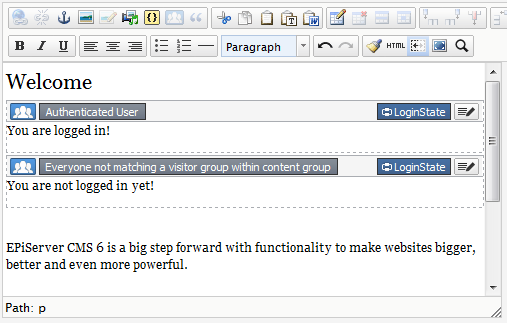
You can all imagine the results rendered.
Source code
The source code is available in the EPiServer World Code Section.

Magus I agree that this functionality should come out of the box (RC maybe?). We've got customers that currently use virtual roles to personalise content. Using this criteria would allow us to put all personalisation under visitor groups which I feel is the right place for it. Not to mention the added flexibility that Visitor Groups adds.