

Increased Flexibility in Commerce Catalog URLs
As all of you probably know there are two built-in ways to route to catalog items in Episerver Commerce: The hierarchical route composed of the catalog/category/entry hierarchy and the "SEO" route which uses a single url segment, which for obvious reasons needs to be globally unique in the site. The hierarchical route story is a different one and we are now improving it in line with partner and customer feedback.
Default: Require Unique URL Segments to Avoid Conflicts
The default hierarchical URL/route is basically going to be /{catalog name}/{category segment}/{entry segment} (this varies a bit depending on setup, but assume this for the sake of argument) where there can of course be multiple categories nested in the URL. But since an entry can be linked to multiple categories there can also be multiple routes to the same entry. This is where the uniqueness gets tricky.
To make entries routable in all categories, Commerce requires the entry segments to be globally unique. That way there is no risk an entry can be linked to a category where another entry is already using the same segment, causing the two to have the same URL in that category. However, in some catalogs it is clear that you would ideally want to use the same url segment for different entries in different categories, and this constraint does more harm than good.
New Option: Avoid Conflicts when Publishing and Monitor Conflicts Later
In Commerce 11.7.1 (soon to be released) we are introducing the AppSetting episerver:commerce.UseLessStrictEntryUriSegmentValidation, which when set to true will drop the global uniqueness constraint for entry segments. Instead, it will ensure uniqueness only with entries/categories in the same category.
However, this validation only happens when publishing the entry and only for its main parent category. This means that if you link entries to multiple categories you risk creating conflicts. For that reason, we are also introducing a new scheduled job Find Catalog Uri Conflicts. The job will find conflicts and write information about them to three places:
- Write WARN messages to the log.
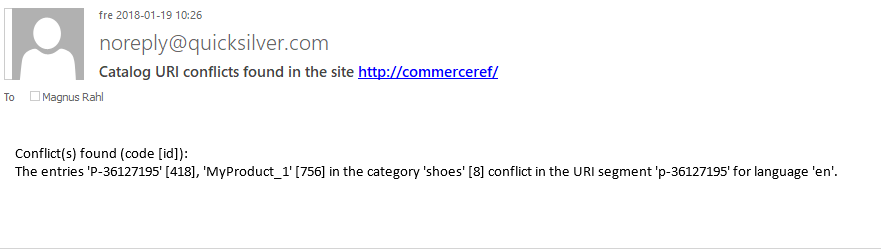
- Send emails to addresses specified in the episerver:commerce.UriSegmentConflictsEmailRecipients AppSetting (semicolon separated list of email addresses).
- Write to the scheduled job output.
Here is some example output:

nice. mail is sent via element settings, right?
@Valdis correct, it uses SmtpClient with the default smtp settings.