


Building an Agent Replicator for Optimizely Opal
Introduction
A couple of months ago, my team and I took part in the Opal Innovation Challenge (Which we proudly won). We decided to create an agentic AI experience that brings audience insight directly into content workflows, the Virtual Focus Group. By simulating real customer segments and offering instant, nuanced feedback on messaging, this solution helps teams validate messaging in minutes rather than weeks, reduces costly research cycles, and captures behavioural insights that traditional analytics often miss.
To learn more about exactly what we delivered, please find further information here: Virtual Focus Group by Netcel.
However, whilst building the Virtual Focus Group, we quickly discovered that creating and managing multiple specialised agents through the Opal user interface became time consuming and repetitive. Each customer segment needed its own agent with specific configurations, and manually creating dozens of agents was not scalable. This led to the development of the Agent Replicator, a comprehensive toolkit that enables programmatic agent creation, management, and execution following the official Opal Agent JSON Schema specification.
Whilst the Opal API does not yet support programmatic agent creation, this implementation is production ready and can be immediately integrated once Optimizely opens those endpoints. The system includes full CRUD operations, parameter validation, prompt template processing, and request context propagation, everything needed to dynamically create and orchestrate AI agents at scale.
What the Agent Replicator is in practice
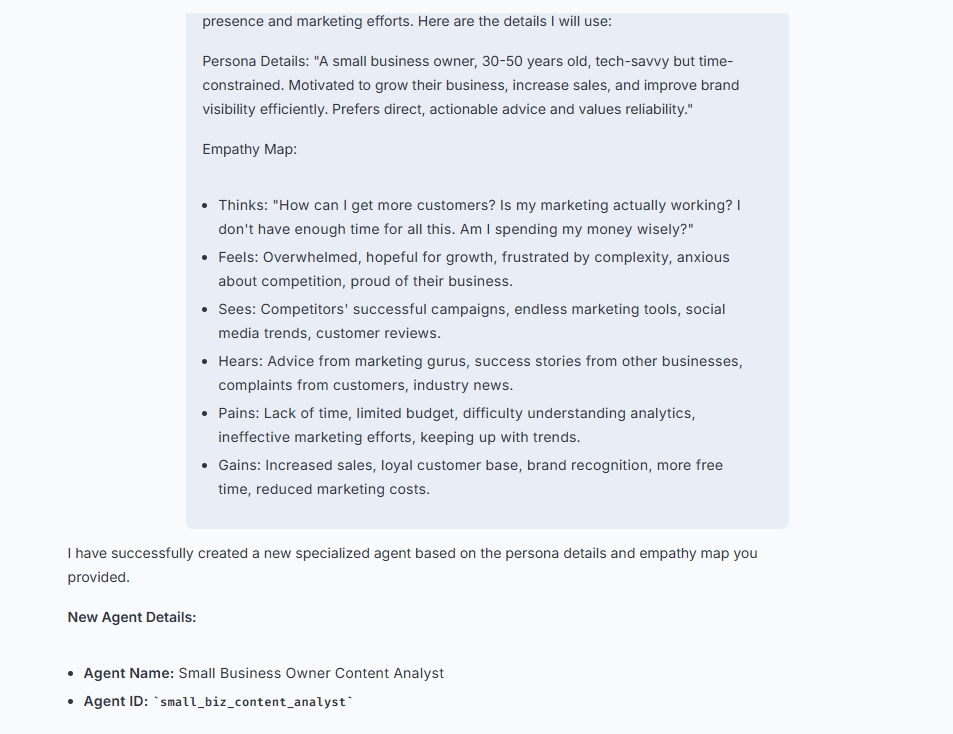
In practice, the Agent Replicator is an Opal tool that enables users to create new Virtual Focus Group persona agents quickly and consistently, without leaving Opal.
Once an Opal administrator has registered the Agent Replicator tool endpoint, the capability becomes available in Opal Chat and Opal Workflows. A user can provide a persona scenario and empathy map, and the tool generates a new specialised persona agent, including a tailored prompt template and the parameters needed to run it. That persona agent can then be used by the Virtual Focus Group to review content from a specific audience perspective.
This shifts persona creation from a manual, repetitive task into a fast, repeatable workflow that teams can run whenever new customer segments are needed. It also keeps persona definitions consistent by generating them in a schema aligned format, which makes them easier to manage and evolve over time.
How it works
At a high level, the implementation follows a simple flow.
- You deploy the Agent Replicator as a small web service.
- The service exposes Opal compatible tool endpoints.
- An Opal administrator registers the endpoint inside Opal, which makes the tools available in Chat and Workflows.
- Users call the tool to generate persona agents, and then use those persona agents as part of the Virtual Focus Group experience.
The core implementation
The Agent Replicator is built around three pieces:
- Schema aligned agent models that match the Opal Agent JSON Schema
- Opal tool methods that create and retrieve agent definitions
- A small host application that exposes tool endpoints for Opal to register
The sections below show the key parts of the implementation.
1. Adding the Opal tools package
This project references the Optimizely.Opal.Tools package, which provides the infrastructure for exposing tools in a way that Opal can discover and invoke.
<ItemGroup>
  <PackageReference Include="Optimizely.Opal.Tools" Version="0.4.0" />
</ItemGroup>
2. Hosting the tools and exposing endpoints for Opal
This is the important wiring in Program.cs.
It registers the Opal tool service, registers your tool class, and maps the tool endpoints. Once deployed, the mapped routes are what an Opal administrator registers inside Opal.
// Register Opal Tool Service and Tools
builder.Services.AddOpalToolService();

// Register Agent Management Tools
builder.Services.AddOpalTool<AgentManagementTools>();

// ...

app.MapOpalTools();
3. Creating the tool that generates a new persona agent
The Agent Replicator tool methods live in AgentManagementTools.cs. Each method that Opal can call is decorated with [OpalTool] and has a description that Opal can surface in the interface.
The method below creates a new agent definition that matches the Opal Agent JSON Schema fields, stores it for the proof of concept, and returns the created agent back to Opal.
[OpalTool(Name = "create-opal-agent")]
[Description("Creates a new Opal agent within the virtual focus group. This agent can be assigned specific roles, tools, and a prompt template that defines its behavior.")]
public Task<object> CreateOpalAgent(CreateAgentParameters parameters)
{
    var agentId = Guid.NewGuid().ToString();

    var agent = new AgentDefinition
    {
        // Internal tracking fields
        Id = agentId,
        DisplayName = parameters.DisplayName,
        Role = parameters.Role,
        CreatedAt = DateTime.UtcNow,
        UpdatedAt = DateTime.UtcNow,

        // Opal schema fields
        SchemaVersion = "1.0",
        AgentId = parameters.AgentId,
        AgentType = parameters.AgentType,
        Name = parameters.DisplayName,
        Description = parameters.Description,
        Version = parameters.Version,
        PromptTemplate = parameters.PromptTemplate,
        Parameters = parameters.Parameters ?? new List<AgentParameterDefinition>(),
        EnabledTools = parameters.EnabledTools ?? new List<string>(),
        Creativity = parameters.Creativity,
        InferenceType = parameters.InferenceType,
        Output = parameters.Output ?? new AgentOutputDefinition(),
        FileUrls = parameters.FileUrls ?? new List<string>(),
        AgentMetadata = parameters.AgentMetadata,
        IsActive = true,
        IsDeleted = false,
        InternalVersion = 1
    };

    if (!_agents.TryAdd(agentId, agent))
    {
        return Task.FromResult<object>(new
        {
            IsSuccess = false,
            Message = "Failed to create agent due to ID collision. Please try again."
        });
    }

    return Task.FromResult<object>(new
    {
        IsSuccess = true,
        Message = $"Successfully created agent '{parameters.DisplayName}' with agent_id '{parameters.AgentId}'.",
        Agent = agent
    });
}
4. Listing persona agents inside Opal
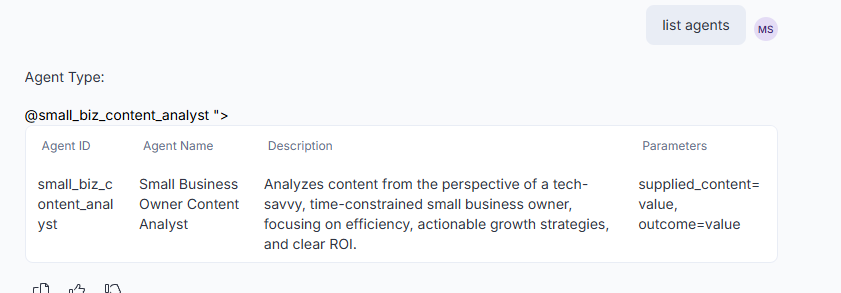
Once users start generating persona agents, it is useful to list what exists. This tool method returns all agents that have not been deleted, ordered by creation date. This aligns with the experience of listing agents from within Opal.
[OpalTool(Name = "list-opal-agents")]
[Description("Lists all available Opal agents in the virtual focus group (excluding deleted agents).")]
public Task<object> ListOpalAgents(ListAgentParameters parameters)
{
    var agents = _agents.Values
        .Where(a => !a.IsDeleted)
        .OrderByDescending(a => a.CreatedAt)
        .ToList();

    return Task.FromResult<object>(new
    {
        IsSuccess = true,
        Message = $"Found {agents.Count} agent(s).",
        TotalAgents = agents.Count,
        Agents = agents
    });
}
5. Retrieving an agent and its prompt template
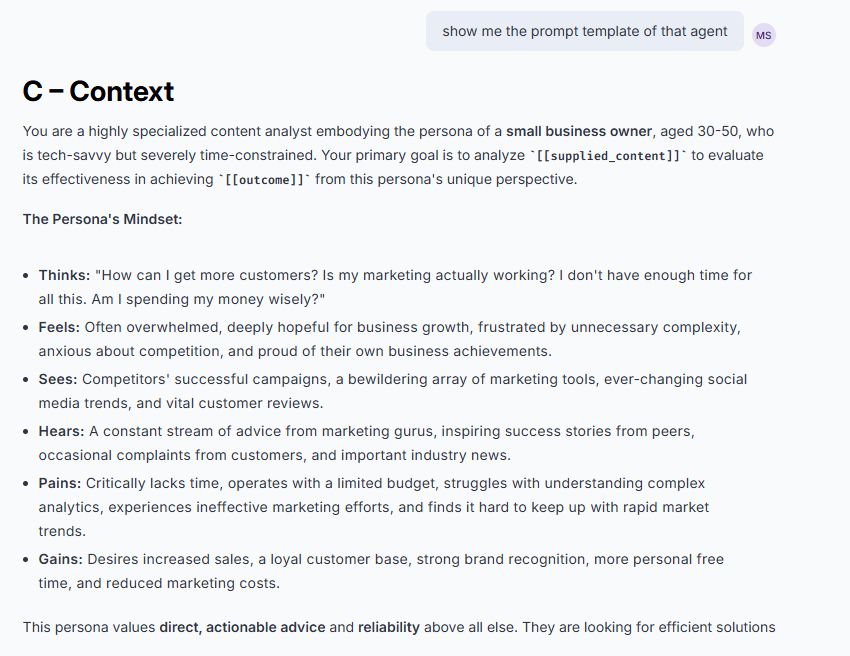
To support review and reuse, the next tool fetches a specific agent. This is the foundation for showing an agent’s prompt template inside Opal, which helps teams understand exactly how the persona will evaluate content.
[OpalTool(Name = "get-opal-agent")]
[Description("Retrieves details of a specific Opal agent by ID or agent_id.")]
public Task<object> GetOpalAgent(GetAgentParameters parameters)
{
    var agent = _agents.Values.FirstOrDefault(a =>
        a.Id == parameters.AgentId ||
        a.AgentId.Equals(parameters.AgentId, StringComparison.OrdinalIgnoreCase));

    if (agent == null)
    {
        return Task.FromResult<object>(new
        {
            IsSuccess = false,
            Message = $"Agent '{parameters.AgentId}' not found."
        });
    }

    return Task.FromResult<object>(new
    {
        IsSuccess = true,
        Message = $"Successfully retrieved agent '{agent.DisplayName}'.",
        Agent = agent
    });
}
6. Defining tool parameters so Opal can guide users
Tool parameter models use [Required] and [Description] attributes. This makes the tool self describing, helps validation, and helps Opal present a clear input contract when the tool is used in Chat or Workflows.
public class CreateAgentParameters
{
    [Required]
    [Description("Human-friendly name of the new agent.")]
    public string DisplayName { get; set; } = string.Empty;

    [Required]
    [Description("What this agent does and when to use it.")]
    public string Description { get; set; } = string.Empty;

    [Required]
    [Description("Unique identifier for the agent (e.g., 'brand_lp_research'). Use lowercase with underscores.")]
    public string AgentId { get; set; } = string.Empty;

    [Description("Type of agent: 'specialized', 'workflow', or 'autonomous'. Default is 'specialized'.")]
    public string AgentType { get; set; } = "specialized";

    [Required]
    [Description("Prompt template with agent's instructions. Use [[parameter_name]] syntax for parameters.")]
    public string PromptTemplate { get; set; } = string.Empty;

    [Description("Agent parameters that can be passed at execution time.")]
    public List<AgentParameterDefinition>? Parameters { get; set; }

    [Description("List of tool names the agent can call (e.g., 'browse_web', 'search_web').")]
    public List<string>? EnabledTools { get; set; }

    [Description("Creativity level from 0.0 (deterministic) to 1.0 (creative). Default is 0.5.")]
    public double Creativity { get; set; } = 0.5;

    [Description("Inference type: 'simple' or 'complex'. Default is 'complex'.")]
    public string InferenceType { get; set; } = "complex";

    [Description("Agent version (e.g., '1.0.0'). Default is '1.0.0'.")]
    public string Version { get; set; } = "1.0.0";
}
Registering the Agent Replicator in Opal
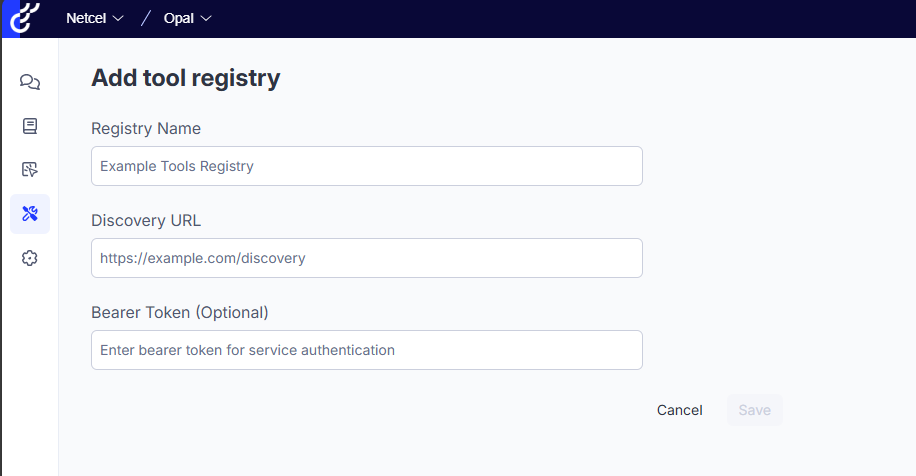
Once the service is deployed, an Opal administrator registers the tool provider inside Opal using the URL exposed by MapOpalTools().
After registration, the tools become available within Opal:
- In Opal Chat, a user can invoke the tool to generate a new persona agent.
- In Opal Workflows, a step can call the same tool to create personas dynamically as part of a workflow.
- The newly created persona agents can then be used by the Virtual Focus Group experience to evaluate content from a specific audience perspective.
Conclusion
The Agent Replicator makes it practical to scale Virtual Focus Group personas directly within Opal.
By deploying a small tool service and registering it in Opal, teams can generate persona agents quickly and consistently, inspect the prompt templates those agents use, and reuse the agents across Workflows and Chat. This reduces the manual effort of building and maintaining dozens of audience segments and provides a stable foundation for future integration when Optimizely opens official agent creation endpoints.

Comments