


Personalisation in CMS 13 when you go headless: variations in the CMS, decisions in Experimentation
Back in February I wrote about personalisation in CMS 13 using Audiences. Everything in that post still holds, with one condition I should have made louder: it only works when the CMS renders the page. The moment your front end is a separate application reading content from Optimizely Graph, Audiences stop doing anything.
This post covers why that is, and how I would approach personalisation on a headless (or hybrid) CMS 13 build instead. The content still lives in the CMS, but the decision about who sees which content moves to Optimizely's experimentation and personalisation products.
Why Audiences do not work on a headless build
Audiences (Visitor Groups, as they were) are evaluated inside the CMS process, on each request. When a content area renders, the CMS looks at the current visitor (their referrer, the pages they have viewed in this session, their geography and so on), checks each item's audience settings, and leaves out the items that do not match. The personalised HTML is the output of that render.
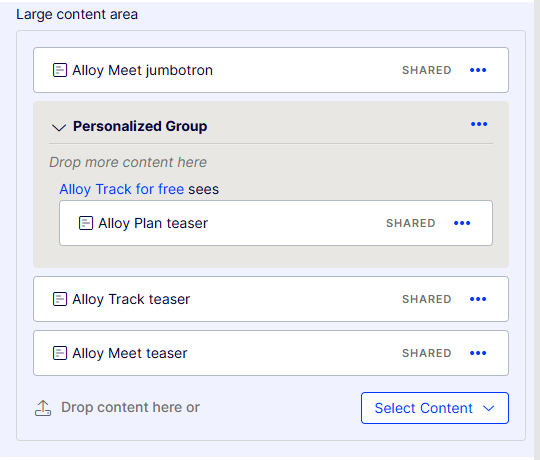
Audiences are evaluated when the CMS renders the content area, which is why they only apply to in-process sites.
On a headless build there is no render in the CMS. Content is published and synchronised into Optimizely Graph once, for everybody, and your Next.js (or other) front end queries Graph when a visitor arrives. Graph never sees the visitor, and the CMS is not in the request path at all, so there is nothing to evaluate the audience against.
Optimizely's own CMS 13 documentation is explicit about this:
"Audiences work only on traditional (in-process) sites, where CMS manages both content authoring and frontend rendering."
(source: Create audiences for personalization)
The CMS 13 technical Q&A adds that Visitor Groups and Audiences "are not indexed to Graph", and recommends "the new Variations support for content and Experimentation for personalization" for Graph-based delivery (source: CMS 13 technical webinar Q&A). The "View as audience" preview is also unavailable on decoupled front ends.
So if your build is headed MVC, carry on with Audiences; the February post still applies. If it is headless or hybrid, read on.
The new split: content in the CMS, the decision in Experimentation
The recommended model separates two jobs that Audiences used to do together.
- The content. Editors author each version of a page in the CMS as a content variation. It gets drafted, reviewed, approved and published like any other content, and it is indexed to Graph.
- The decision. An experimentation or personalisation engine decides which variation a given visitor should see, and the front end fetches that variation from Graph.
The two are joined by a single string: the variation name. If the engine says "WinterCampaign", the front end asks Graph for the "WinterCampaign" variation of the page. If that variation does not exist, it falls back to the original.
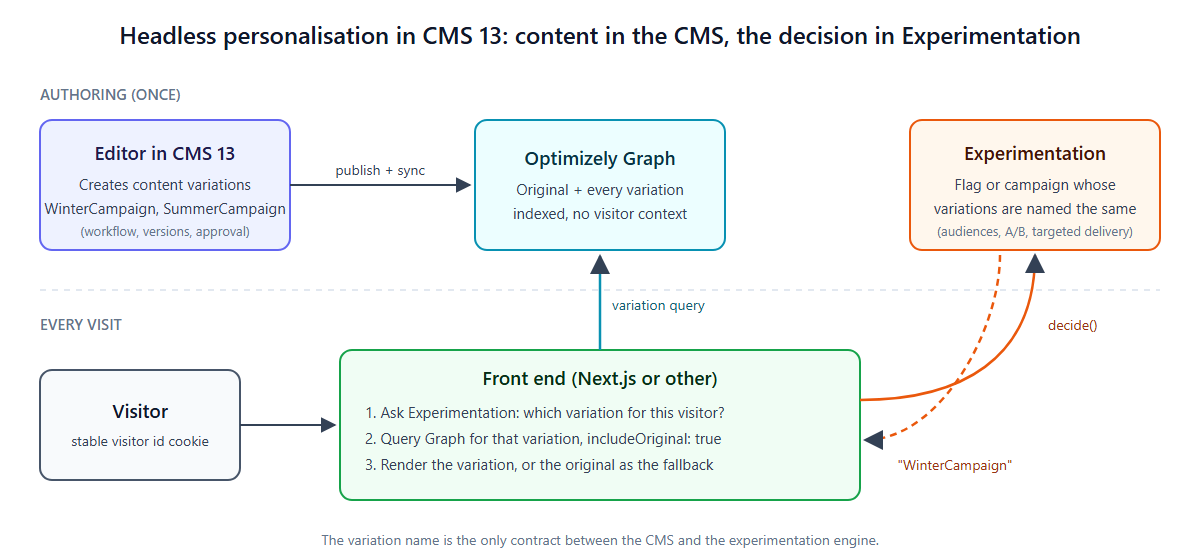
I think this is a better model than it first appears. Content stays in one place, under the CMS's workflow and version history, rather than being pasted into a testing tool's visual editor. The engine that decides is also the one that measures, so every personalised experience can be tested against the original.
Content variations in CMS 13
A content variation is a second (or third, or tenth) published version of the same content item, in the same language. Each variation has its own version history and publishing lifecycle, and only stores the properties you actually change (source: Create content variations in CMS 13).
Creating one from the editor:
- Select the page in the content tree.
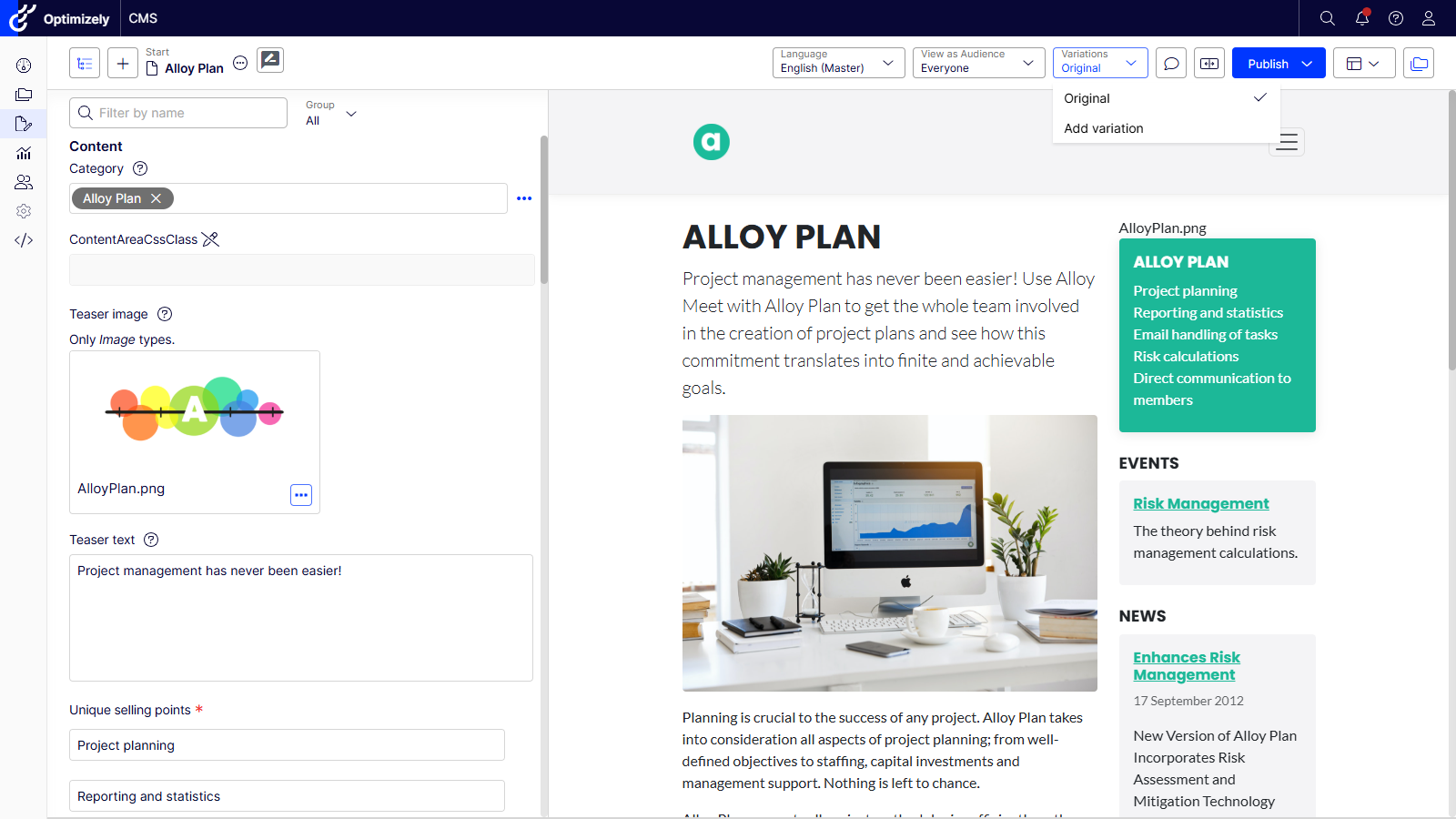
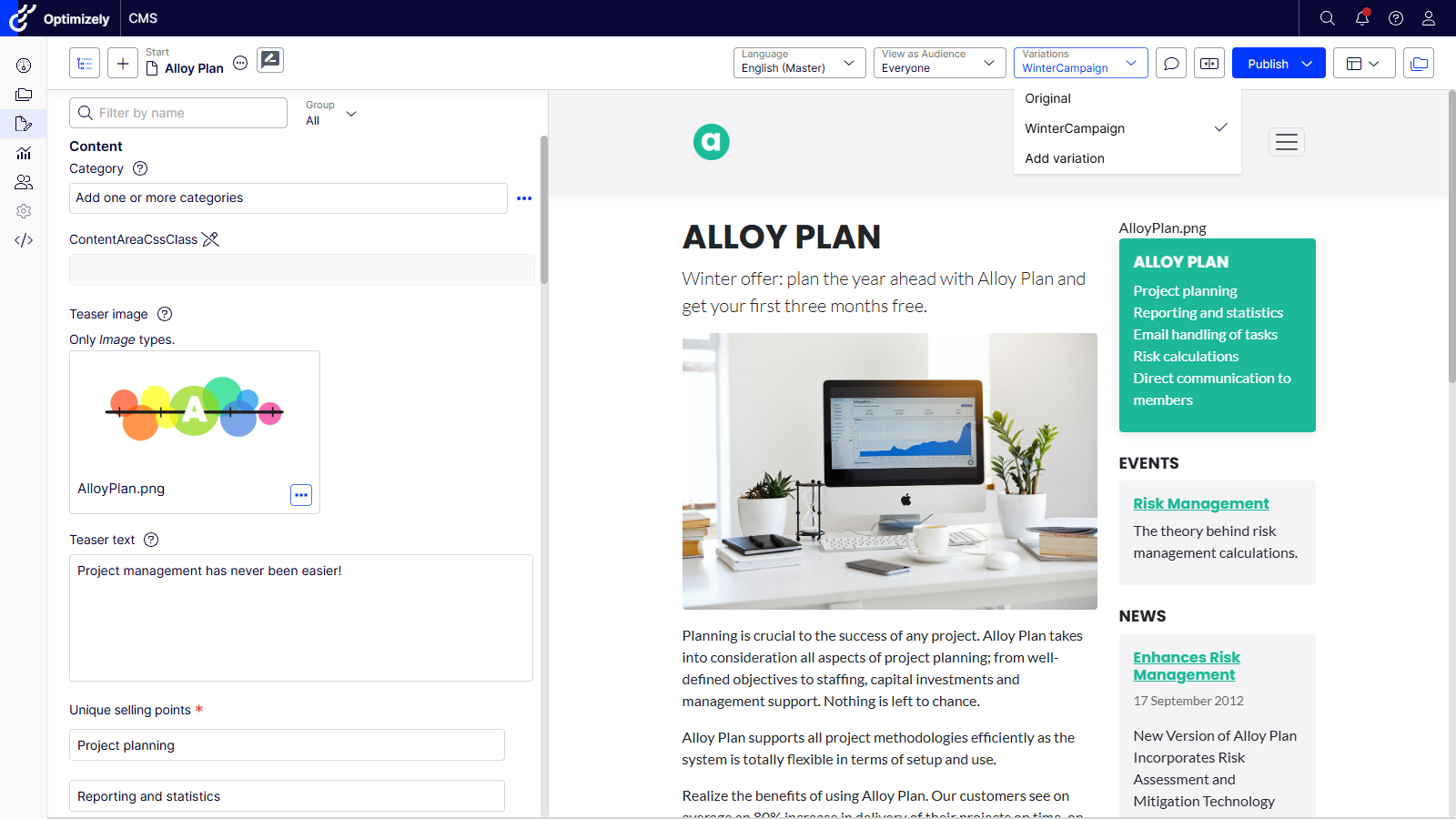
- Choose Variations > Add variation.
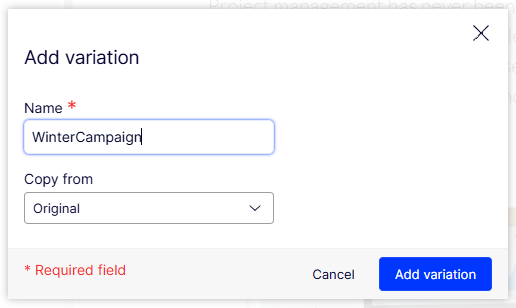
- Give it a name, for example WinterCampaign. It cannot start with a number or contain spaces.
- Select Add variation. The variation opens in Visual Builder and appears in the Variations dropdown.
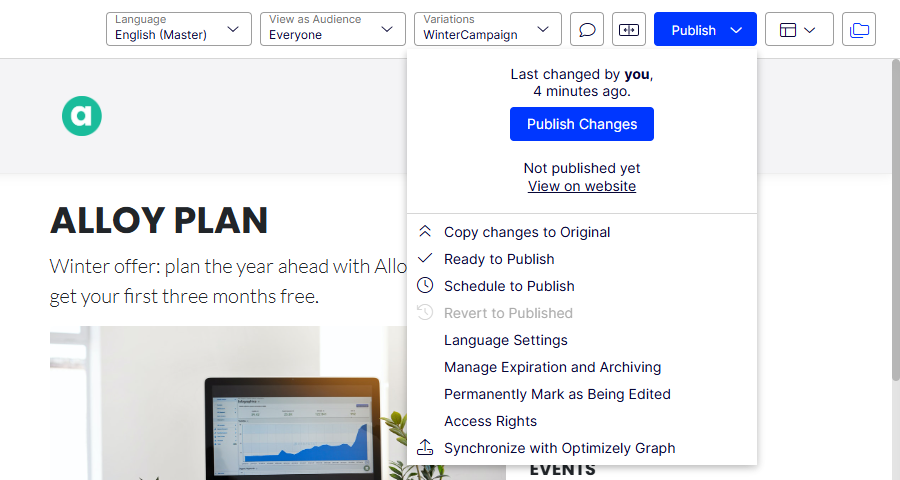
- Make your changes, then Publish > Publish changes.
You can also copy a new variation from an existing one using Copy from, and if a variation wins, Copy changes to Original promotes it to become the new default.
Two things worth knowing before your editors start:
- Name variations for what they are, and treat the name as a contract. The name is what the experimentation side will ask for, and it is case sensitive. Rename a variation in the CMS and the front end will quietly serve the original to everyone while the experiment keeps counting visitors.
- Check which properties can vary on your version. At the time of writing, variations only vary localisable properties. Treat that as release-specific and re-check it on the version you ship.
Fetching a variation from Graph
By default, Graph queries only return original content, so existing queries are unaffected. To ask for a variation, add the variation argument and keep the original in the response as the fallback (source: Query content variations in Optimizely Graph):
query LandingPage($variation: [String!]) {
  _Content(
    where: { _metadata: { url: { default: { eq: "/winter-offers/" } } } }
    variation: { include: SOME, value: $variation, includeOriginal: true }
  ) {
    items {
      _metadata { key displayName variation }
      ... on LandingPage { Heading MainBody { html } }
    }
  }
}
const requested = items.find((i) => i._metadata?.variation === variationKey);
const original = items.find((i) => !i._metadata?.variation);
const page = requested ?? original;
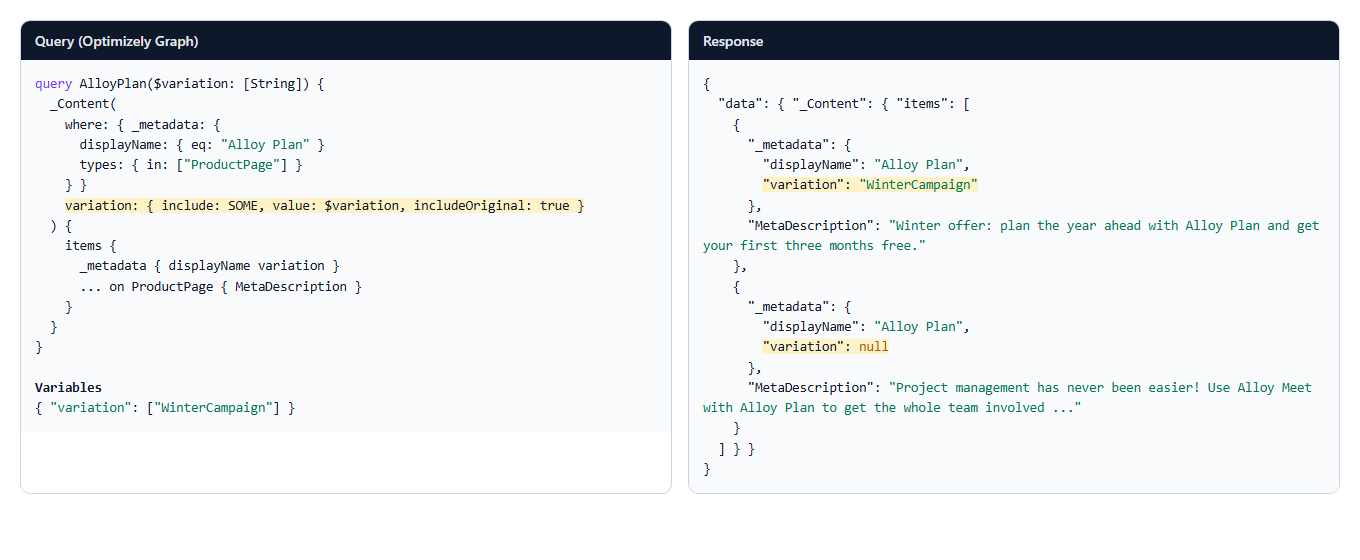
That fallback is what makes the whole approach safe. If the engine is switched off, returns nothing, or asks for a variation that does not exist, the visitor gets the original page.
Route 1: Feature Experimentation (server-side, the native route)
This is the route Optimizely documents today, and the one I would reach for first on a headless build (source: Configure the Optimizely CMS (SaaS) integration; Piotr Nowak's Unlock Experimentation with Content Variations in CMS 13 walks through the same pattern for CMS 13 with both an MVC and a Next.js head).
In Feature Experimentation:
- Create a flag, for example winter_landing_page.
- Add variations whose keys match the CMS variation names exactly (WinterCampaign, SummerCampaign). The documented SaaS integration also adds a string variable carrying the name, which is a good idea because it lets you change the mapping without renaming the variation.
- Add a rule.
- An A/B test rule splits traffic across the variations and measures them against a metric.
- A targeted delivery rule with an audience serves one variation to everyone who matches, for example visitors in the UK, logged-in members, or a segment you pass in as an attribute. This is where personalisation happens.
In the front end, decide on the server and fetch the matching variation:
import { createInstance, OptimizelyDecideOption } from '@optimizely/optimizely-sdk';

const optimizely = createInstance({
  sdkKey: process.env.OPTIMIZELY_FX_SDK_KEY!,
  datafileOptions: { autoUpdate: true, updateInterval: 60_000 },
});

export async function getVariationKey(visitorId: string, attributes: Record<string, unknown>) {
  await optimizely.onReady();
  const user = optimizely.createUserContext(visitorId, attributes);
  const decision = user?.decide('winter_landing_page', [OptimizelyDecideOption.INCLUDE_REASONS]);
  return decision?.enabled ? decision.variationKey : null;
}
A few things I would build in from the start:
- A stable visitor id. Bucketing hashes on the user id, so anonymous visitors need a first-party cookie set in middleware, or they will flip between variations.
- Keep the datafile fresh. Without autoUpdate, the JavaScript SDK fetches the datafile once, so rule changes in the dashboard do not reach a long-running server.
- Caching. A page that varies by visitor cannot be served from one shared cache entry. Either mark decided responses as uncacheable, or cache per variation (the variation name makes a sensible cache key when the number of variations is small).
- Attributes only come from you. Feature Experimentation audiences evaluate the attributes your code passes in. If you want to target on a CRM segment or a logged-in state, the front end has to supply it.
Because the decision happens on the server, there is no flicker and the personalised content is in the first HTML response.
Route 2: Web Experimentation and Personalization (client-side)
The other half of Optimizely's engine is Web Experimentation and its sibling, Optimizely Personalization. Personalization adds campaigns made of experiences, each targeted at an audience, and can use real-time segments from Optimizely Data Platform where you have it (source: Optimizely Personalization overview). Marketers own these audiences and campaigns in the Optimizely UI, which is often exactly what a marketing team wants.
The trap here is the visual editor. It makes it easy to change a heading or swap an image directly in the browser, and when you do that the personalised content lives in Web Experimentation, not in the CMS. It is unversioned by the CMS, invisible to editors, and it breaks the moment the page markup changes.
The better pattern keeps the content in the CMS and uses the campaign only to choose the variation:
- Name each Web Experimentation variation or Personalization experience after the CMS variation it should show.
- In the front end, read the visitor's active decisions from the snippet's state API and fetch the matching CMS variation from Graph.
function getCmsVariationName(): string | null {
  const state = (window as any).optimizely?.get?.('state');
  if (!state) return null;
  const active = state.getCampaignStates({ isActive: true });
  for (const campaign of Object.values<any>(active)) {
    const name = campaign.variation?.name;
    if (name && /^[A-Za-z][A-Za-z0-9]*$/.test(name)) return name;
  }
  return null;
}
getCampaignStates returns both experiments and personalisation campaigns (source: Get state). Check the returned shape against your own snippet version before relying on it.
This is a pattern rather than an out-of-the-box integration. Optimizely documents the Feature Experimentation route; I have not found a documented Web Experimentation equivalent, so treat this as something you build and own. The trade-offs are the usual client-side ones: the decision happens after the page loads, so either the personalised region is fetched late (reserve its space to avoid layout shift) or you hide it until the decision arrives. I would keep personalised regions out of the largest above-the-fold element for that reason.
Which route should you use?
| Feature Experimentation | Web Experimentation / Personalization | |
|---|---|---|
| Where the decision happens | Your server or edge | The visitor's browser |
| Flicker and layout shift | None | Needs designing for |
| Who owns audiences | Developers pass attributes; audiences built in FX | Marketers, in the Optimizely UI, including ODP real-time segments |
| Content lives in | The CMS | The CMS, if you use the pattern above |
| Documented by Optimizely for CMS variations | Yes | Not yet; build it as a pattern |
My default on a headless or hybrid CMS 13 build is Feature Experimentation for anything above the fold or on key journeys, with Personalization campaigns where marketers need to own and change audiences without a developer. Both can sit on the same content variations, because the only thing either needs from the CMS is the name.
What about headed sites?
Nothing changes. Audiences still work on in-process CMS 13 sites and remain the simplest option for rules-based personalisation. Content variations work there too, so a headed site can use the same Feature Experimentation pattern with the .NET SDK and IContentLoader when you want proper testing rather than show-and-hide rules.
Optimizely has said deeper integration between the CMS and Experimentation is on the roadmap, without a date. I will update this post if that changes the picture.
Comments