
EpiChatty – your personal EPiServer assistant – Gadget
Hi, here is my small contribution to the Gadget competition. Meet EpiChatty, your personal assistant (chat bot) that can give you help and information about EPiServer CMS. It could serve as a help desk assistant to EPiServer CMS editors / administrators / developers / designers and to content editors.
The main idea behind this is to have Google Talk client embedded as a gadget on dashboard and run EPiChatty as a console application which can interact with the user and give appropriate response.
Google Talk implements Extensible Messaging and Presence Protocol (XMPP) protocol which essentially exchange messages using XML between clients and servers. More information about this protocol can be found here and more information about Google Talk API can be found at here
As Google do not provide any C# implementation of XMPP protocol and as I am primarily a C# developer,(not brave enough to try Google’s java based implementation for this protocol), so I have to look for different options. After bit more research, I found out that agsXMPP is an open source SDK / library for the XMPP protocol which is written in managed C# and is dedicated to .NET and Mono technologies. More information about this SDK can be found here .
With all my components in place, I have to learn basics about the new protocol (which I have never used before) and also use the SDK to implement it (easy). It took a while to do a ‘hello world’ kind of code, as Google server require a different port (5222) than 80 to be open as well so that it could communicate. Once I figured that out with help from support team at agsXMPP, next thing was to implement the automated behaviour for the asked questions.
There are several ways that this could be implemented, but I went for the XML based approach. I have stored questions and answers in a set patterned way so that if user ask ‘what is’ or ‘how to’ or any ‘generic’ question, a patterned would be matched and answer would be returned. The main reason behind this approach was its simplicity and extendibility.
Here is the screen shot how the EPiChatty gadget will look like on dashboard

The gadget view contains embedded Google Talk client and the controller simply returns the view. The login it will redirect to central Google account services where you could login and then it will return you back to the dashboard.
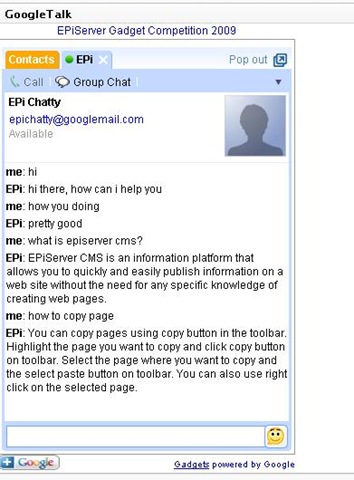
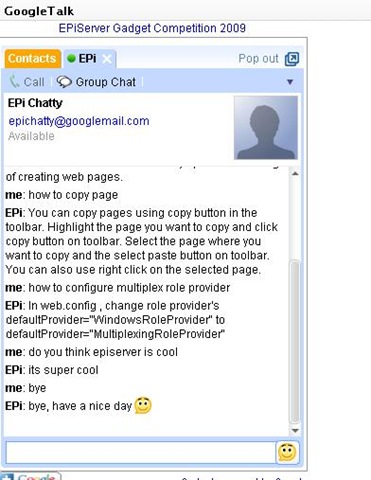
once login you can ask ‘what is’ or ‘how to’ or ‘generic’ questions
Here is the screen shot of the console application showing that EPiChatty is available to chat
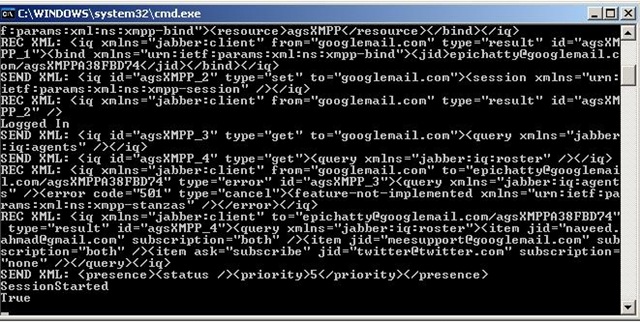
I have made the EPiChatty as a console application so that it could run separately from the main application as a light weight process in background. In case you want to start chatting and test it out, send an invite to epichatty@googlemail.com . I will be hosting it till the end of December 2009 and then EPiChatty will be on long vacations.
Source files contain every thing apart from the password for the EPiChatty Google’s account. If you would like to host your own, you can create a new Google account and replace the username and password in console application and run the console application.

Comments