


Display the property name for developers in edit mode
For those of you that have read any of my previous blog posts may have noticed that I like things that make the daily life easier. So here is another thing I have had a need for and hopefully can be of use.
A thing that has been a royal pain since I started with EPiServer is all the times when coding and I need to know a property's name. At least for me when this need arise I’m usually in edit mode entering a value in the particular property I’m interested in.
I hate that I need to go into admin mode and check the property name. And since my memory fails me sometimes I need to do this way to often.
If I was using PageTypeBuilder this wouldn’t be an issue but there are lots of “classic” EPiServer sites out there.
From some earlier investigation I remembered that it’s the PropertyDataForm web control that is responsible for doing the rendering. I had an idea that I could modify it through a page adapter. A bit of googling and I found a post form Andreas Hattestad where he hade done just that.
The PropertyDataForm has a public Itemplate field that we can assign our own template and thus change the rendering of the property's caption.
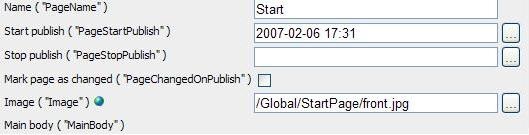
The result looks like this with the property name in parentheses. I also added a feature so that if you click the property name it’s added to the clipboard for easy pasting in Visual Studio (IE only for now).
Here’s the code
using System;
using System.Collections.Generic;
using System.Web;
using EPiServer.Web.WebControls;
using EPiServer.UI.WebControls;
using EPiServer;
using EPiServer.Web.PropertyControls;
using System.Web.UI;
using System.Web.UI.Adapters;
using System.Web.UI.WebControls;
using EPiServer.Core;
using System.Configuration;
namespace EPiServer.Templates.Public
{
public class PropertyDataFormAdapter : PageAdapter
{
#region Fields
const string copyScript = "<script>function copyToClipboard(s){if( window.clipboardData && clipboardData.setData ){clipboardData.setData(\"Text\", s);}}</script>";
#endregion
#region Classes
/// <summary>
/// Custom captiontemplate to change the caption rendering for the properties
/// </summary>
protected class CaptionTemplate : ITemplate
{
public void InstantiateIn(Control container)
{
Label lbl = new Label();
PropertyData property = ((PropertyTemplateContainer)container).DataItem as PropertyData;
lbl.Text = string.Format("{0} ( \"{1}\" )", property.TranslateDisplayName(), property.Name);
lbl.Attributes.Add("onclick", string.Format("copyToClipboard(\"{0}\")", property.Name));
container.Controls.Add(lbl);
}
}
#endregion
#region Methods
/// <summary>
/// Finds the propertydataform and add a custom Captiontemplate and javascript for copytoclipboard
/// </summary>
protected override void OnInit(EventArgs e)
{
PropertyDataForm dataForm = FindControl<PropertyDataForm>(this.Page, null);
if (dataForm != null)
{
dataForm.CaptionTemplate = new CaptionTemplate();
RegisterCopyScript();
}
base.OnInit(e);
}
/// <summary>
/// Registers the copytoclipboard javascript specified in separete const
/// </summary>
private void RegisterCopyScript()
{
if (!this.Page.ClientScript.IsClientScriptBlockRegistered(this.GetType(),"displeyExtraInfo"))
{
this.Page.ClientScript.RegisterClientScriptBlock(this.GetType(), "displeyExtraInfo", copyScript);
}
}
#endregion
#region FindControl(s) methods
protected T FindControl<T>(Control control, string id) where T : Control
{
T controlTest = control as T;
if (null != controlTest && (null == id || id.Equals(controlTest.ID)))
return controlTest;
foreach (Control c in control.Controls)
{
controlTest = FindControl<T>(c, id);
if (null != controlTest)
return controlTest;
}
return null;
}
protected List<PropertyDataControl> FindControlsProperties(Control control)
{
List<PropertyDataControl> results = new List<PropertyDataControl>();
FindControlsProperties(control, results);
return results;
}
protected void FindControlsProperties(Control control, List<PropertyDataControl> results)
{
if (control is PropertyDataControl)
{
results.Add((control as PropertyDataControl));
}
else
{
foreach (Control c in control.Controls)
{
FindControlsProperties(c, results);
}
}
}
#endregion
}
}
Don’t forget to register the adapter in a .browser file in the App_Browsers folder.
1: <browsers>
2: <browser refID="Default">
3: <controlAdapters>
4: <adapter
5: controlType="EPiServer.UI.Edit.EditPanel"
6: adapterType="EPiServer.Templates.Public.PropertyDataFormAdapter"/>
7: </controlAdapters>
8: </browser>
9: </browsers>
Hope someone find it useful.
As per request here´s a zip with the code.

Simple and brilliant!
Any chance you can upload the source code as well? Would make it easier to copy :-)
Thank you. Added a zip with the code.
/ Per Nergard