


PageCriteriaQueryService builder with Blazor and MudBlazor
This might be a stupid idea but my new years resolution was to do / test more stuff so here goes. This razor component allows users to build and execute queries against your CMS site, providing a semi user-friendly interface for searching for pages based on content type, properties.
You do need to have knowledge about your content types and the data but the thought is that when the need arises to identify what pages / how many pages you have with a certain combination of data you should be able to find those without any coding. If the results are not that many maybe manually editing them and adjusting what is needed is enough. If the number is to high or more complex changes needs to be performed a action-button can be added to do the work instead of possible doing a scheduled job or something.
You can find the code over at my Gist.
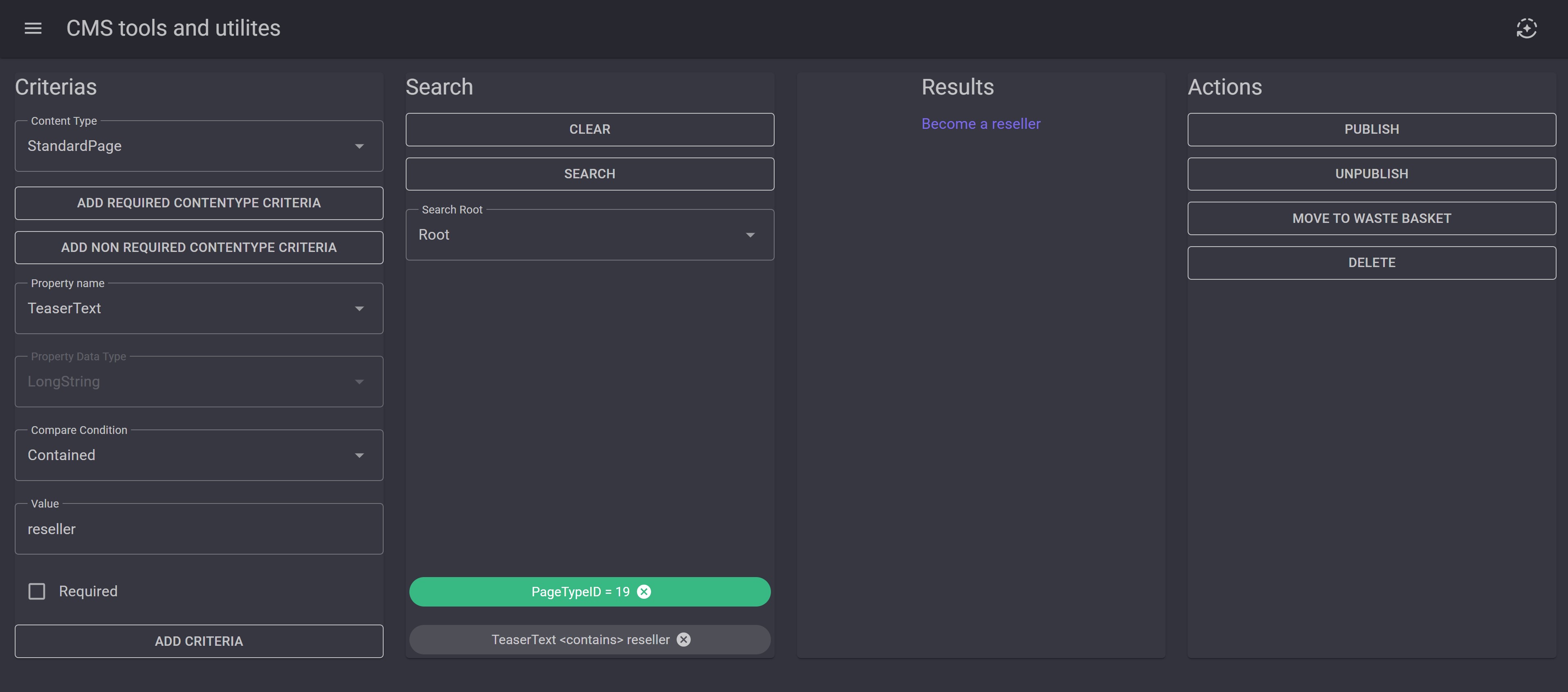
Criteria:
So you can create criteria parameters based on content type , propertes and condition and make them required or not. Required parameters will be shown in green.
Search:
When youre happy with your criterias you select a startnode (Root or any of the defined sites) and hit search. If you are not happy with the results you can delete individual parameters or all.
Results:
Simple list with a link to edit mode for each content that opens in a new tab.
Actions:
I actually haven't implemented any actions. But the idea is that it's easy to add any action need to perform actions on the search result.
Looks like this:

Comments