
The EPiServer Pages and Properties From the Database Point Of View.
The database diagram describing relations between EPiServer pages and their properties is given below.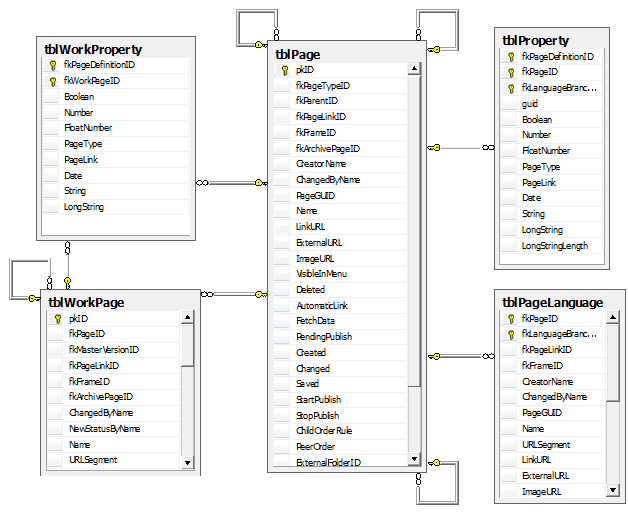
As you can see the tables tblPage and tblWorkPage are connected with “one – to - many ” relation. The main record about the page is stored in tblPage and the page versions records are saved in the tblWorkPage. The query getting all the versions for the page with id = 49 looks this way:
select * from tblPage p
join tblPageType pt on p.fkPageTypeID = pt.pkID
join tblWorkPage wp on wp.fkPageID = p.pkID
where p.pkID = 49
When you create new page new record is added to the tblPage table. Everytime you publish new version of the page the correspondent record is inserted into the tblWorkPage. Information about the page current version is stored in tblPageLanguage.PublishedVersion field which can contain one of the tblWorkPage.pkID values.
Evidently, if you need to get the properties values for the given page version ( f.e.130) you should execute
select * from tblWorkProperty where fkWorkPageID = 130,
where fkWorkPageID is a foreign key to tblWorkPage. So in much the same way the tblWorkProperty table keeps the history of properties values and tblProperty contains just a single record about given property – the value when created.
Hi Yugeen, Thanks a lot, very useful information for a beginner like me.
Hi,
If I want to change a parent of a particular page from node1 to node2, which tables shall I look at?
Right now I have used the query below
update tblpage
set fkparentid = [new parent id]
where pkid = [id of the page]
This does change the node, but when I use the GetParents, it still points to the old node
Thanks.
Thank you, Yugeen! This has been very helpul.
I noticed that in Episerver version 10.10, tblPage, as well as other tables you mentioned, are actually a Views in a database.
Thanks
Sonya