


 Certification.png "SaaS CMS Administrator (Expert) Certification")


A day in the life of an Optimizely OMVP: Introducing Optimizely Style Manager
Managing display templates in Optimizely CMS (SaaS) has traditionally required working directly with the REST API or managing JSON configuration files manually. Today, I'm excited to share a new open-source tool that brings a visual, user-friendly interface to display template management: Optimizely SaaS Style Manager.
What Are Display Templates?
In Optimizely CMS (SaaS), display templates (also known as "styles") define how content editors can customise the visual presentation of content. They allow you to create predefined styling options for Sections, Rows, and Columns within Visual Builder, giving content editors flexibility without requiring developer intervention for every design change.
Each display template can include:
- A unique key for identification
- Display name shown to content editors
- Base type (Section, Row, or Column)
- Associated content type for context-specific styling
- Custom settings with various editor types (text, boolean, number, dropdown)
The Challenge
While the Optimizely CMS API provides full CRUD operations for display templates, managing them through raw API calls or JSON files presents several challenges:
- No visual interface for browsing existing templates
- Manual JSON editing prone to syntax errors
- Difficult to migrate templates between environments
- No search or filtering when you have many templates
Enter Style Manager
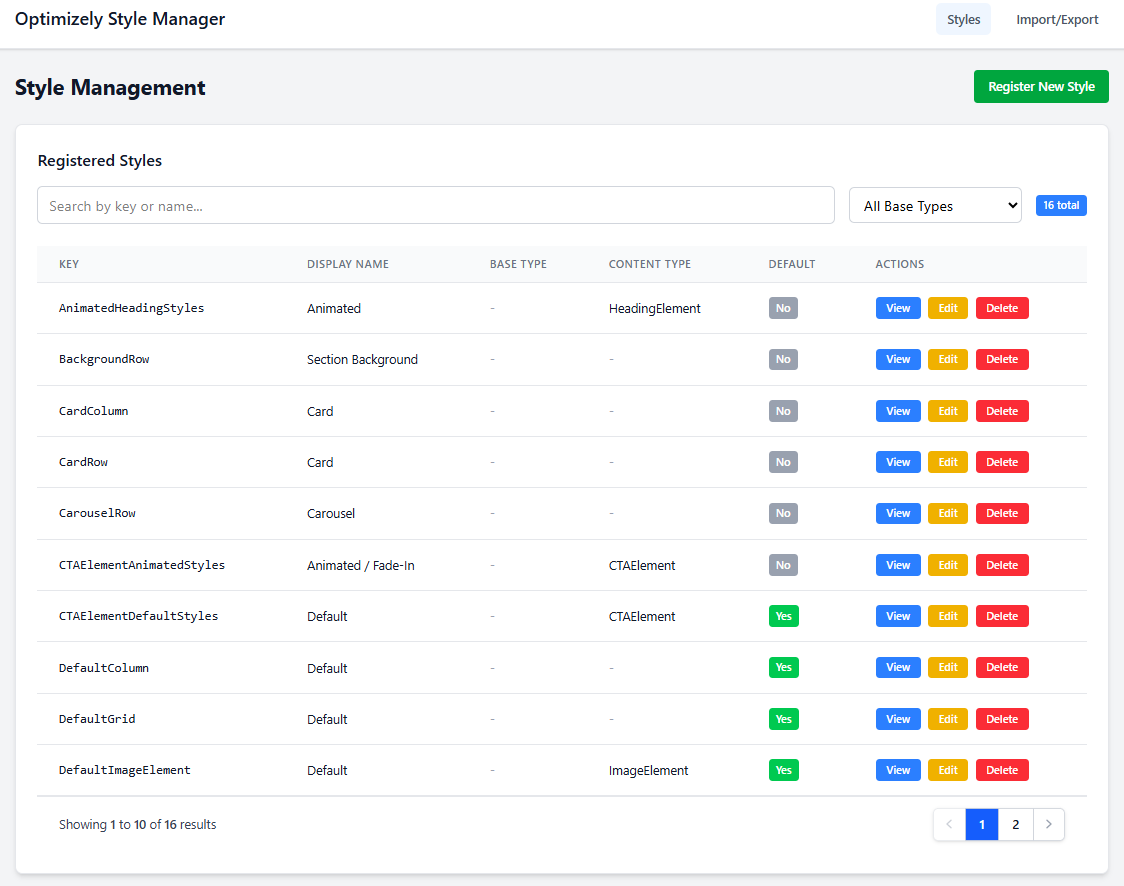
Style Manager is a Blazor-based web application that connects directly to your Optimizely CMS instance via the REST API, providing a complete management interface for display templates.
Key Features
1. Full CRUD Operations
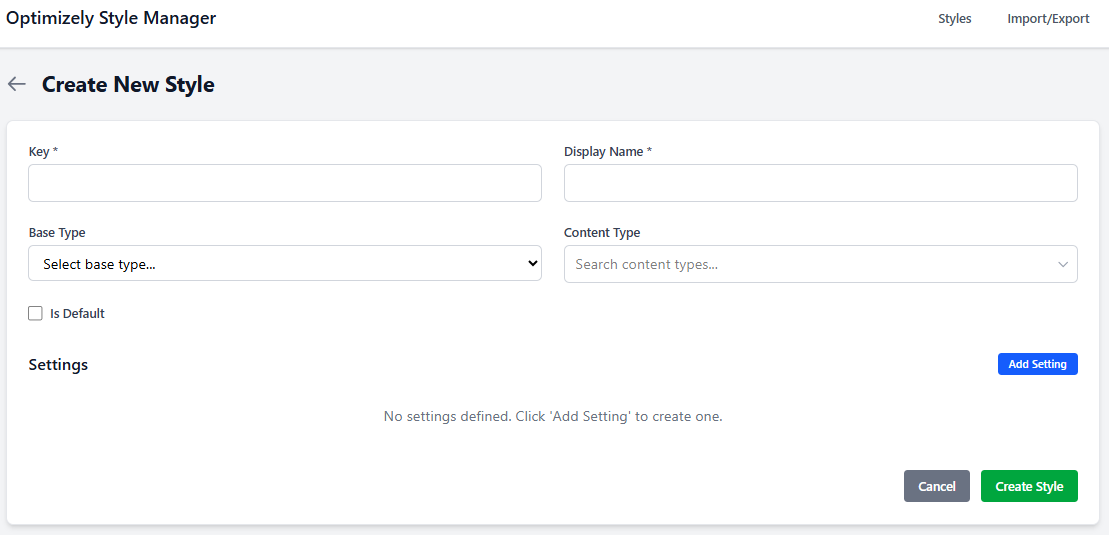
Create, view, edit, and delete display templates through an intuitive form-based interface. No more hand-crafting JSON or making raw API calls.
2. Smart Search & Filtering
Quickly find templates using text search across keys and display names, or filter by base type (Section, Row, Column). With debounced input, the interface stays responsive even with large template collections.
3. Dynamic Settings Management
Configure template settings visually with support for multiple editor types:
- String - Text input fields
- Boolean - Toggle switches
- Number - Numeric inputs
- Select - Dropdown menus with custom choices
Add, remove, and reorder settings and choices without touching JSON.
4. Content Type Integration
The new searchable content type dropdown fetches available content types directly from your CMS instance. Simply start typing to filter, use keyboard navigation, and select the appropriate content type for your template.
5. Import & Export
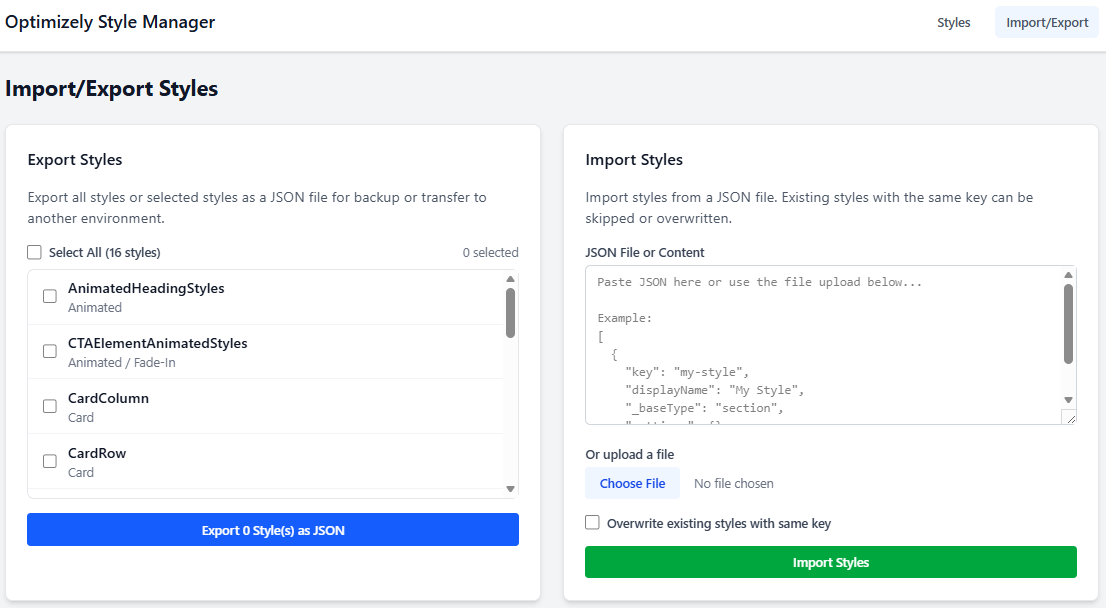
Transfer templates between environments with ease:
- Export all templates or select specific ones to download as JSON
- Import by pasting JSON or uploading a file
- Conflict resolution - choose to skip or overwrite existing templates
- Detailed results showing success/failure for each imported template
6. Secure OAuth Authentication
Style Manager uses OAuth 2.0 client credentials flow with automatic token caching and refresh. Your API credentials are configured once, and the application handles authentication transparently.
Getting Started
Prerequisites
- .NET 10.0 or later
- An Optimizely CMS (SaaS) instance
- API credentials (Client ID and Client Secret) from your Optimizely dashboard
- Download the repo from https://github.com/adayinthelifeofapro/OptimizelySaaSStyleManager
Configuration
Update appsettings.json with your API credentials:
{
"OptimizelyApi": {
"BaseUrl": "https://api.cms.optimizely.com/preview3",
"TokenUrl": "https://api.cms.optimizely.com/oauth/token",
"ClientId": "your-client-id",
"ClientSecret": "your-client-secret"
}
}
Running the Application
dotnet run
Navigate to https://localhost:5001 and start managing your display templates.
Use Cases
Environment Migration
Developing new templates in a staging environment? Export them as JSON and import into production with a few clicks. The conflict resolution feature ensures you won't accidentally overwrite templates that have diverged.
Template Auditing
Need to review all templates for a specific content type? Use the search and filter capabilities to quickly locate and audit relevant templates.
Rapid Prototyping
Create and iterate on template configurations through the visual interface, then export the final JSON for version control or documentation.
Team Collaboration
Share exported JSON files with team members for review before importing to shared environments. The preview feature shows exactly what will be created or updated.
Technical Architecture
Style Manager is built with modern .NET technologies:
- ASP.NET Core Blazor with Interactive Server rendering for a responsive SPA experience
- Tailwind CSS for a clean, utility-first design
- HttpClient with DelegatingHandler pattern for transparent authentication
- System.Text.Json for efficient JSON serialization
The application follows clean architecture principles with clear separation between:
- Pages - Blazor components for UI
- Services - Business logic and API communication
- Models - Data transfer objects matching the Optimizely API schema
What's Next?
This is just the beginning. Potential future enhancements include:
- Bulk operations for managing multiple templates simultaneously
- Template versioning to track changes over time
- Validation rules for settings values
- Template duplication for creating variations quickly
- Dark mode for late-night template management sessions
Conclusion
Optimizely SaaS Style Manager transforms display template management from a developer-centric API task into an accessible, visual workflow. Whether you're a developer looking to speed up template creation or a technical content manager who needs to audit existing templates, Style Manager provides the tools you need.
The application is open source and available for you to use, modify, and contribute to. Give it a try and let us know how it improves your Optimizely CMS workflow!
Style Manager uses the Optimizely CMS REST API to manage display templates. Ensure your API credentials have appropriate permissions for the operations you need to perform.


Great work!