


A day in the life of an Optimizely OMVP: Learning Optimizely Just Got Easier: Introducing the Optimizely Learning Centre
On the back of my last post about the Opti Graph Learning Centre, I am now happy to announce a revamped interactive learning platform that makes mastering Optimizely products approachable for everyone which is called the "Optimizely Learning Centre"
The Challenge of Learning New Technology
We've all been there. You're eager to learn a new tool or platform, but the official documentation feels overwhelming. You read through pages of technical jargon, follow along with examples that don't quite click, and wonder if there's a better way.
That's exactly why I built the Optimizely Learning Centre — a free, interactive platform designed to help you learn Optimizely products at your own pace, with hands-on practice built right in.
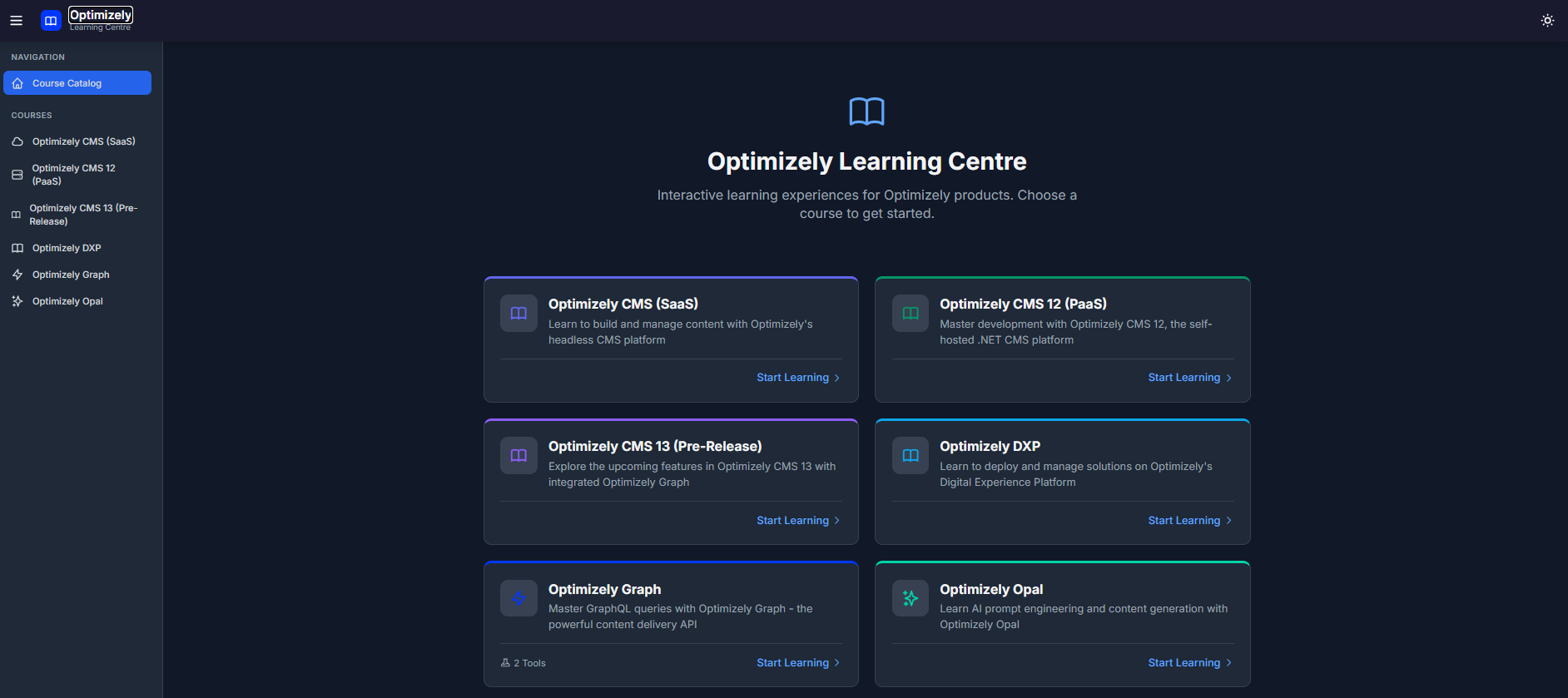
What Is the Optimizely Learning Centre?
Think of it as your personal tutor for all things Optimizely. Instead of wading through dense documentation, you follow structured learning paths that guide you from beginner to advanced topics. Each lesson includes real examples you can try immediately — no setup required.
The platform currently offers courses on:
- Optimizely Graph
- Optimizely Opal
- Optimizely CMS (SaaS)
- Optimizely CMS 12
- Optimizely CMS 13 (Pre-Release)
- Optimizely DXP
- Optimizely Content Marketing Platform
- Optimizely Web Experimentation
- Optimizely Feature Experimentation
- Optimizely Data Platform
- Optimizely Commerce Connect
- Optimizely Content Recommendations
- Optimizely Configured Commerce
- Optimizely Analytics
- Optimizely Product Recommendations
- Optimizely PIM
Learning That Actually Sticks
What makes this platform different? Three things:
1. Learn by Doing
Every lesson includes interactive examples. When learning about Optimizely Graph, you don't just read about queries — you write and run them. There's a built-in playground where you can experiment, make mistakes, and see results instantly.
For Optimizely Opal, you can test AI prompts and see sample responses. It's learning through experience, not just reading.
2. Progress at Your Own Pace
The platform tracks where you are in each course. Pick up exactly where you left off, whether that's tomorrow or next month. Complete lessons to unlock new ones, building your knowledge step by step.
A progress bar shows how far you've come, giving you a sense of accomplishment as you work through each module.
3. Clear, Structured Paths
Each course is organised into modules covering specific topics. Modules are labelled by difficulty — Beginner, Intermediate, or Advanced — so you know what to expect. Estimated completion times help you plan your learning sessions.
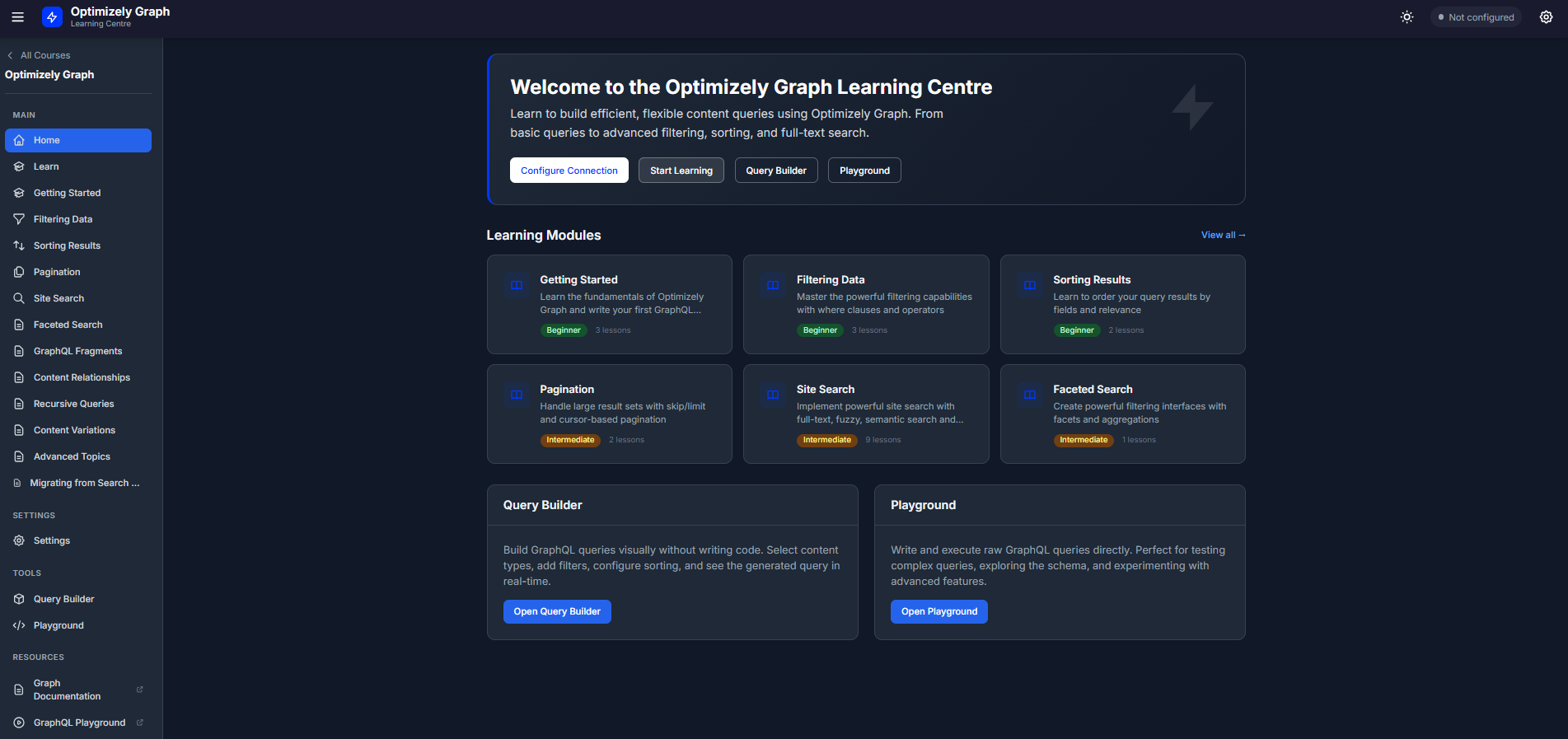
A Closer Look: The Graph Course
Let's take the Optimizely Graph course as an example. Graph is Optimizely's content delivery API — it lets developers fetch content in exactly the format they need.
The course starts with the basics: What is GraphQL? How do you write your first query? Then it gradually introduces more powerful concepts like filtering, sorting, searching, and working with related content.
But here's where it gets interesting. The course includes two interactive tools:
The Playground — A sandbox where you can write queries and run them against a real GraphQL endpoint. It's like having a practice range where you can experiment freely.
The Query Builder — A visual tool that lets you construct queries by selecting options from menus. Perfect for those who prefer a more guided approach, or for quickly building queries without remembering the exact syntax.
Both tools connect to your own Optimizely Graph instance, so you're working with your actual content.
Who Is This For?
The Learning Centre is designed for:
- Developers new to Optimizely who want a structured introduction
- Content teams curious about what's possible with Optimizely's tools
- Technical architects evaluating Optimizely's capabilities
- Anyone who learns better by doing rather than just reading
You don't need to install anything. The platform runs entirely in your web browser.
Built for the Modern Web
The Learning Centre is a modern web application that works beautifully on any device — desktop, tablet, or phone. It includes dark mode for those late-night learning sessions and remembers your preferences between visits.
All your progress is saved locally in your browser, so your learning journey is private and personal.
Getting Started
Ready to explore? Visit the Learning Centre on the following link https://optilearningcentre.adayinthelife.pro and browse the course catalogue. Pick a course that interests you, start with the first module, and see how quickly you can go from curious to confident.
Whether you're taking your first steps with Optimizely or looking to deepen your expertise, there's something here for you. The best part? It's completely free.
Learning shouldn't feel like a chore. With interactive examples, clear explanations, and a structured path to follow, mastering Optimizely products is more accessible than ever.
Happy learning!
The Optimizely Learning Centre is an open-source project. If you'd like to contribute or suggest improvements, we'd love to hear from you.

Graham, thats brilliant. Cant wait to explore. :)