


 Certification.png "SaaS CMS Administrator (Expert) Certification")


A day in the life of an Optimizely OMVP: Unlock the Power of Unified Search: Introducing Custom Data Management for Optimizely Graph
Bring all your data together in one searchable experience
The Challenge: Siloed Data, Fragmented Search
Every organisation has data spread across multiple systems. Your product information might live in an ERP system, customer reviews in a third-party platform, and event listings in an external calendar service. Meanwhile, your website visitors expect to find everything in one place.
Traditional approaches force you to choose: either build complex custom integrations or accept that some content simply won't appear in your site search. Neither option is ideal.
The Solution: Custom Data Sources in Optimizely Graph
The Custom Data Management feature in OptiGraphExtensions bridges this gap. It allows you to bring external data into Optimizely Graph, making it searchable alongside your CMS content. The result? A unified search experience that spans your entire digital ecosystem.
What Does This Mean in Practice?
Imagine a university website where prospective students can search and find:
- Course pages (from the CMS)
- Staff profiles (from an HR system)
- Research publications (from an academic database)
- Upcoming events (from an events platform)
All from a single search box. That's the power of Custom Data.
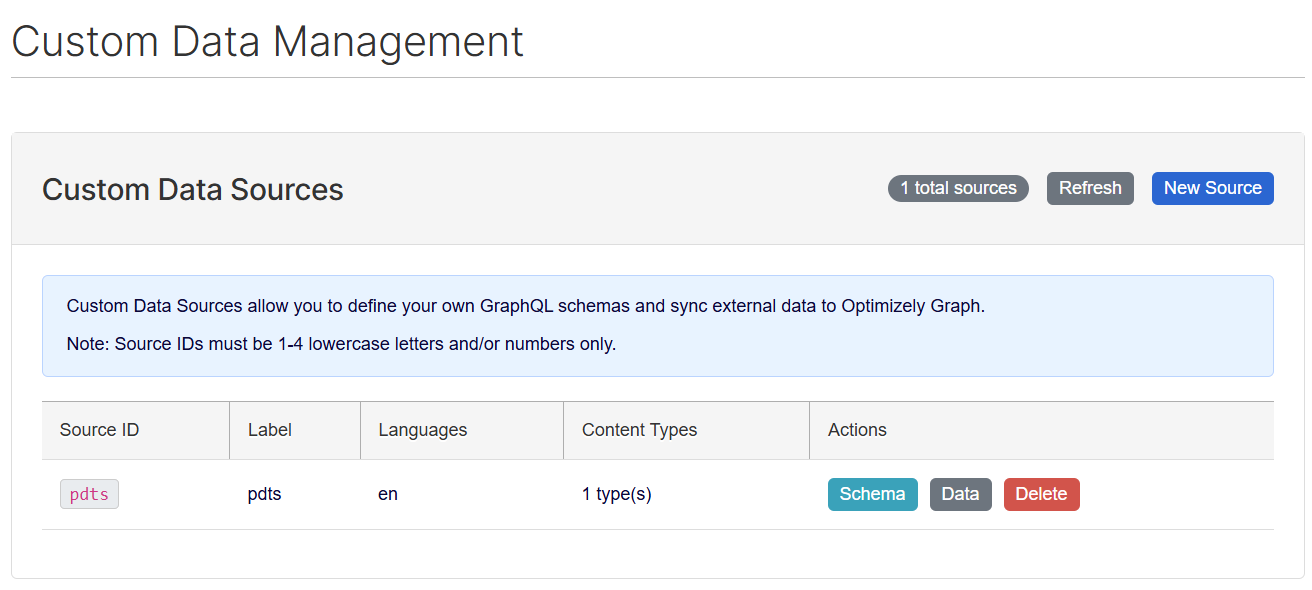
Key Features at a Glance
Visual Schema Builder
No need to write complex code. The visual schema builder lets you define your data structure through an intuitive interface. Simply specify what fields your data will have—titles, descriptions, dates, categories—and the system handles the rest.
For those who prefer more control, a raw JSON editor is also available for advanced configurations.
Multi-Language Support
Operating in multiple markets? Custom Data fully supports multi-language content. Define language-specific versions of your data, and Optimizely Graph will serve the right content to the right audience.
Flexible Data Entry
Whether you're adding a handful of records or thousands, you have options:
- Manual entry for small datasets or one-off additions
- Bulk import for larger data migrations
New: Automated External API Imports
The latest enhancement takes Custom Data to the next level. You can now connect directly to external REST APIs and automatically import data on a schedule.
Connect to Any REST API
Have a product catalogue exposed via API? A events feed? A jobs board? Simply provide the API endpoint, configure any required authentication, and map the fields to your custom data schema.
Supported authentication methods:
- No authentication (public APIs)
- API Key
- Basic authentication
- Bearer token
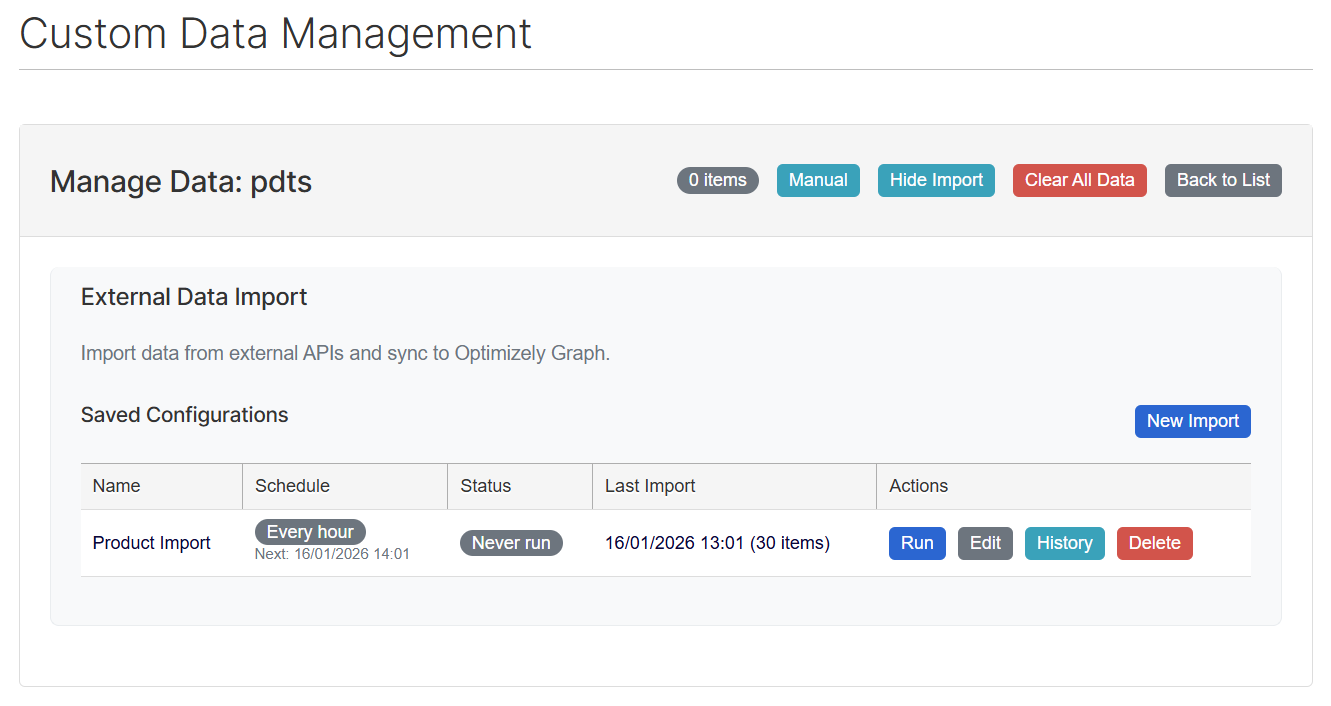
Intelligent Field Mapping
External APIs rarely match your exact requirements. The field mapping feature lets you:
- Select which fields to import
- Map API field names to your schema properties
- Navigate nested JSON structures with ease
Preview your import before committing to ensure everything looks correct.
Set It and Forget It: Scheduled Imports
This is where the real time-saving begins. Configure your imports to run automatically:
- Hourly – For rapidly changing data like stock levels or availability
- Daily – Perfect for content that updates overnight
- Weekly – Ideal for periodic updates like event listings
- Monthly – Suitable for relatively static reference data
Choose the specific time and day that works best for your workflow.
Built-In Reliability
Things don't always go smoothly with external systems. That's why automated imports include:
- Automatic retry with exponential backoff – If an import fails, the system will retry with increasing intervals (1 minute, 5 minutes, 15 minutes, 30 minutes), giving temporary issues time to resolve
- Email notifications – Get alerted when imports fail, and receive confirmation when they recover
- Execution history – Full audit trail of every import, including success rates, item counts, and any warnings or errors
Real-World Use Cases
E-Commerce: Product Data from Your PIM
Connect your Product Information Management system to Optimizely Graph. When customers search your site, they'll find products with up-to-date pricing, availability, and specifications—all synchronised automatically overnight.
Healthcare: Provider Directory
Import practitioner information from your credentialing system. Patients can search by speciality, location, or availability, with data refreshed daily to reflect the latest schedules.
Media & Publishing: External Content Feeds
Aggregate content from partner publications or wire services. Scheduled imports ensure your search results always include the latest articles without manual intervention.
Recruitment: Job Listings
Pull open positions from your applicant tracking system. Hourly imports ensure job seekers always see current opportunities, with closed positions automatically removed.
Education: Course Catalogues
Sync course information from your student information system. Prospective students can search across programmes, modules, and entry requirements, all updated automatically each term.
Getting Started
Custom Data Management is available now in OptiGraphExtensions. Here's how to begin:
- Navigate to Custom Data in the Optimizely Graph Extensions administration area
- Create a new data source with a unique identifier
- Define your schema using the visual builder or JSON editor
- Choose your approach: manual entry for small datasets, or configure an API import for automation
- Set up scheduling if you want data to stay synchronised automatically
- Sync to Graph and start searching
The Bottom Line
Custom Data Management transforms Optimizely Graph from a CMS search tool into an enterprise search platform. By bringing external data into the same index as your CMS content, you create a seamless experience for your users while reducing the technical complexity of managing multiple search systems.
The new scheduled import functionality means this integration isn't a one-time project—it's an ongoing, automated process that keeps your search results fresh without manual effort.
Your data lives in many places. Your search shouldn't.
OptiGraphExtensions is an open-source add-on for Optimizely CMS 12. For technical documentation and installation instructions, visit the project repository.


Comments