


A day in the life of an Optimizely OMVP: Scoping a Search & Navigation - Optimizely Graph migration with Roslyn
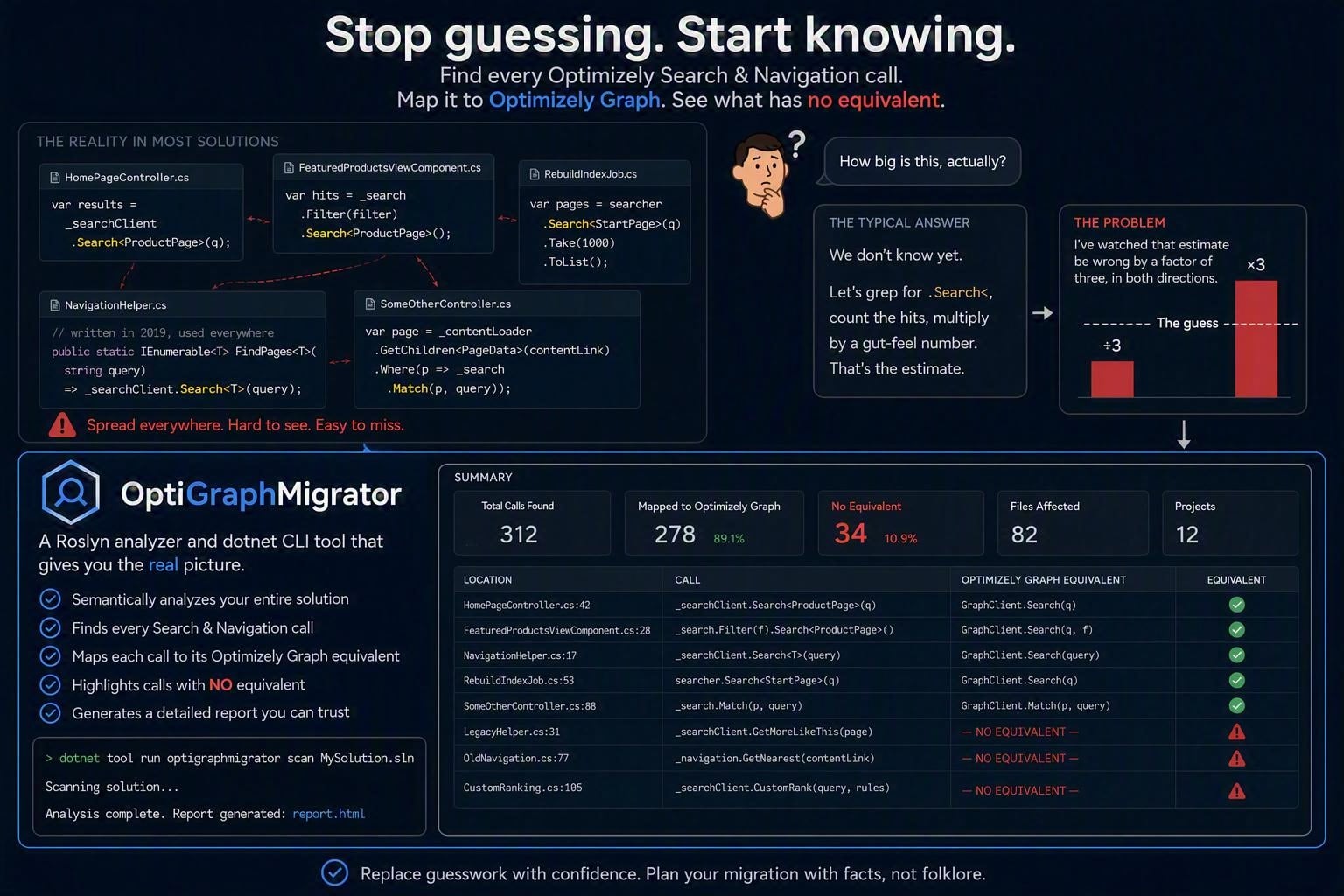
If you have an Optimizely solution of any real age, you have Find code. Not in one tidy SearchService.cs, either — it's spread through page controllers, view components, scheduled jobs, and that one static helper somebody wrote in 2019 that everything quietly depends on.
At some point a conversation starts about moving to Optimizely Graph, and someone asks the question that decides the whole project:
How big is this, actually?
The honest answer is usually "we don't know yet." So somebody greps for .Search<, counts the hits, multiplies by a gut-feel number, and that becomes the estimate. I've watched that estimate be wrong by a factor of three, in both directions.
I built OptiGraphMigrator to replace the guess with a report. It's a Roslyn analyzer and dotnet CLI tool that reads your solution semantically, finds every Search & Navigation call, maps each one to its Optimizely Graph equivalent, and — the important part — tells you which ones have no equivalent at all.
Why grep doesn't work here
Two reasons.
The first is that Find queries are fluent chains, and the interesting part is usually at the end. Consider:
var query = _client.Search<Article>();

if (applyGeoFilter)
{
    query = query.OrderBy(a => a.Title).DistanceFrom(latitude, longitude);
}

var results = query.GetContentResult();
Grepping for Search< finds line 1 and tells you nothing. The thing that will actually derail your migration is DistanceFrom — a geo/spatial filter — three lines later, inside a conditional, attached to a variable. A text search finds the string but can't tell you it belongs to the same query, or what content type it's filtering.
OptiGraphMigrator resolves that chain through Roslyn's semantic model. It walks from the outermost invocation back down through the receivers, and it follows local-variable reassignment, so the example above is understood as one query with a geo filter on it — not three unrelated fragments.
The second reason is that "found a Find call" is not useful information. What you need to know is what happens when you try to port it. Which brings me to the part of the design I think actually matters.
Three buckets, not one number
Every rule in the tool classifies a construct into one of three levels of translatability:
| Bucket | Meaning | What it costs you |
|---|---|---|
| Exact | A mechanical, behaviour-preserving 1:1 mapping exists. | Hours. Sometimes automatic. |
| Caveat | A mapping exists, but the semantics differ. | A developer has to read it and decide. |
| Blocked | No clean translation. The feature must be redesigned. | A conversation with your product owner. |
Filter(), OrderBy(), Skip(), Take(), GetContentResult() — these are Exact. They map onto Graph's where, orderBy, skip, limit and query execution almost mechanically. If your codebase is 90% this, your migration is a port and your estimate should be small.
Language(), FilterForVisitor(), Select() projections, MatchContained() — these are Caveat. There's a target to aim at, but the behaviour isn't identical, so a human has to confirm each one. Find's For() free-text search is in here too: it applies BM25-style ranking across all indexed fields, and Graph's full-text match will rank results differently. The code compiles either way. Whether the search results still look right is a different question.
And then there's Blocked: BestBets(), DidYouMean(), Autocomplete(), MoreLikeThis(), RemoveDuplicates(), MinScore(), DistanceFrom(), the statistical aggregations (AverageOf/SumOf/MaximumOf/MinimumOf), custom scoring via Boost()/CustomScore(), query-time synonyms, and direct push-based indexing (Index()/UpdateIndex()/DeleteIndex()).
The Blocked list is the real output of this tool. Everything else is work you can plan. The Blocked list is work you have to design, and it's the reason migrations slip. Finding out in week six that the editorial team depends on Best Bets is considerably worse than finding out on day one.
There's a fourth category worth mentioning: patterns that are technically legal Find but which only work because Find can fall back to evaluating them outside the index. A Filter() whose lambda calls arbitrary .NET code is the classic case. Graph's where clauses can only express what the index itself can evaluate, so that logic has to become either an indexed field comparison or an explicit post-query filter in application code. The tool flags those specifically rather than letting them hide inside the friendly-looking "Filter() → where" mapping.
What it looks like
Point it at a solution or a project:
optigraph-migrate scan MySolution.sln --format console
WARNING OGM001   FindUsageSamples.cs(39,27): Find 'Filter(...)' can be translated to a Graph 'where' clause
        -> Graph equivalent: .Where(x => <translated predicate>)
WARNING OGM003   FindUsageSamples.cs(39,27): Find 'OrderBy(...)' can be translated to a Graph 'orderBy' clause
        -> Graph equivalent: .OrderBy(x => <field>)
INFO    OGM007   FindUsageSamples.cs(39,27): Find 'Take(...)' can be translated to a Graph 'limit' argument
        -> Graph equivalent: .Take(<count>)
WARNING OGM010   FindUsageSamples.cs(82,27): Find 'StaticallyCacheFor(...)' has no built-in Graph SDK equivalent; caching must be implemented by the caller
        -> Graph equivalent: Cache the GraphQL response in the calling application (for example via IMemoryCache) for an equivalent duration
WARNING OGM103   FindUsageSamples.cs(114,13): Find indexing convention 'ShouldIndex(...)' has no in-code Graph equivalent; configure the schema in Graph instead
WARNING OGM104   FindUsageSamples.cs(123,26): 'FindByContentType(...)' is an IContentLoader helper backed by Find; migrate the call site to the Graph SDK client
WARNING OGM202   FindUsageSamples.cs(131,27): Find custom scoring 'Boost(...)' has no clean Graph SDK translation

Summary: 0 error(s), 48 warning(s), 44 info
The Markdown format is the one to hand to a lead or put in a ticket, because it leads with the shape of the problem rather than the list of findings:
# OptiGraphMigrator report

0 error(s), 48 warning(s), 44 info

- Exact (auto-fixable): 48
- Caveat (needs review): 19
- Blocked (no clean translation): 15

## Top blocking patterns

| Rule | Title | Occurrences |
|---|---|---|
| OGM202 | Custom relevance scoring has no Graph equivalent | 2 |
| OGM021 | DistanceFrom(...) geo/spatial filter has no direct Graph equivalent | 2 |
| OGM203 | Query-time synonym expansion has no Graph equivalent | 1 |
| OGM018 | BestBets(...) has no direct Graph equivalent | 1 |
That "Top blocking patterns" table is the slide you take to the planning meeting.
Four output formats are supported: console, markdown, html, json, and sarif. SARIF is proper 2.1.0, so Azure DevOps and GitHub code scanning will render the findings inline on pull requests without any extra glue.
Beyond the query chains
Queries are the obvious target, but they're not the whole migration. The tool also covers three areas that tend to get missed during scoping:
Indexing conventions. client.Conventions.ForInstancesOf<T>().ShouldIndex(...).IncludeField(...) is C# configuration that has no in-code Graph equivalent — it becomes schema configuration in Graph instead. Easy to overlook, because it usually lives in an initialization module nobody has opened in two years.
Find-backed IContentLoader helpers. FindByContentType<T>(), FindPagesWithCriteria<T>(), GetChildrenWithFind<T>() — these don't look like search code at the call site. They look like content loading. Every one is a call site that needs to become an explicit Graph query.
The static singleton. SearchClient.Instance has no Graph SDK equivalent, and every usage is a place where you'll need to introduce proper dependency injection as part of the port.
Installing and running it
The tool targets net10.0 and uses MSBuildWorkspace to load your solution, so you need a .NET SDK installed. It analyzes the code — it does not need credentials, an index, or a running Find instance, and it makes no network calls.
From source
git clone <REPO-URL>
cd OptiGraphMigrator
dotnet build OptiGraphMigrator.slnx
dotnet run --project src\OptiGraphMigrator.Tool\OptiGraphMigrator.Tool.csproj -- scan <path-to-your-solution> --format markdown
As a global tool
dotnet pack src\OptiGraphMigrator.Tool\OptiGraphMigrator.Tool.csproj -c Release
dotnet tool install --global --add-source artifacts OptiGraphMigrator.Tool

optigraph-migrate scan MySolution.sln --format markdown --output migration-report.md
Options
| Option | Description |
|---|---|
--format <console|sarif|html|json|markdown> |
Report format. Defaults to console. |
--output, -o <file> |
Write to a file instead of stdout. |
--rules <file> |
A rule catalogue that overrides or extends the built-in mappings. |
--severity-threshold <info|warning|error> |
Minimum severity to include in the report. |
--fail-on <info|warning|error> |
Minimum severity that produces a non-zero exit code. |
In CI
Exit codes are designed to be gated on:
- 0 — scan completed, nothing met the --fail-on threshold.
- 1 — scan completed, findings met the threshold.
- 2 — the scan could not run (bad path, workspace load failure, unexpected error).
The distinction between 1 and 2 matters. 2 is an infrastructure problem and should always break the build; 1 is a finding and you get to decide how strict to be. A useful pattern during an active migration is to run with --fail-on error so the build breaks only when someone introduces new Blocked-tier Find usage into a codebase you're trying to move off it.
As an analyzer, while you're actually porting
The CLI is for scoping. Once the migration is underway, there's a second mode: the analyzer and code fix provider pack as a normal analyzer package, so you get the same diagnostics as squiggles in Visual Studio or Rider, on the file you're editing, with the suggested Graph equivalent right there in the tooltip.
The mappings marked isAutoFixable in the rule catalogue also ship a code fix, so the genuinely mechanical ones can be applied with Ctrl+. rather than by hand.
Scope with the CLI, port with the analyzer.
Teaching it your codebase
There are 47 rules today: 34 declarative mappings plus 12 hand-written rules for patterns that need real semantic inspection (checking what's inside a Filter() lambda, for instance).
The declarative ones live in a JSON catalogue, and you can override or extend it without touching the code — point --rules at your own file, or drop an optigraph.rules.json next to your solution and it'll be discovered by walking up the directory tree, the same way .editorconfig works. A rule looks like this:
{
  "id": "OGM001",
  "title": "Filter(...) maps to Graph where(...)",
  "severity": "warning",
  "category": "filtering",
  "translatability": "exact",
  "findSymbolPattern": {
    "containingType": "EPiServer.Find.Api.Querying.FilterExtensions",
    "methodName": "Filter",
    "minArguments": 1,
    "matchDerivedTypes": true
  },
  "graphEquivalent": ".Where(x => <translated predicate>)",
  "graphQlSnippetTemplate": "where: {{ {0} }}",
  "caveats": [
    "Find's Filter() predicates are evaluated server-side against the index; confirm the equivalent Graph 'where' clause targets the matching indexed field name."
  ],
  "isAutoFixable": true
}
Rules with a matching id replace the built-in ones; new ids are appended. So if your solution wraps Find in your own extension methods — and most mature solutions do — you can teach the tool about your wrappers in a few lines of JSON and get them classified alongside everything else. That's the difference between a report that covers 60% of your search code and one that covers all of it.
What it won't do
Worth being direct about the limits:
- It does not rewrite your queries for you. A handful of Exact mappings have code fixes. The rest is a map, not a migration. Anyone promising automated Find → Graph translation for anything beyond the trivial cases is overselling.
- Caveat findings genuinely need a human. The tool tells you the semantics differ and why; it cannot tell you whether your users will notice.
- Unrecognised API surface is reported, not hidden. If a chain can't be fully resolved — an overload the catalogue doesn't know, or a compilation error — you get an OGM901 info-level finding saying so, rather than a silent gap in the report. If you see a lot of those, that's a signal to extend the catalogue.
- It needs your solution to build. Roslyn needs a working compilation for symbol resolution.
Try it on your worst solution
If you're weighing up a Find → Graph migration, the most valuable thing you can do this week is run this against your largest legacy solution and look at nothing but the Blocked list. It takes about five minutes and it will tell you whether you're looking at a port or a redesign.
I'd particularly like to hear about two things: Find API surface that produces OGM901 unresolved findings (that's a gap in the catalogue and easy to fix), and any mapping you think is classified wrong — especially anything I've marked Exact that bit you in practice. The translatability calls are judgement, and they get better with more codebases behind them.
Source, rules documentation and issues: OptiGraphMigrator/OptiGraphMigrator at main · adayinthelifeofapro/OptiGraphMigrator

Comments