


Optimizely Forms - How to add extra data automatically into submission
Some words about Optimizely Forms
Optimizely Forms is a built-in add-on by Optimizely development team that enables to create forms dynamically via block-based approach. Developers could install Optimizely Forms to any Optimizely CMS or Customized Commerce site via installing nuget package.
It allows content editors to create forms dynamically as a normal block, dragging and dropping available form elements such as text box, text area, date time, file upload, image...etc into form container block. So editors can design easily any form with needed controls and re-use it at any pages for vary contexts such as user survey, user registration, user feedback, user support.
Once users submit form then data will be saved into database permanently by default. Moreover, we also can send submission data to third parties via connectors for auto-marketing purpose.
Here is illustrated image about creating form in Edit User Interface
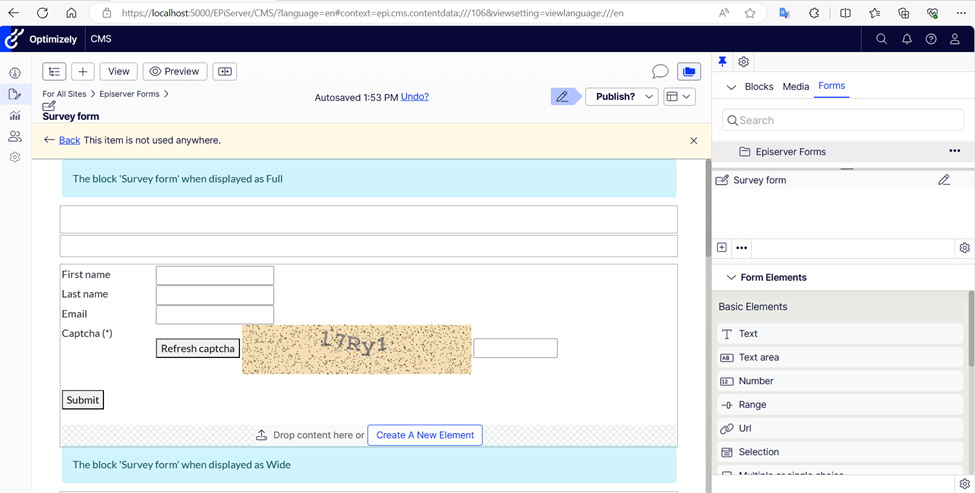
After creating form then placing form in pages then users can see it when viewing page like this below

How Optimizely Forms works
The below image illustrates about how to apply Optimizely Forms and how it works

So as a developer, I realized that we can do a lot of customization around Optimizely Forms such as creating new form elements, adding more extra post submission actors, implementing custom connector.
Recently, I got a requirement that the client want to have some extra data in all submission data such as page url, page category. These extra fields must be stored in database, showed in form submissions view and exporting files as well.
This below image shows how to submission data is displayed in backend user interface.

You can see data in blue border is filled data by users, data in orange border is system data – they are not data filled by user. Is it possible to add more data as same as default system data? Yes. We can do customization for it and here is sample code that I want to share
How I do to add extra data to submission
- First, we need a new post submission actor to add extra data to submission data. This actor should be run first by setting order to make sure that extra data is always added to submission data before all other actors.
public class MoreExtraInformationPostSubmissionActor : PostSubmissionActorBase, ISyncOrderedSubmissionActor
 {
     private readonly IUrlResolver _urlResolver;

     public MoreExtraInformationPostSubmissionActor(IUrlResolver urlResolver)
     {
         _urlResolver = urlResolver;
     }

     public int Order => 1;

     public override object Run(object input)
     {
         var hostedPageId = SubmissionData.Data["SYSTEMCOLUMN_HostedPage"] as string;

         if (!string.IsNullOrEmpty(hostedPageId))
         {
             var hostedPageUrl = _urlResolver.GetUrl(new ContentReference(hostedPageId));
             SubmissionData.Data.Add("PageUrl", hostedPageUrl);
         }
         return new SubmissionActorResult();
     }
}- In order to display extra data in view and export file here is the thing that we need to add.
public class CustomFormRepository : FormRepository
{
    public override IEnumerable<FriendlyNameInfo> GetFriendlyNameInfos(FormIdentity formIden, params Type[] excludedElementBlockTypes)
    {
        var friendlyNameInfos = new List<FriendlyNameInfo>(base.GetFriendlyNameInfos(formIden, excludedElementBlockTypes));
        friendlyNameInfos.Add(new FriendlyNameInfo() { FormatType = FormatType.String, FriendlyName = "Page Url", ElementId = "PageUrl" });
        return friendlyNameInfos;
    }
}
- Finally, need to override default FormRepository by new one by adding this below code in Startup.cs
services.AddSingleton<IFormRepository, CustomFormRepository>();The result after applying all above code changes
- In Form submissions UI

- In exported file

That is all thing that I want to share in this article. I hope that it is helpful for someones. Happy coding!

Comments