


Add more scheduled job settings from the Optimizely CMS 12 admin UI -- with OptiScheduledJob.ExtraParameters
Optimizely (EPiServer) CMS 12 ships a great scheduled-jobs framework, but it has one frustrating gap: a job has nowhere to store its own configuration. Want an administrator to tweak a batch size, flip a feature flag, pick a priority, or set a cut-off date for a job — within Scheduled Job Settings UI directly? Out of the box you can't. Teams usually end up hard-coding values, hanging them off `appsettings.json`, adding more content type as settings type.
OptiScheduledJob.ExtraParameters closes that gap. It lets you attach a strongly-typed settings class to any custom scheduled job and edit it right on the job's detail page in the admin UI — no extra plumbing, no custom screens.
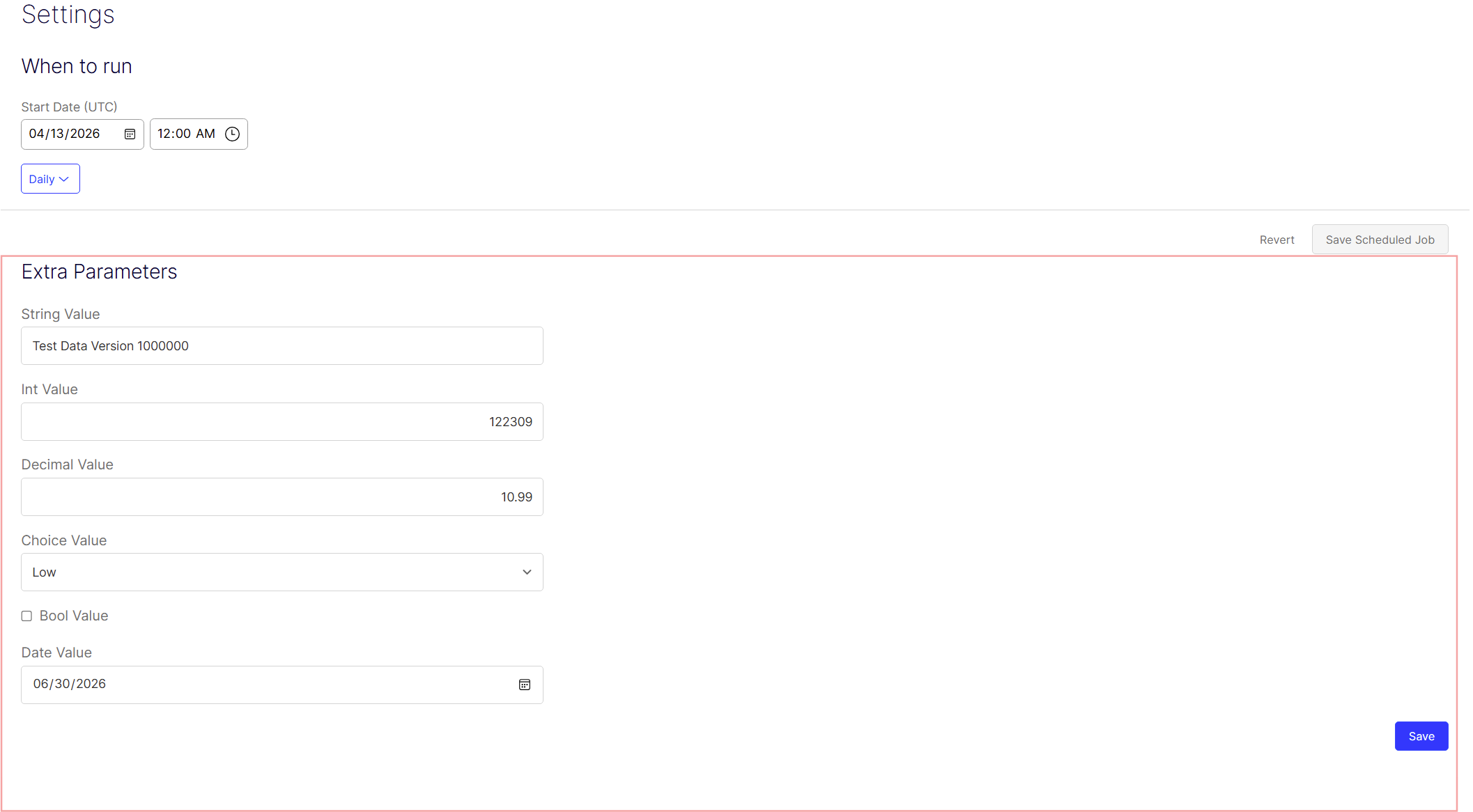
✅ Edited by CMS admins in a form rendered automatically under the default job settings
✅ Persisted in Optimizely's Dynamic Data Store
✅ Read back inside the job at execution time through a simple service
How to install
The package is published to the Optimizely NuGet feed https://nuget.optimizely.com. Register that feed as a source first, then install:
dotnet nuget add source https://api.nuget.optimizely.com/v3/index.json -n optimizelydotnet add package OptiScheduledJob.ExtraParametersRegister the module once in Startup.cs:
using OptiScheduledJob.ExtraParameters.Infrastructure.Configuration;public void ConfigureServices(IServiceCollection services){ services.AddCms(); // ... services.AddScheduledJobExtraParameters();}1. Define your settings
Create a class deriving from ScheduledJobExtraParametersBase and decorate each property with
[ExtraParametersPropertyDisplay] for its label, help text, and (optionally) dropdown options:
using OptiScheduledJob.ExtraParameters.Attributes;using OptiScheduledJob.ExtraParameters.Models;
public class CleanupJobParameters : ScheduledJobExtraParametersBase{ [ExtraParametersPropertyDisplay(DisplayName = "Source folder", Description = "Path to scan")] public string SourceFolder { get; set; } [ExtraParametersPropertyDisplay(DisplayName = "Batch size", Description = "Items per run")] public int BatchSize { get; set; } [ExtraParametersPropertyDisplay(DisplayName = "Threshold", Description = "Minimum match score")] public decimal Threshold { get; set; } [ExtraParametersPropertyDisplay(DisplayName = "Send notifications")] public bool SendNotifications { get; set; } [ExtraParametersPropertyDisplay(DisplayName = "Run after")] public DateTime RunAfter { get; set; } // A string[] of options renders a dropdown. [ExtraParametersPropertyDisplay(DisplayName = "Priority", Options = new[] { "Low", "Medium", "High" })] public string Priority { get; set; }}
2. Attach it to your job
[ScheduledPlugInWithExtraParameters] is a drop-in replacement for [ScheduledPlugIn]:
using EPiServer.Scheduler;using OptiScheduledJob.ExtraParameters.Attributes;[ScheduledPlugInWithExtraParameters( DisplayName = "Unused Image Removal", ExtraParameterDefinition = typeof(CleanupJobParameters))]public class UnusedImageRemovalJob : ScheduledJobBase{ // ...}3. Read the values when the job runs
using OptiScheduledJob.ExtraParameters.Services;public class UnusedImageRemovalJob : ScheduledJobBase{ private readonly IScheduledJobExtraParametersDataService _extraParameters; public UnusedImageRemovalJob(IScheduledJobExtraParametersDataService extraParameters) { _extraParameters = extraParameters; } public override string Execute() { var settings = _extraParameters.Get<CleanupJobParameters>(this.ScheduledJobId); var batchSize = settings?.BatchSize ?? 100; // ... use the settings return "Done"; }}How it looks in the admin
Open Admin → Scheduled Jobs → your job. Below the standard "When to run" controls, an Extra Parameters form appears automatically. Each property is rendered with the right input control for its type — text box, number, date picker, checkbox or dropdown — one per row:
Saving — with notification
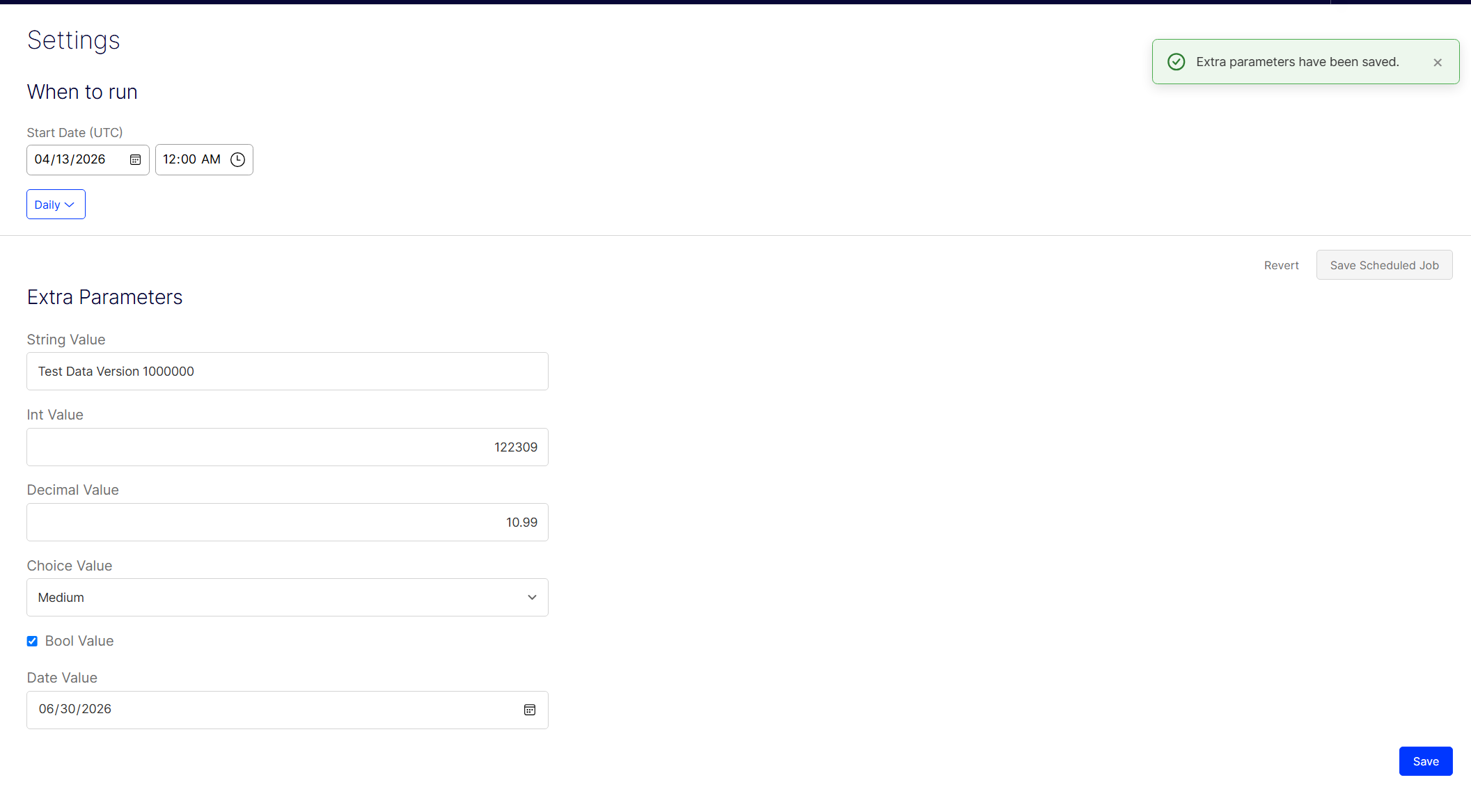
Hit Save on the Extra Parameters form and the values are posted back stored. You get a clear toast notification confirming the result:
Compatibility
- Optimizely CMS 12 (EPiServer.CMS 12.x)
- .NET 6, 8, 9 and 10 — the package multi-targets all four runtimes
- Optimizely CMS 13 - planned in future no far
Links
- NuGet: Optimizely NuGet feed — https://nuget.optimizely.com/
- Source & issues: https://github.com/binhboong1802/optimizely-scheduledjob-extraparameters
Jun 25, 2026
Wow, such a nice addition! Thanks!